












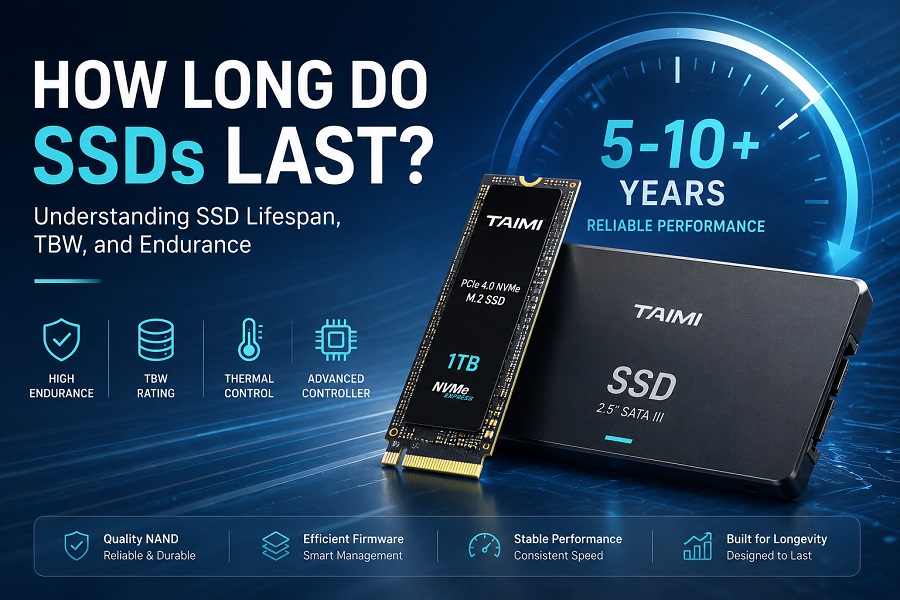
Most modern consumer SSDs can last for many years under typical workloads, and many can remain reliable for 5–10 years or longer. However, there is no fixed expiration date for an SSD. Its actual lifespan depends on total data written, NAND flash endurance, TBW ratings, daily workload, operating temperature, controller design, firmware, and drive maintenance.
How long do SSDs last? For everyday computing, gaming, and general office use, a properly selected SSD can remain reliable for many years. More demanding workloads—such as continuous video editing, large-scale file processing, or heavy daily write activity—can consume SSD endurance faster.
For PC builders, distributors, and OEM customers, SSD reliability also involves more than the lifespan of an individual drive. Product consistency, platform compatibility, thermal behavior, testing procedures, and quality control all play important roles when deploying SSDs across many systems.
This guide explains how SSDs wear out, what TBW means, how NAND wear and write amplification affect endurance, how daily writes can be used to estimate lifespan, and what to consider when choosing an SSD for long-term use.
How Long Does an SSD Last?
There is no single number of years that applies to every SSD. A modern consumer drive can provide long-term service under normal conditions, but actual longevity varies based on workload intensity, drive design, and total write volume.
Different workloads place different demands on storage drives:
| Usage Scenario | Typical Write Intensity | Main Lifespan Considerations | Recommended Drive Focus |
|---|---|---|---|
| Office & Web Browsing | Low | Overall drive quality, health, and power stability | Entry-level 2.5" SATA III or M.2 SATA |
| General PC Use & Gaming | Low–Medium | Capacity, read performance, and thermal behavior | Mainstream PCIe 3.0 / PCIe 4.0 NVMe |
| Video Editing & Content Creation | Medium–High | Sustained write performance, TBW, and NAND endurance | High-Endurance PCIe 4.0 / PCIe 5.0 (TLC) |
| Heavy Workstation Use | High | Total write volume, WAF, endurance, and thermal control | High-TBW, high-endurance consumer NVMe |
Note: These usage categories are general examples rather than strict limits. Two users performing similar tasks may generate very different write volumes depending on local software settings, OS background tasks, and data management habits.
What Determines SSD Lifespan?
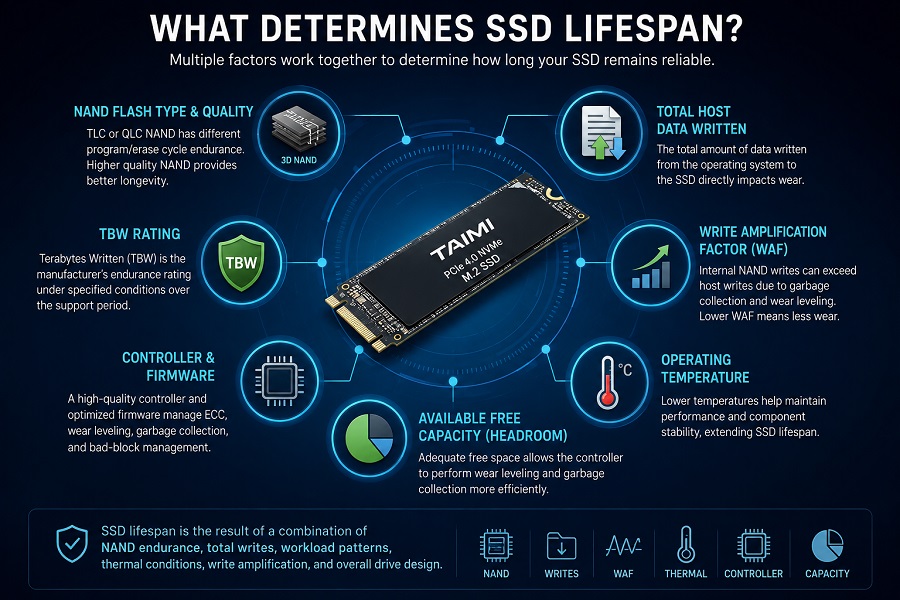
Several factors work together to dictate how long an SSD remains operational and reliable over time:
- NAND Flash Type & Quality: Baseline endurance characteristics derived from TLC or QLC cell structures.
- Total Host Data Written: The actual volume of data sent from the operating system to the SSD.
- TBW Rating: The manufacturer’s rated endurance threshold over the product support period.
- Workload Pattern: Random versus sequential write behavior can affect physical cell wear.
- Write Amplification Factor (WAF): Internal NAND write operations can exceed requested host writes.
- Controller & Firmware Management: Controller capabilities handle ECC, wear leveling, garbage collection, and other maintenance functions.
- Operating Temperatures: Sustained thermal conditions can influence component stability and throttling behavior.
- Available Free Headroom: Adequate free space helps the controller optimize internal maintenance operations.
How Does NAND Flash Wear Out?
SSDs store data electronically in NAND flash memory rather than on magnetic platters like traditional hard disk drives. Because NAND cells require electrical voltage adjustments to program and erase data, repeated write/erase cycles gradually alter their physical characteristics.
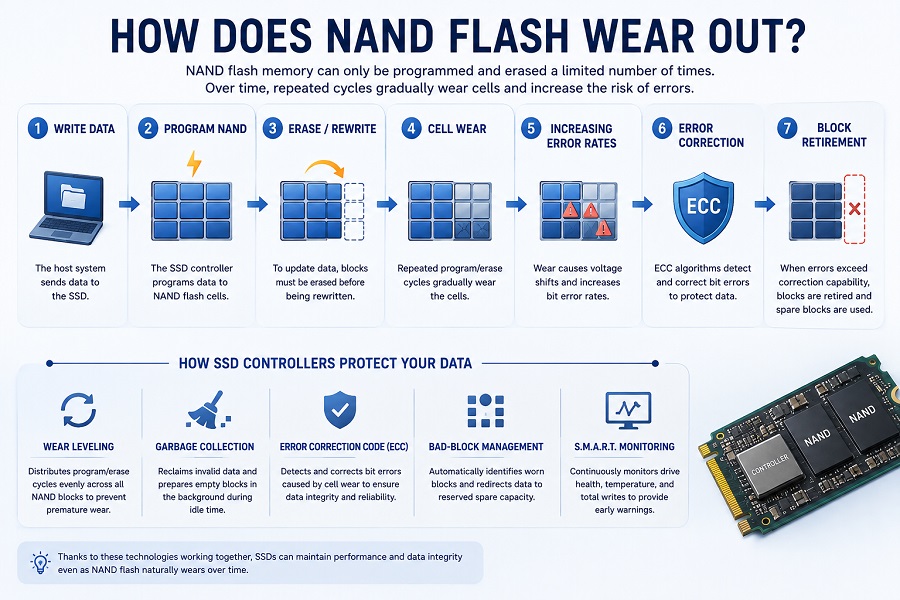
A simplified overview of the wear process looks like this:
Write Data → Program NAND → Erase/Rewrite → Cell Wear → Increasing Error Rates → Error Correction → Block RetirementAs flash memory ages, the SSD controller utilizes several automated technologies to maintain drive integrity and protect user data:
- Wear Leveling: Evenly distributes program and erase cycles across available physical blocks so that no single block wears out prematurely.
- Error Correction Code (ECC): Identifies and corrects bit errors caused by gradual voltage shifts in aging NAND cells.
- Garbage Collection: Reorganizes active data and clears invalid blocks during system idle time to prepare empty space for incoming writes.
- Bad-Block Management: Automatically flags worn memory blocks and redirects incoming data to reserved spare capacity.
- S.M.A.R.T. Monitoring: Reports drive health indicators, temperature information, and cumulative host write volume to the user.
What Is Write Amplification?
Write Amplification Factor (WAF) describes the relationship between data written by the host system and data actually written to physical NAND flash memory.
When an operating system issues a request to write data, the SSD controller may need to read, move, and rewrite existing data blocks to execute garbage collection and wear leveling effectively.
- Host System Writes: 100 GB
- Actual NAND Flash Writes: 130 GB
- Resulting WAF: 1.3
Certain random-write workloads can increase write amplification and cause more physical NAND writes than an equivalent amount of sequential host writes. The exact impact depends on the overall SSD architecture, workload patterns, available free space, and firmware algorithms.
What Is TBW and How Does It Relate to Lifespan?
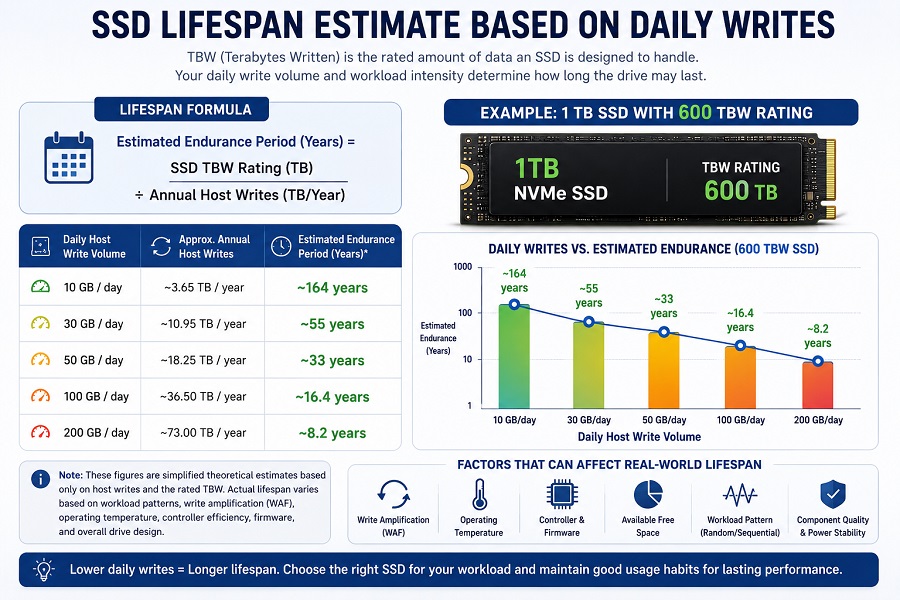
TBW (Terabytes Written) is a standard endurance rating indicating how much total host data an SSD is designed to handle under specified testing conditions. For example, a 1 TB SSD with a 600 TBW rating has a rated endurance of 600 TB of cumulative host writes under the manufacturer’s specified conditions.
However, TBW should be understood with proper context:
- TBW Is an Endurance Rating, Not a Fixed Expiration Date: Reaching 100% of the rated TBW does not mean an SSD will immediately fail. Actual behavior after the rated endurance point can vary by product and usage conditions.
- Non-NAND Component Risks: An SSD consists of multiple hardware components, including the controller, power management ICs (PMIC), capacitors, and PCB traces. Power anomalies or hardware faults can potentially affect a drive before it reaches its TBW limit.
For a more detailed explanation of TBW and SSD endurance ratings, see our guide to SSD TBW and how it affects SSD lifespan.
Estimating Lifespan Based on Daily Writes
Daily write volume provides a practical way to understand how workload intensity relates to rated SSD endurance over time:
Using a standard 600 TBW rated drive as an example:
| Daily Host Write Volume | Approx. Annual Host Writes | Simplified Endurance Calculation* |
|---|---|---|
| 10 GB / day | ~3.65 TB / year | ~164 years |
| 30 GB / day | ~10.95 TB / year | ~55 years |
| 50 GB / day | ~18.25 TB / year | ~33 years |
| 100 GB / day | ~36.50 TB / year | ~16.4 years |
| 200 GB / day | ~73.00 TB / year | ~8.2 years |
*Note: These mathematical figures are simplified baseline estimates based solely on host writes and a fixed TBW rating. They illustrate workload intensity rather than promise an exact real-world operational lifespan.
Why are theoretical calculations often so high? Average consumer workloads may write far less data each day than users expect. Real-world lifespan is also influenced by thermal conditions, write amplification, controller efficiency, firmware behavior, and overall electrical hardware design.
Real-World Workload Analysis
1. Office Work and Web Browsing
Standard office tasks—including document editing, web browsing, spreadsheets, and media streaming—generate modest daily write volumes. For these applications, ultra-high TBW ratings are rarely necessary. Buyers can focus on core drive stability, thermal efficiency, and overall value when choosing reliable 2.5-inch SATA SSDs or mainstream M.2 modules.
2. Gaming Workloads
Gaming environments are primarily read-intensive. While downloading and updating large game titles generates noticeable initial writes, active gameplay mainly involves reading game assets such as textures, audio files, and geometry data. Reading data from NAND does not consume program/erase cycles in the same way that writing and erasing data does.
However, save files, shader caches, game updates, logs, and temporary files still generate some writes. Gamers should therefore consider capacity, latency, read performance, and overall drive quality when choosing an SSD.
3. Video Editing and Content Creation
Video production generates significantly higher write volumes through scratch files, proxy generation, temporary render caches, and project exports. For write-heavy creative workflows, key selection criteria should balance TBW ratings, sustained write speeds, high-endurance TLC NAND, and adequate thermal management.
Operating Temperature and Thermal Throttling
Operating temperature plays an important role in SSD performance and microelectronic stability, especially for high-speed PCIe 4.0 and PCIe 5.0 NVMe drives.
When continuous heavy workloads generate excessive heat, the SSD controller may temporarily reduce transfer speeds to protect internal components from thermal stress. This safeguard is known as thermal throttling.
Installing motherboard heatsinks, ensuring proper thermal pad contact, and maintaining steady chassis airflow can help prevent premature throttling and preserve reliable operating conditions.
What SSD Lifespan Means for PC Builders and Volume Buyers
For individual users, SSD lifespan is a personal device question: “How many years can I use this drive?”
For PC builders, system integrators, and OEM distributors, the evaluation shifts toward production consistency and deployment reliability across multiple units.
When deploying storage drives at scale, key considerations include:
-
Component Consistency: Ensuring NAND flash, controller configurations, and firmware builds remain stable across production batches.
-
Validation & Quality Control: Implementing functional checks, compatibility testing, and burn-in validation before shipment.
-
Workload Matching: Selecting drive configurations that align with target hardware specifications and expected user workloads.
Manufacturing testing and quality control procedures help volume deployments maintain predictable behavior and consistent performance across production runs. Learn more about the SSD manufacturing and testing process from NAND flash to finished products.
7 Practical Ways to Extend SSD Lifespan
- Maintain Reasonable Free Space: Avoid completely filling an SSD. Leaving some unused capacity gives the controller more flexibility for wear leveling and garbage collection.
- Ensure Proper Cooling: Use adequate airflow and heatsinks, particularly on high-performance NVMe M.2 drives.
- Minimize Unnecessary Benchmarks: Avoid running continuous synthetic write stress tests that consume NAND cycles unnecessarily.
- Match the SSD to Your Workload: Match the SSD's endurance, capacity, controller design, and thermal characteristics to the workload.
- Monitor Drive Health Regularly: Periodically review S.M.A.R.T. health indicators, operating temperatures, and host write totals.
- Keep Firmware Updated: Apply stable manufacturer firmware updates when available to maintain compatibility and controller efficiency.
- Maintain Independent Data Backups: Hardware, power, or software issues can occur independently of NAND wear. Never rely on a single drive as your sole backup.
Frequently Asked Questions About SSD Lifespan
How many years does an SSD usually last?
Under typical everyday workloads, a modern consumer SSD can provide many years of reliable service. Actual lifespan depends on total write volume, NAND endurance, daily workload intensity, operating temperature, and overall drive quality.
Can an SSD fail before reaching its rated TBW?
Yes. TBW measures NAND flash endurance, but an SSD also contains the controller, power management components, PCB, and other electronic components. Electrical problems, firmware issues, physical damage, or thermal stress can potentially cause failure before the rated TBW limit is reached.
Does gaming reduce SSD lifespan quickly?
Usually not. Installing and updating games generates write operations, while active gameplay is primarily read-intensive. Reading data from NAND does not consume program/erase cycles in the same way that writing and erasing data does. However, save files, shader caches, updates, logs, and temporary files still generate some writes.
Is TLC better than QLC for SSD longevity?
In general, TLC NAND offers higher program/erase cycle endurance and better sustained write performance than QLC NAND. For a detailed comparison, see our guide to TLC vs QLC SSD performance, endurance, and lifespan.
Does SSD capacity affect total endurance?
Yes. Within the same product family, higher-capacity models such as 1 TB or 2 TB drives typically contain more physical NAND flash than 512 GB models. This can distribute write operations across a larger number of memory blocks and often results in higher TBW ratings.
Summary: Evaluating SSD Endurance
Answering “How long will an SSD last?” requires looking beyond a single advertised specification. Long-term storage endurance depends on workload demands, NAND flash characteristics, write amplification, operating temperature, controller design, firmware, and overall product quality.
For individual users, selecting a reputable SSD, maintaining reasonable free space, and monitoring S.M.A.R.T. metrics can support long-term reliability. For PC builders, distributors, and OEM partners, long-term confidence also depends on consistent component validation, quality control, compatibility testing, and stable supply.
About Taimi (苔米)
Taimi (苔米) is a storage manufacturer specializing in consumer-grade SSDs and memory products for PC builders, distributors, and OEM customers worldwide.
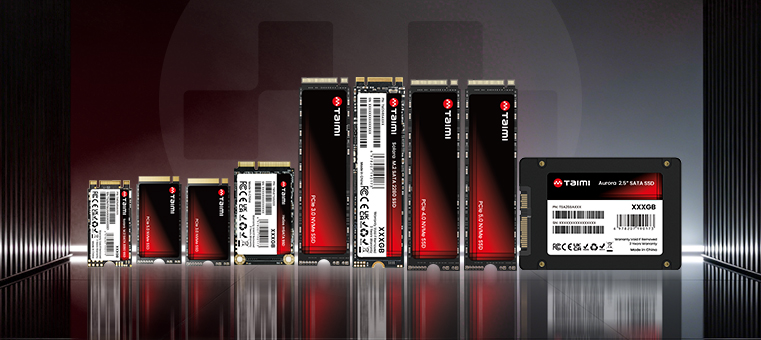
With a focus on product consistency, compatibility validation, and strict production quality control, Taimi offers a comprehensive portfolio of storage solutions—including PCIe 3.0 / PCIe 4.0 / PCIe 5.0 NVMe SSDs, 2.5-inch SATA SSDs, mSATA / M.2 SATA modules, eMMC embedded storage, and Micro SD cards.
Looking for Reliable Consumer SSDs for Your Business?
Whether you are a PC builder, distributor, or OEM customer, Taimi provides consumer-grade SSDs in different capacities, interfaces, and performance configurations. Contact us to discuss your requirements and find a suitable SSD solution for your application.
Get a Quote