








4K timeline stuttering and mid-master export freezes are rarely caused by a weak CPU or graphics card. In professional workflows, these issues are almost always the direct result of a storage bottleneck—specifically, a mainstream consumer SSD failing under sustained, high-bitrate video streams.
Let’s look past the marketing data sheets to analyze what actually occurs within an M.2 drive under heavy production rendering, and why standard "fast" configurations break down under professional post-production workloads.
The Real-World Test: Why Standard Drives Choke
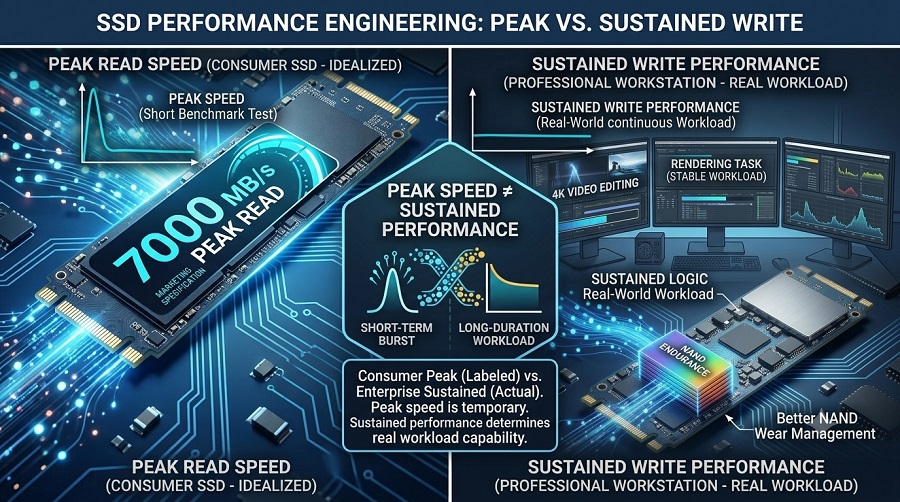
Interface bandwidth also affects maximum performance capability. Understanding PCIe 4.0 and PCIe 3.0 performance differences helps explain why different SSD generations deliver different theoretical speeds. However, these advertised sequential read metrics are captured under highly optimized, short-duration laboratory tests that do not represent steady-state video production workloads.
Here is how basic flash architecture handles standard workloads versus continuous, non-linear editing tasks:
Typical Consumer Workload
Short bursts of peak speed, followed by frequent idle/rest periods.
Video Editing Workload
Heavy, continuous, and sustained read/write streams for hours.
The SLC Cache Collapse
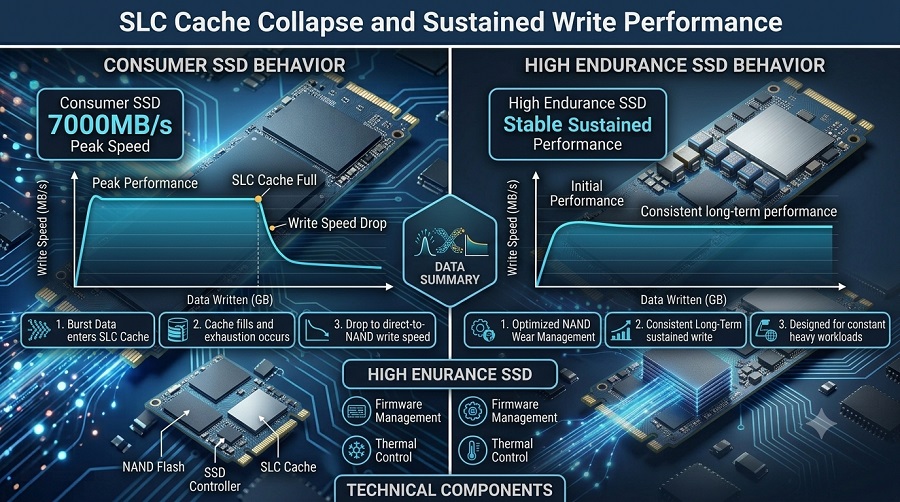
Consumer SSDs depend on a firmware allocation known as Single-Level Cell (SLC) caching, which runs a reactive buffer pool to simulate high-speed operations. While intermittent operating system file queries execute entirely within this buffer, massive asset ingest profiles—such as a 120GB directory of raw 4K ProRes footage—quickly saturate the caching boundary. Once exhausted, write speeds fall off a cliff, dropping from advertised 7000MB/s metrics down to a native 500MB/s baseline. Production-grade controllers avoid this degradation by pairing superior NAND flash sorting with specialized mapping tables to lock in a flat steady-state response.
Multi-Angle Read Congestion
Scrubbing a multi-cam sequence with three or four 4K concurrent streams forces the drive controller out of its standard sequential read pattern. The hardware must execute random, non-contiguous seek operations across multiple localized source files inside the same millisecond. When standard consumer drives encounter these heavy non-sequential deep queues, command execution stalls, causing massive frame drops across the editing monitor.
Accelerated NAND Wear and Degradation
Post-production processes accelerate silicon aging. Generating proxies, writing temp timeline database render caches, and compiling scratch allocations in DaVinci Resolve or Premiere Pro will accumulate hundreds of gigabytes of written data per edit session. Budget consumer controllers lack the advanced wear-leveling logic and robust cell chemistry necessary to sustain this volume, leading to premature drive degradation or complete controller panic within 12 to 24 months.
The Spec Sheet Cheat Sheet: What to Look For
When configuring a new production edit bay, scroll straight past the promotional graphics to the technical data sheet. These hardware metrics establish the threshold of steady-state stability:
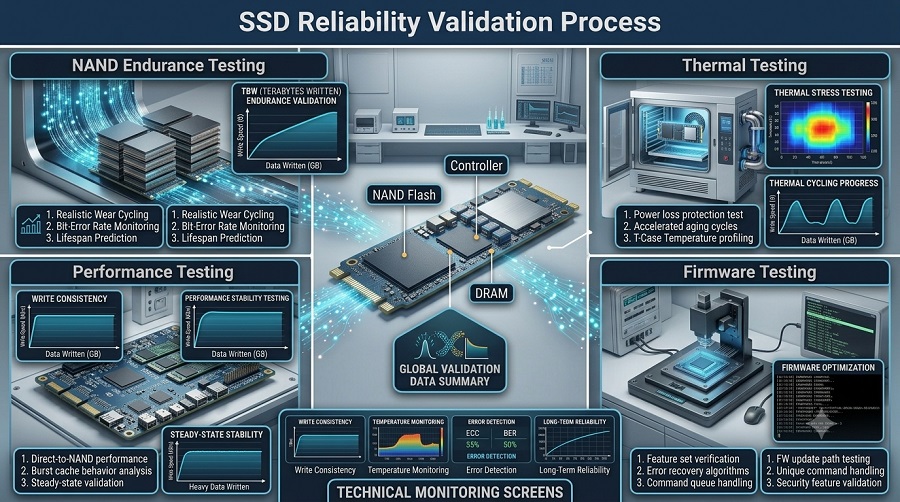
- Dedicated Onboard DRAM (Non-Negotiable): Eliminate DRAMless SSDs from your active timeline pool. Host Memory Buffer (HMB) alternatives rely on host system RAM allocation, a pipeline with far too much latency for intensive frame lookup routines. Onboard physical DRAM functions as a high-speed lookup directory, allowing the controller to pull random media frames without command lag.
- High TBW (Terabytes Written) Endurance: This rating indicates the amount of data an SSD can handle during its rated lifespan. However, SSD TBW does not represent the only factor that determines long-term reliability, as NAND quality, controller design, firmware optimization, and workload patterns also play important roles.
- Sustained performance is your bottleneck—not peak speed: Advertised parameters like 7000MB/s read speeds represent optimal sequential bandwidth under transient loads, not long-term write capabilities. While excellent for initial file loading, a drive's real-world efficiency hinges on its sustained write line. Video mastering environments require controllers optimized to minimize performance drop-offs when handling continuous 6000MB/s sequence rendering, avoiding thermal throttling mid-export.
- Thermal Dissipation Architecture: High-performance SSD controllers generate significant thermal energy under continuous loads. Crossing the 70°C threshold triggers aggressive thermal throttling, capping bandwidth to protect controller stability. Effective video editing storage requires dedicated cooling infrastructure—either a high-conductivity graphene heat spreader or a solid aluminum heatsink—to sustain maximum throughput during extended exports.
How Professionals Setup Their Workstation Storage
Software-level drive partitioning provides no architectural benefit; data streams are still funneled through a single, oversubscribed hardware controller chip. High-availability editing workstations rely on a physically separated multi-drive configuration to balance data transit lines:
| Drive Assignment | Architecture Profile | Target Capacity | Rationale |
|---|---|---|---|
| 1. OS & Applications | Standard PCIe 4.0 NVMe M.2 | 512GB – 1TB | Isolates system operating processes and editing software execution from the asset paths. Prevents workspace drive utilization from choking OS page files. |
| 2. Projects, Cache & Proxies | Premium PCIe 4.0 NVMe M.2 (DRAM-Equipped & High TBW) |
1TB – 2TB | The Production Workhorse. Dedicated entirely to high-volume asset caching, temporary render directory generation, and real-time proxy reading. |
| 3. Archive / Asset Repository | Mass SATA SSD / Enterprise HDD | 4TB – 8+TB | High-capacity, cost-efficient long-term arrays. Used exclusively for staging source files, asset cold-storage, and completed project delivery retention. |
Real Production Troubleshooting (FAQs)
Q: Can I edit raw timelines directly off a portable external SSD?
A: Successful external multi-stream editing requires high-bandwidth interfaces. Mass-market external enclosures utilizing basic USB-A or standard USB 3.0 lines lack the protocol queuing efficiency and bus width needed for 4K workflows. For dropped-frame prevention, choose premium external devices operating on dedicated USB4 or Thunderbolt 3/4 pipelines (40Gbps architectures) paired with internal, high-endurance NVMe controller boards.
Q: Does utilizing an SSD as an active media cache cause premature drive failure?
A: Media cache tasks execute non-stop overwrite functions, consuming flash program-erase (P/E) cycles much faster than normal computing tasks. This specific operational wear behavior is why enterprise-grade or creator-specific SSD storage is mandatory. Drives built with an expanded TBW endurance matrix absorb these constant scratch files for 3 to 5 years of commercial use without capacity or stability losses.
Q: Why does a brand-new, rated "fast" NVMe drive still cause timeline stuttering?
A: Hardware tracking under real editing workloads often reveals hidden thermal limitations. High-throughput sequential rendering pushes controllers to extreme thermal limits. When a controller idles above 55°C and hits 70°C+ during heavy workloads, the drive activates internal safety steps to lower heat, slashing transfer bandwidth. Fixing this requires high-conductivity thermal interfaces or thick aluminum heatsink blocks to quickly pull heat away from the controller silicon. (For a complete guide on evaluating controller quality, real-world speeds, and avoiding common performance bottlenecks, check out our comprehensive overview:
Q: Is there any technical advantage to partitioning a high-capacity NVMe drive?
A: Logical drive partitioning does not alter physical hardware behavior. Because all data channels still pass through the exact same controller core and silicon interface, creating virtual drives provides no parallel input/output benefits. Splitting hardware processing paths across separate physical drives is always the superior workstation configuration.
Processors and graphics cards are limited by the speed at which files can be delivered to them. Removing a standard consumer drive and moving to a dedicated high-endurance, high-sustained-speed SSD is the most direct method to establish a highly responsive, frame-accurate production environment.
Taimi Pro Tip: Balanced system design is essential. While specialized storage cures timeline congestion, heavy multi-layered color grading and deep visual effect stacks still require a base tier of 32GB system RAM (64GB preferred) alongside a dedicated GPU hardware acceleration block (such as NVIDIA's NVENC) to achieve minimum export durations.