

















An SSD can store, update, and retrieve data quickly, but NAND flash memory has a limitation that affects how it manages storage space: data cannot be overwritten directly in an already programmed page.
When existing data is updated, the SSD writes the new version to another available location. The old physical page becomes invalid, even though it may remain inside a NAND block alongside data that is still needed.
This creates a challenge. NAND flash can only be erased at the block level, not one page at a time. To make those blocks available again, the SSD controller uses a process called garbage collection (GC).
Understanding how SSD garbage collection works explains how an SSD reclaims NAND space, why it moves data internally, and how its storage management can influence write performance.
Quick Answer: What Is SSD Garbage Collection?
SSD garbage collection is an internal process that reclaims NAND flash blocks containing invalid data. The SSD controller selects a suitable block, moves any valid pages to another location, updates the data mapping, and erases the original block. The erased block can then be reused for future write operations.
Why Does NAND Flash Need Garbage Collection?
The need for garbage collection comes from the way NAND flash is programmed and erased. Unlike a conventional hard drive, an SSD cannot simply overwrite existing data at the same physical location.
How NAND Flash Pages and Blocks Work
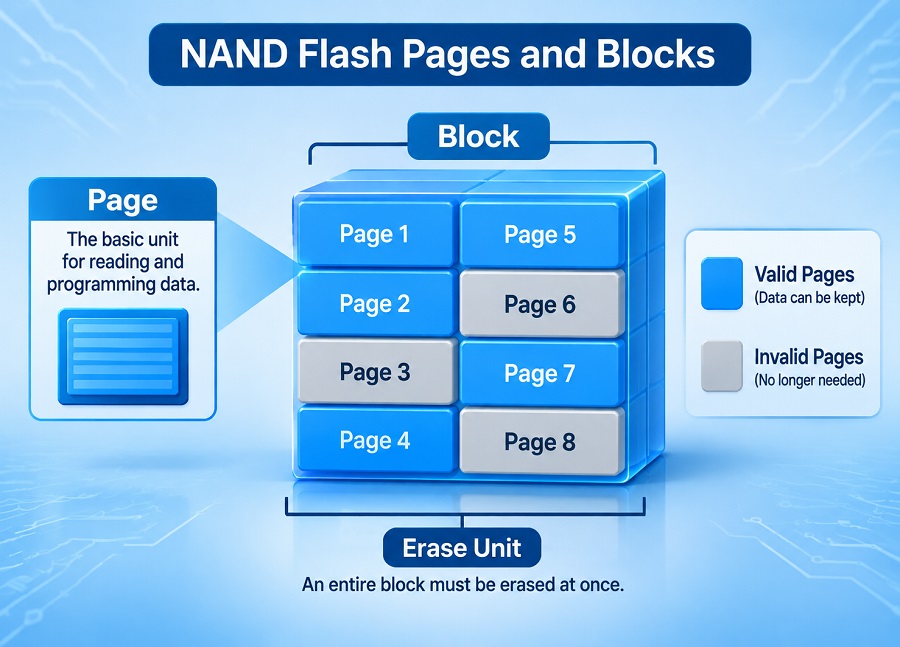
NAND flash is organized into pages and blocks. These two units have different roles:
- Page: The basic unit for reading and programming data.
- Block: A group of pages that serves as the basic unit for erasing data.
An SSD can program data into available pages, but it generally cannot erase a single programmed page independently. Erasing takes place at the block level.
This difference between programming and erasing is central to garbage collection. When a page contains outdated data, the SSD can mark it as invalid, but the physical space cannot be reclaimed until the entire block is erased.
What Happens When Data Is Deleted or Updated?
Consider a NAND block containing eight pages. Five pages hold data that is still valid, while the other three contain outdated data.
Once the SSD identifies the three pages as invalid, the remaining five valid pages must be preserved before the block can be erased.
The same situation occurs when a file is modified. The SSD may write the updated data to a new physical page and mark the old page as invalid. As more data is written and updated, NAND blocks can accumulate a mixture of valid and invalid pages.
Garbage collection resolves this problem by preserving the data that is still needed and reclaiming the blocks that contain obsolete data.
How Does SSD Garbage Collection Work?
The SSD controller manages garbage collection with the help of the Flash Translation Layer (FTL). The FTL manages the mapping between host-visible logical block addresses (LBAs) and physical NAND locations.
The FTL handles logical-to-physical address mapping, while garbage collection is a block reclamation process managed by the SSD controller. They work together when valid pages are relocated: the controller moves the data and the FTL updates the corresponding mappings.
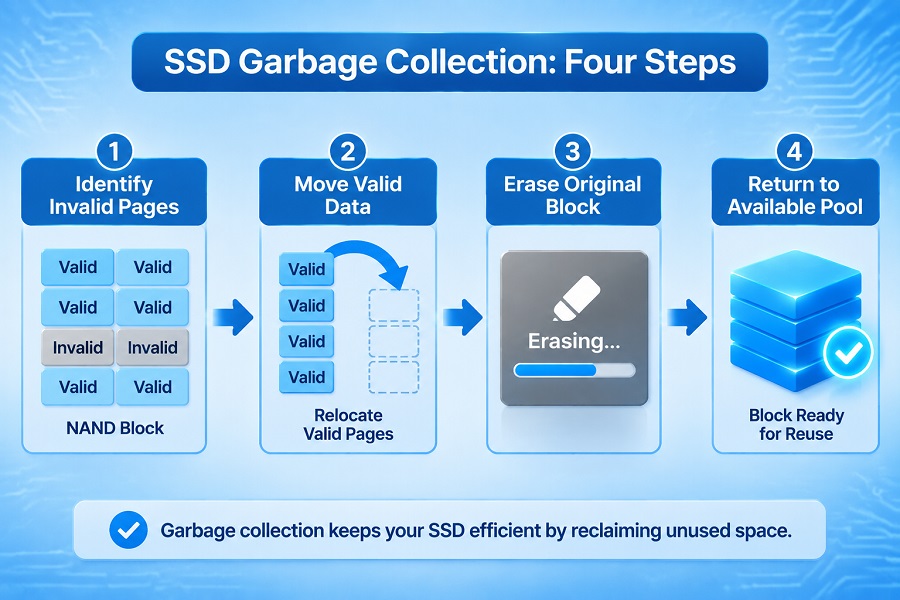
Although block-selection strategies and scheduling differ between SSD designs, the basic reclamation process follows four steps.
Step 1: Identify Blocks Containing Invalid Pages
The controller monitors NAND usage and identifies blocks that contain invalid pages.
It can consider factors such as how many pages are invalid, how much valid data would need to be moved, and how many erased blocks are currently available.
A block with many invalid pages may be a more efficient candidate because less valid data needs to be relocated before the block can be erased.
Step 2: Move the Remaining Valid Data
Before erasing a selected block, the controller must preserve every page that still contains valid data.
It reads those pages and writes their contents to available locations in another NAND block. The FTL then updates its mapping information so that the relevant logical addresses point to the new physical locations.
For example, if a block has eight pages and three are invalid, the five valid pages must be preserved. Once those five pages have been relocated, the original block no longer contains data that needs to be retained.
This relocation step is necessary, but it also creates additional internal NAND writes.
Step 3: Erase the Original NAND Block
After the valid pages have been moved and the mapping information has been updated, the controller can erase the original block.
The erase operation applies to the entire block, including the pages that previously contained invalid data.
Once erasure is complete, the block is ready to be programmed again.
Step 4: Return the Block to the Available Pool
The erased block becomes available for future write operations or other internal storage management tasks.
The controller can then use this space when handling new host writes. Garbage collection repeats as necessary to maintain a supply of reusable NAND blocks.
Garbage collection may run in the background when the SSD has available resources, or become more active when the supply of erased blocks starts running low. The exact scheduling strategy depends on the controller and firmware. Some SSDs may also use idle periods to prepare blocks for future writes.
Key takeaway: Garbage collection does not simply delete old data. It first preserves valid data, then erases the block containing both valid and invalid pages so that the physical space can be reused.
How Does TRIM Help SSD Garbage Collection?
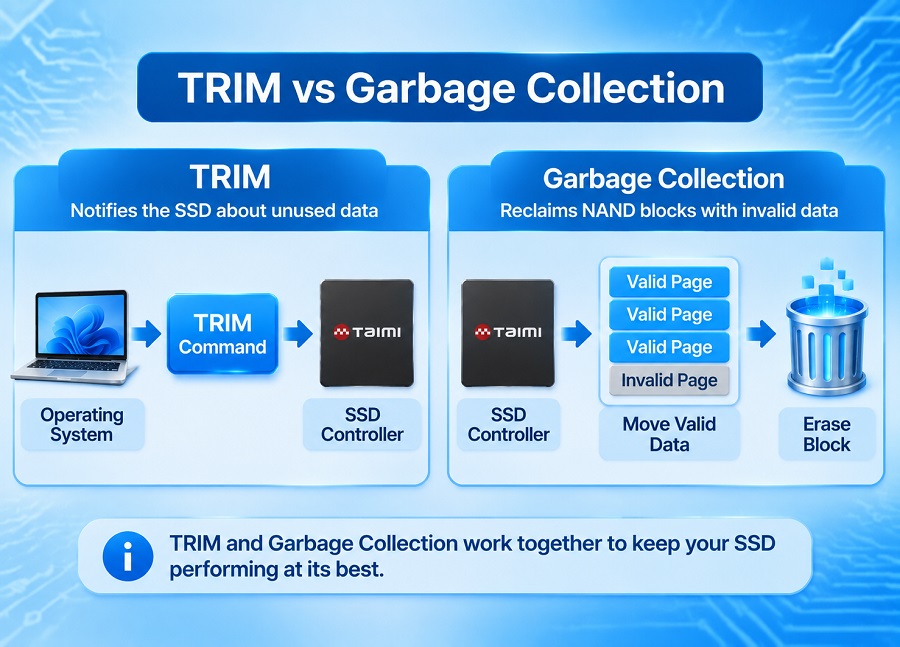
TRIM and garbage collection work together, but they are not the same operation.
When a user deletes a file, the operating system updates its file system information. That change does not necessarily tell the SSD immediately which physical NAND pages can be discarded.
The TRIM command allows the operating system to notify the SSD that specific logical data ranges are no longer needed. The controller can use this information when identifying invalid data and managing NAND blocks.
| Feature | TRIM | Garbage Collection |
|---|---|---|
| Main purpose | Notifies the SSD that specified data ranges are no longer needed | Reclaims NAND blocks containing invalid pages |
| Main function | Provides information about unused logical data | Relocates valid data and erases physical blocks |
| Operation | Host-to-device command | Internal SSD management process |
| Erases NAND blocks directly? | No | Yes |
| Relationship | Helps the controller identify data that can be discarded | Uses available information when reclaiming blocks |
A TRIM command does not directly erase a NAND block, and it does not guarantee that garbage collection will start immediately. The controller decides when and how to perform reclamation based on its internal management strategy.
For a closer look at the command itself, see What Is SSD TRIM? How It Affects Performance and Lifespan.
How Does Garbage Collection Affect SSD Write Performance?
Garbage collection helps keep NAND blocks available for new writes, but reclaiming a block takes work. The controller may need to read valid pages, relocate them, update mapping information, and erase the original block.
How much this affects performance depends on the amount of data that needs to be moved, the available working space, the workload, and the controller's scheduling strategy.
Keeping Erased Blocks Available
An SSD needs erased NAND blocks before it can program new data into them.
When enough erased blocks are available, the controller can handle incoming writes without first reclaiming space from a block that contains valid data.
If the supply becomes limited, garbage collection may need to perform more work before additional writes can be accommodated. Maintaining available blocks therefore helps the SSD manage write requests more efficiently.
Internal Data Movement Creates Write Overhead
Moving valid pages requires additional NAND reads and writes. These operations use internal resources and may compete with host requests.
For example, imagine an SSD handling a sustained write workload while several candidate blocks contain mostly valid data. Reclaiming those blocks requires the controller to relocate a relatively large amount of data before erasing them.
That internal work can increase latency or reduce the bandwidth available for host writes, depending on the drive's architecture and workload.
How Garbage Collection Relates to Write Amplification
Garbage collection is one contributor to write amplification.
The Write Amplification Factor (WAF) describes the relationship between the total data written to NAND flash and the data written by the host.
For example, if a host writes 100 GB of data and the SSD performs 150 GB of NAND writes, the WAF is 1.5.
The additional NAND writes may include valid-page relocation during garbage collection and other internal management operations. A higher WAF means the NAND flash is receiving more write activity than the host requested.
For more on sustained write behavior, see Why Does SSD Write Speed Drop During Large File Transfers?.
What Factors Influence SSD Garbage Collection Efficiency?
Garbage collection efficiency depends on both the SSD's design and the way it is used. Several factors can influence how much data the controller needs to move and how easily it can reclaim NAND blocks.
| Factor | Effect on Garbage Collection |
|---|---|
| Available Free Space | More available working space gives the controller greater flexibility when relocating valid data and selecting blocks for reclamation. |
| Over-Provisioning | Reserved NAND capacity provides additional space for internal management and can support block reclamation. |
| Workload Pattern | Sequential and random writes can create different distributions of valid and invalid pages across blocks. |
| TRIM Support | Information about unused logical data helps the controller identify pages that no longer need to be preserved. |
| Controller and Firmware | Their algorithms determine block selection, data relocation, scheduling, and background management behavior. |
Available space is particularly important. When an SSD has fewer free blocks to work with, the controller may have less flexibility when relocating valid data and preparing blocks for reuse.
Over-Provisioning can provide additional working capacity, but its benefit depends on the NAND configuration, workload, controller, and firmware. A larger reserved area does not automatically guarantee better performance in every application.
Workload patterns matter as well. Random updates may leave valid and invalid pages mixed across many blocks, while other write patterns can produce different reclamation requirements. The controller must manage these conditions while continuing to handle host requests.
For a related discussion of capacity and performance, see Why Does an SSD Become Slower When It Is Nearly Full?.
Garbage Collection vs. Wear Leveling: What's the Difference?
Garbage collection and wear leveling are both part of NAND flash management, but they address different problems.
| Comparison | Garbage Collection | Wear Leveling |
|---|---|---|
| Primary purpose | Reclaim blocks containing invalid data | Distribute program/erase activity across NAND blocks |
| Main operation | Move valid pages and erase blocks | Manage data placement to balance block usage |
| Main concern | Maintaining reusable storage space | Avoiding uneven NAND wear |
| Relationship | Reclaims physical storage for reuse | Helps manage NAND endurance over time |
Garbage collection focuses on recovering usable NAND space. Wear leveling focuses on distributing erase cycles more evenly so that a small group of blocks does not wear out significantly earlier than others.
The two processes can interact because moving data during garbage collection also affects where data is stored. However, garbage collection does not replace wear leveling, and wear leveling does not remove the need to reclaim blocks.
How Does Garbage Collection Relate to SSD Reliability?
Garbage collection is a normal part of SSD operation, but its internal data movement is one reason SSD reliability cannot be judged by read and write speed alone.
Relocating valid pages creates additional NAND writes. Since NAND flash has finite endurance, the controller must manage these operations alongside wear leveling, error correction, and other firmware functions.
For manufacturers and OEM buyers, several aspects are worth evaluating:
- Sustained write behavior: How the drive performs during longer write workloads, rather than only short peak-speed tests.
- Endurance specifications: Whether the drive's stated endurance is appropriate for its intended application.
- Firmware management: How the controller handles data mapping, block reclamation, and other internal operations.
- Quality validation: Whether the SSD has undergone appropriate functional, compatibility, and reliability testing.
No single feature determines SSD reliability. NAND characteristics, controller design, firmware implementation, workload, and manufacturing quality all contribute to the result.
For OEM projects, evaluating an SSD under the intended workload is more useful than relying on peak sequential read and write speeds alone. Sample validation can help buyers assess sustained performance, compatibility, and consistency before moving to volume production.
For more information about endurance ratings, see SSD TBW Explained: What It Means and How It Affects SSD Lifespan.
Frequently Asked Questions About SSD Garbage Collection
1. Does SSD Garbage Collection Happen Automatically?
Yes. Garbage collection is managed internally by the SSD controller and firmware. Users generally do not need to start the process manually. The controller schedules block reclamation according to its internal management strategy and current storage conditions.
2. Does TRIM Trigger SSD Garbage Collection?
Not necessarily. TRIM tells the SSD that specified logical data ranges are no longer needed. The controller can use this information when identifying invalid pages, but receiving a TRIM command does not mean that a block will be erased immediately.
3. Does Garbage Collection Slow Down an SSD?
It can temporarily affect performance because the controller may need to move valid data before erasing a block. These internal operations can compete with host read and write requests. The actual impact depends on the workload, available space, controller design, and firmware.
4. Does an SSD Need Free Space for Garbage Collection?
An SSD needs available working capacity to relocate valid data and reclaim NAND blocks. This capacity may come from currently available NAND blocks and reserved Over-Provisioning space. When fewer erased blocks are available, garbage collection may require more internal work.
5. Is SSD Garbage Collection Related to SSD Lifespan?
Yes, indirectly. Moving valid data during garbage collection generates additional NAND writes, which contribute to total program/erase activity. However, SSD lifespan also depends on NAND endurance, wear leveling, workload, controller design, and firmware management.
Conclusion
SSD garbage collection solves a fundamental limitation of NAND flash: individual programmed pages cannot simply be erased and reused on their own. By identifying invalid pages, relocating valid data, and erasing entire blocks, the controller makes physical storage available for future writes.
TRIM helps identify data that is no longer needed, while available working space, Over-Provisioning, workload patterns, and firmware design influence how efficiently block reclamation can take place.
For PC builders, distributors, and OEM buyers, understanding garbage collection provides a clearer picture of what happens inside an SSD during everyday and sustained write operations. It is also a reminder to evaluate storage products through more than headline speed specifications.
Looking for SSD Solutions for Your OEM or Bulk Order?
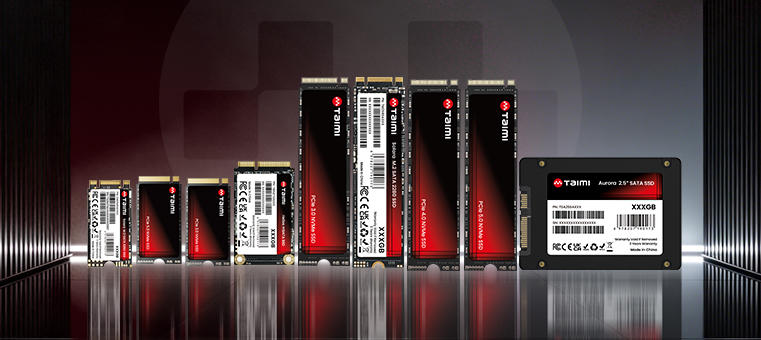
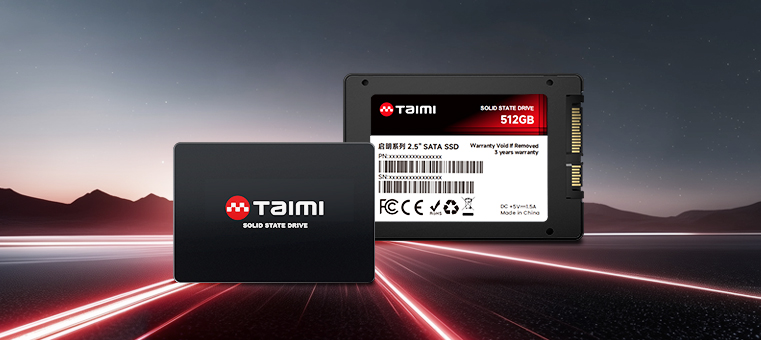
Taimi (苔米) develops and manufactures SSD storage products for PC builders, channel partners, and OEM projects. Our portfolio includes PCIe NVMe SSDs, 2.5-inch SATA SSDs, and other storage solutions for different application requirements.
Contact our team to discuss product specifications, sample evaluation, and bulk procurement cooperation.
Contact Taimi