
Company Introduction
More













What Is SLC Cache in an SSD? How It Affects Write Speed and Sustained Performance (2026 Guide)
Share:
Quick Answer
SLC cache is a portion of NAND flash that an SSD temporarily operates in Single-Level Cell (1-bit-per-cell) mode to improve write performance. It works as a high-speed write buffer, allowing the SSD to absorb bursts of incoming data before that data is managed and stored in the underlying TLC or QLC NAND storage.
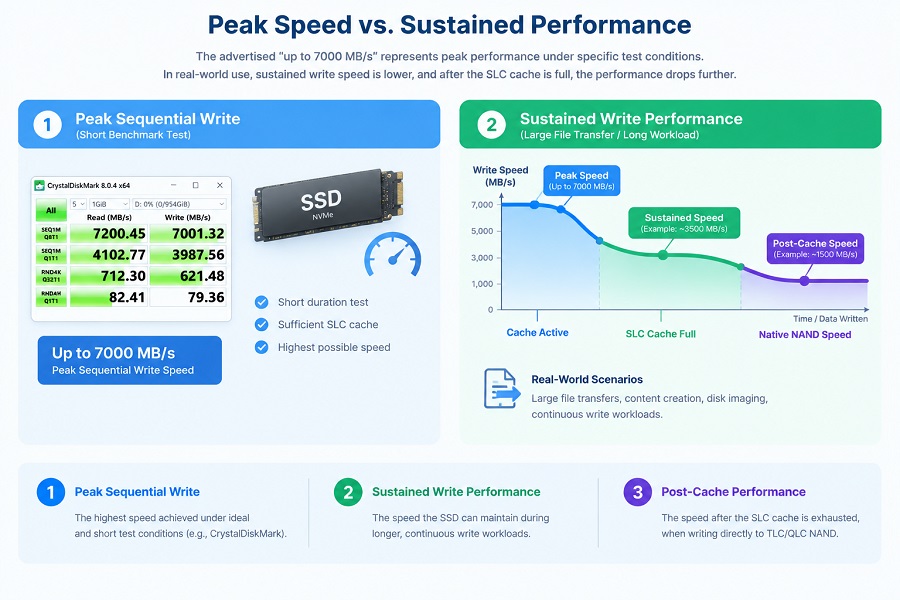
This is one reason an SSD can deliver very high sequential write speeds during short benchmark tests while showing lower speeds during a long, continuous write workload.
When the available SLC cache is exhausted, write performance may decrease. The actual behavior depends on factors such as NAND type, SSD controller, firmware, drive capacity, temperature, available free space, and workload.
For this reason, peak write speed and sustained write performance should be evaluated separately, especially when an SSD will be used for large file transfers, content creation, disk imaging, or OEM system integration.
What Is SLC Cache in an SSD?
SLC stands for Single-Level Cell. In traditional SLC NAND, each memory cell stores one bit of data.
Modern consumer SSDs commonly use higher-density NAND technologies such as TLC (3 bits per cell) and QLC (4 bits per cell). These technologies allow manufacturers to provide larger storage capacities at a more practical cost.
To improve short-term write performance, an SSD can use part of its NAND in SLC mode. This is commonly called SLC cache or pseudo-SLC (pSLC) cache.
Instead of storing multiple bits per cell during this temporary operating mode, the selected NAND cells store one bit per cell. This allows the SSD to handle incoming write data more efficiently during burst workloads.
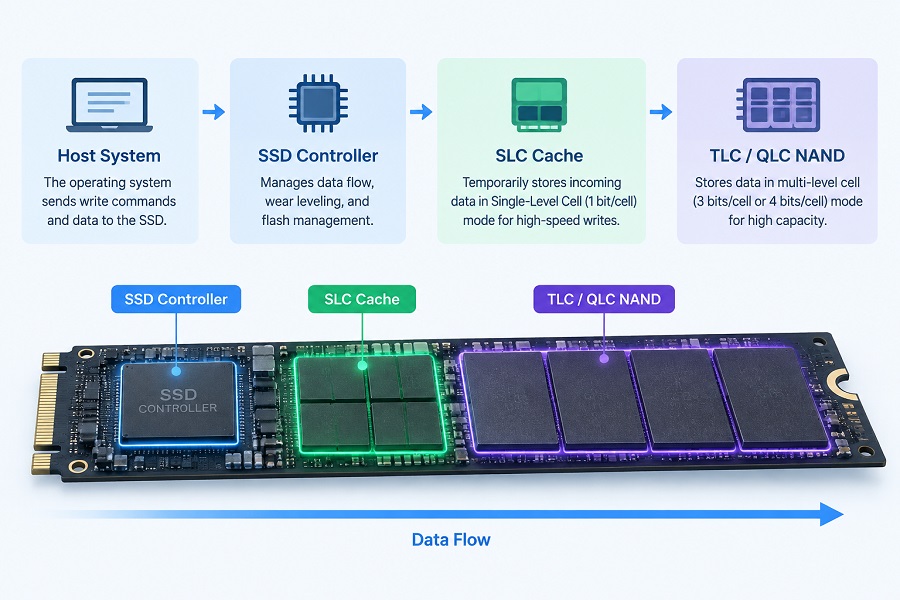
Simplified Data Path:
Host System → SSD Controller → SLC Cache → Underlying TLC / QLC NAND Storage
SLC Cache Is Not the Same as SLC NAND
This distinction is important:
- SLC NAND refers to NAND flash that is physically manufactured to operate permanently as Single-Level Cell memory.
- SLC cache is usually a portion of TLC or QLC NAND that is temporarily operated in SLC mode.
Therefore, an SSD with an SLC cache does not necessarily contain physically separate SLC NAND chips. The controller and firmware determine how data is written, moved, and reorganized within the NAND.
For a broader explanation of NAND cell types, see our guide to TLC vs QLC SSDs.
How Does SLC Cache Work?
The SSD controller manages the movement of data between the host system, the cache area, and the underlying NAND flash.
For more information about how the controller manages SSD data and performance, see How SSD Controllers Work.
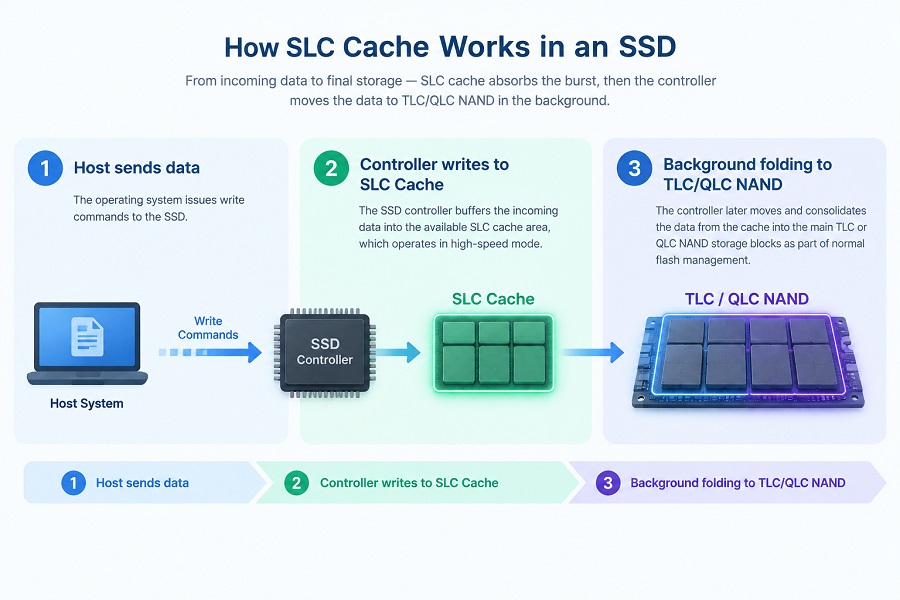
When a write workload begins, incoming data is initially directed through the available SLC cache:
- Host sends data: The operating system issues write commands to the SSD.
- Controller buffers the write: When cache space is available, data is written into NAND operating in high-speed SLC mode.
- Data is reorganized: The SSD controller later moves and consolidates the data into the main TLC or QLC storage blocks as part of normal background flash management.
When the SLC Cache Is Available
When enough SLC cache is available, the SSD maintains high write performance during short or moderate workloads, such as:
- Installing applications or games
- Saving documents and media files
- Transferring small or medium groups of files
- General daily computing tasks
For these everyday workloads, users rarely notice the transition from SLC-cache speed to native NAND speed.
When the SLC Cache Becomes Full
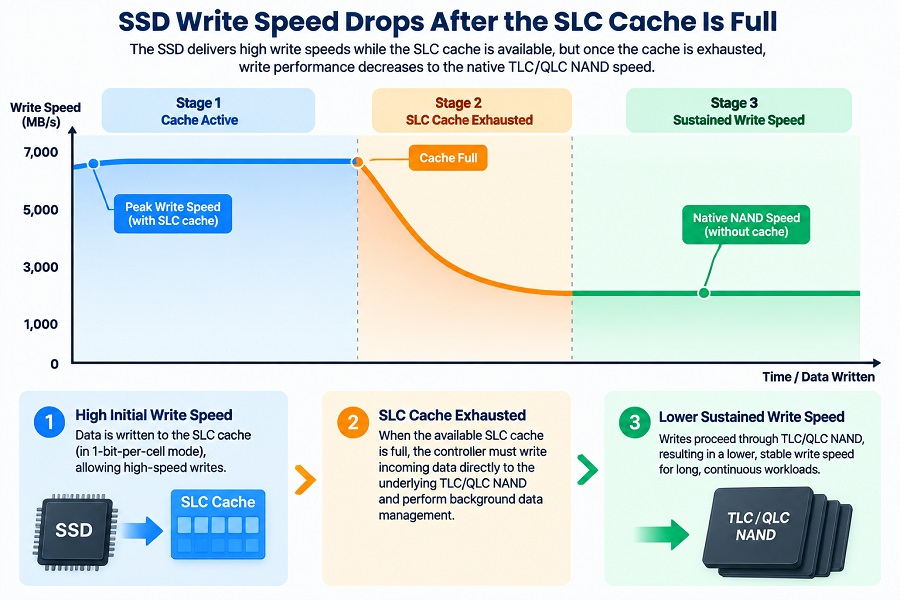
Longer and continuous write workloads can eventually consume the available high-speed buffer. Once the cache becomes exhausted, the controller must write more incoming data directly through the underlying NAND configuration while performing background data cleanup.
When the SLC cache becomes full, the SSD may need to write incoming data directly to TLC or QLC NAND while also moving cached data into its final NAND location. This data movement is often described as “folding.” The additional NAND management can reduce sustained write throughput.
As a result, write speed can step down:
High Initial Write Speed → SLC Cache Exhaustion → Lower Sustained Write Speed
Why Does SSD Write Speed Drop After the SLC Cache Is Full?
This transition explains why an SSD's advertised sequential write speed may differ from what you see during a massive file transfer.
An SSD specification quoting “Up to X MB/s” describes performance under specific peak test conditions while the cache buffer is fully available. It does not mean the drive can maintain that peak speed indefinitely under continuous workload pressure.
Typical Performance Pattern:
Speed (MB/s)
  High  |====================\ (Peak Burst Speed / Cache Active)
        |                     \
  Lower |                      +-------------------------------- (Sustained / Post-Cache Speed)
        +------------------------------------------------------------------> Time / Continuous Data Written
Peak Write Speed vs. Sustained Write Speed
| Performance Measurement | What It Represents |
|---|---|
| Peak Sequential Write | Maximum speed under short benchmark or burst conditions. |
| SLC-Cache Write Performance | Speed delivered while sufficient cache buffer is available. |
| Sustained Write Performance | Throughput during a long, continuous write workload. |
| Post-Cache Performance | Native write behavior after the available SLC cache is exhausted. |
This distinction is especially important for workloads that involve large amounts of continuous data:
- Copying 4K / 8K raw video files
- Video editing and rendering export
- Disk cloning and system backups
- Large dataset transfers
Dynamic SLC Cache vs. Static SLC Cache
SLC cache can be implemented in different ways depending on the SSD controller, firmware, NAND configuration, and product design.
| Feature | Dynamic SLC Cache | Static SLC Cache |
|---|---|---|
| Allocation | Cache capacity can change according to drive conditions. | A more defined portion of NAND is reserved for cache. |
| Relationship with Free Space | Heavily influenced by available free storage capacity. | Generally more predictable across different fill levels. |
| Cache Capacity | Larger on an empty drive; shrinks as the drive fills. | Remains consistent regardless of available user space. |
| Performance After Cache Depletion | May vary more depending on free space, background management, and NAND behavior. | More predictable because the cache allocation is relatively fixed. |
| Primary Advantage | Maximizes short-term burst capacity for clean drives. | More predictable cache behavior for workloads requiring consistent performance. |
Does a Nearly Full SSD Behave Differently?
Yes. When an SSD becomes heavily filled, the amount of free space available for dynamic cache allocation and internal data management decreases.
For this reason, performance testing on a completely empty SSD does not always represent how the same drive will behave when it is close to full capacity.
SLC Cache vs. DRAM Cache: What Is the Difference?
Because both features influence SSD performance, SLC cache and DRAM cache are sometimes discussed together, but they serve completely different hardware roles:
| Feature | SLC Cache | DRAM Cache |
|---|---|---|
| Storage Medium | Non-volatile NAND flash operating in SLC mode | Volatile DRAM memory chip |
| Primary Role | Buffers write data to improve burst write performance | Stores Flash Translation Layer (FTL) mapping tables and metadata |
| Performance Benefit | Helps absorb short-term sequential write bursts | Reduces mapping-related access latency and boosts random IOPS |
An SSD can use SLC cache and DRAM together, or operate as a DRAM-less drive utilizing Host Memory Buffer (HMB) technology alongside an SLC cache.
For more information, see our guide to DRAM vs. DRAM-less SSDs.
Thermal Throttling: Another Cause of Speed Drops
When testing high-speed NVMe SSDs during extended write workloads, a performance drop is not always caused by SLC cache exhaustion alone.
Continuous heavy writing generates heat in the SSD controller. When the controller approaches its configured thermal limit, the firmware may reduce performance to control temperature and protect system stability.
To properly evaluate an SSD, it is useful to track both drive temperature and write throughput to distinguish between SLC cache depletion and thermal throttling.
Does SLC Cache Affect SSD Lifespan?
SLC cache is primarily a performance management feature, so its size should not be used as a direct indicator of overall SSD endurance.
SSD lifespan depends on a combination of factors:
- Quality and grade of the NAND flash
- Total Bytes Written (TBW) rating
- Wear-leveling algorithms in the firmware
- Operating temperature and thermal environment
- Overall workload patterns
A larger SLC cache does not automatically guarantee a longer lifespan, nor does a smaller cache imply poor durability. For endurance evaluation, buyers should rely on specifications such as TBW and the manufacturer's official warranty terms.
For deeper insights, see How Long Do SSDs Last? TBW, NAND Wear, and Real-World Lifespan Explained.
How to Test SSD Sustained Write Performance
A short benchmark test may not fully reveal how an SSD performs after its SLC cache is exhausted. To evaluate sustained write performance accurately:
- Run Large Sequential Write Tests: Use tools like CrystalDiskMark (with larger test files), AIDA64 Linear Write, fio, or IOMeter to put continuous write pressure on the drive.
- Observe the Full Performance Curve: Record write speed over time rather than looking only at the initial peak score. Look for initial burst speed, cache transition points, and post-cache sustained rates.
- Test at Variable Fill Levels: Test the SSD when nearly empty, 50% full, and heavily filled (80%+) to check how dynamic cache allocation holds up under real-world usage.
- Monitor Drive Temperatures: Keep track of thermal telemetry during extended runs to ensure thermal management is not masking the drive's true native write performance.
What Buyers Should Check for OEM and Bulk Procurement
For general PC users, peak burst speeds within the SLC cache are often sufficient for daily computing. For PC builders, distributors, system integrators, and OEM project managers, however, evaluating sustained throughput and batch consistency is far more critical.
Key Procurement Checklist:
- Distinguish Peak vs. Sustained Speeds: Verify whether quoted figures represent short burst capabilities or long-term sustained throughput.
- Understand the NAND & Controller Pair: Evaluate how the underlying architecture behaves after cache exhaustion.
- Evaluate Thermal Design: Ensure the drive's power and thermal characteristics fit the target system environment (such as thin notebooks, compact PCs, or desktop motherboards).
- Validate Samples Before Mass Order: Conduct full-drive workload tests on sample units to verify firmware stability, target platform compatibility, and batch-to-batch consistency.
Frequently Asked Questions
1. What happens when an SSD's SLC cache is full?
When the available SLC cache is consumed, the SSD can no longer rely on the available SLC cache for the same burst-write behavior. The controller must manage incoming data directly through the underlying NAND while performing internal background operations, which lowers the sustained write speed.
2. Is SLC cache the same as SLC NAND?
No. SLC cache refers to a portion of TLC or QLC NAND temporarily operated in SLC mode. It does not mean the drive contains physically dedicated SLC NAND chips.
3. Is SLC cache the same as DRAM cache?
No. SLC cache uses non-volatile NAND flash to buffer write throughput, while DRAM is volatile memory used primarily to store mapping tables and metadata for rapid data access.
4. Does every SSD have the same SLC cache size?
No. SLC cache size and management strategies vary by SSD model, capacity, controller, firmware version, and available free storage space.
5. Why does my SSD write slower during a large file transfer?
The most common reason is that the initial file write exhausted the available SLC cache buffer. Other contributing factors include thermal management limits, high drive fill levels, or background drive maintenance.
Final Takeaway
An advertised speed such as “Up to 7,000 MB/s” describes an SSD's peak burst capability while its SLC cache is available. It does not define how the drive will perform during a massive, continuous file transfer.
SSD sustained write performance depends on several factors: SLC cache behavior, native NAND speed, firmware strategy, thermal conditions, and drive fill level.
For bulk procurement, testing sample units under continuous workloads is one of the most reliable ways to confirm performance stability and real-world behavior before mass production.
About Taimi
Taimi focuses on consumer-grade SSD and flash storage product development and manufacturing, supporting PC builders, distributors, system integrators, and OEM projects with bulk procurement requirements.
The Taimi technical team supports product specification confirmation, sample validation, platform compatibility testing, and sustained performance evaluation for custom and bulk SSD projects.
Looking for Customized SSD Support?
Looking for customized SSD specifications, pSLC options, or bulk sample validation?
Contact the Taimi Technical Team for product specifications, sample testing, platform compatibility validation, and OEM/ODM project support.
Contact Taimi Technical Team```
Related Products
Recommended Articles
How to Choose a PCIe 3.0 SSD Supplier for Bulk Orders
2026-09-23
More
UFS vs eMMC: Speed, Performance, Versions, and Key Differences
2026-09-21
More
What Is an M.2 SSD? Form Factors, Keys & NVMe vs SATA Explained (2026 Guide)
2026-09-18
More
How to Choose an NVMe SSD Supplier: Bulk Buyer & OEM Guide
2026-09-16
More
What Is UFS Storage? Speed, Versions, and OEM Selection Guide
2026-09-14
More
How to Choose an SSD Supplier for PC Builders: Bulk Procurement Guide
2026-09-11
More
What Is NAND Flash? Types, Speed, Endurance, and Applications Explained
2026-09-10
More
What Is eMMC? Everything You Need to Know About eMMC Storage
2026-09-04
More
What Is a PCIe SSD? Speed, NVMe, and Compatibility Guide (2026)
2026-08-19
More
What Is a SATA SSD? Speed, Benefits, Compatibility, and Applications (2026 Guide)
2026-08-14
More
What Is an NVMe SSD? Complete Guide to Speed, Gaming Performance, Compatibility, and SSD Selection (2026)
2026-08-12
More