














When selecting an SSD, many buyers focus on the maximum sequential read and write speeds shown in product specifications, such as 3,500 MB/s or 7,000 MB/s. However, peak sequential numbers alone do not fully represent how an SSD performs in real-world applications.
SSD performance is mainly evaluated through two important metrics: sequential speed and random speed.
Sequential speed measures how quickly an SSD transfers large continuous files, while random speed measures how efficiently the drive handles many small data requests from different locations.
For PC builders, system integrators, and OEM buyers, understanding these differences helps select SSD solutions based on actual workloads instead of focusing only on benchmark numbers.
Quick Answer
- Sequential SSD Speed (MB/s or GB/s): Measures how quickly an SSD transfers large continuous files. It is important for video editing, backups, large file transfers, and other data-intensive workloads.
- Random SSD Speed (IOPS): Measures how efficiently an SSD processes small scattered data requests. It directly affects system responsiveness, application loading, OS startup, and multitasking.
- The Bottom Line: A fast SSD needs both high bandwidth and responsive access performance. Sequential speed improves large transfers, while random performance influences everyday user experience.
1. Understanding Sequential and Random SSD Speeds
SSD performance depends on how the host system requests data from the drive. In practical usage, storage workloads are mainly divided into two categories:
| Performance Metric | Measurement | Data Pattern | Example |
|---|---|---|---|
| Sequential Speed | MB/s or GB/s | Large continuous blocks | Copying large video files |
| Random Speed | IOPS | Small scattered requests | Launching applications |
SSD Specifications Usually Include Both Metrics
SSD specifications normally include:
- Sequential Read / Write: Example: 5,000 MB/s / 4,500 MB/s
- Random Read / Write: Example: 600K IOPS / 500K IOPS
For a detailed explanation of SSD read and write specifications, see: SSD Read Speed vs. Write Speed .
2. What Is Sequential SSD Speed?
2.1 Definition of Sequential Speed
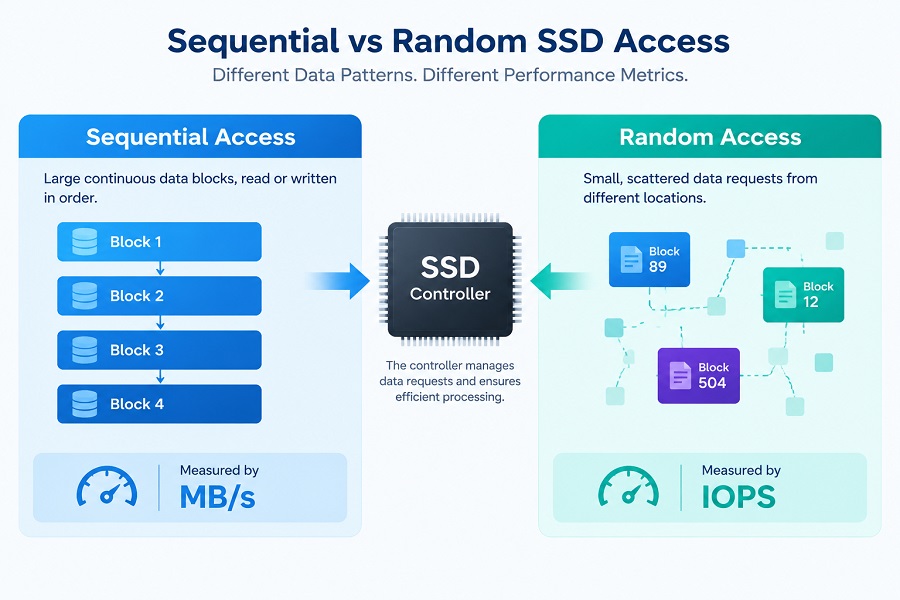
Sequential speed measures an SSD’s ability to read or write data stored in continuous blocks.
Because data is arranged in order, the SSD controller can process these requests efficiently and achieve higher bandwidth.
2.2 When Sequential Speed Matters
Sequential performance is especially important for:
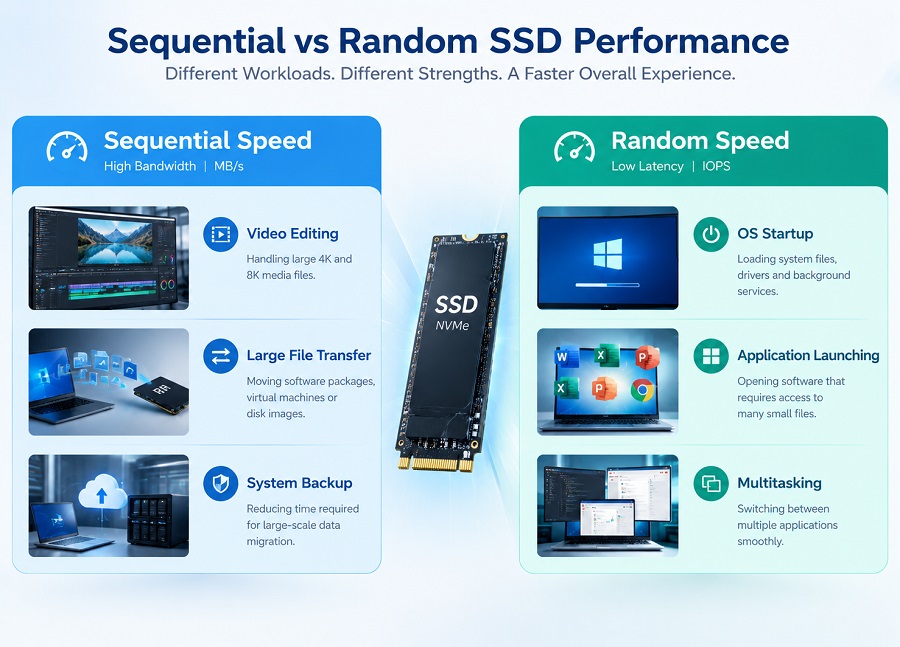
- Video Editing: Handling large 4K and 8K media files.
- Large File Transfers: Moving software packages, virtual machines, or disk images.
- System Backup: Reducing time required for large-scale data migration.
3. What Is Random SSD Speed?
3.1 Random Speed and IOPS Explained
Random speed measures how efficiently an SSD processes small data requests that may come from different locations on the drive.
Unlike sequential workloads, random operations involve multiple small requests that are not arranged continuously. These types of operations are common during everyday computer usage.
Random performance is measured in IOPS (Input/Output Operations Per Second), which represents how many individual data operations an SSD can complete in one second.
Sequential Access
Data Pattern:
[Block 1] → [Block 2] → [Block 3] → [Block 4]
Data is processed continuously in order, allowing the SSD to achieve high transfer bandwidth.
Measured by: MB/s
Random Access
Data Pattern:
[Block 89] → [Block 12] → [Block 504]
Data requests are distributed across different locations and require efficient processing by the SSD controller.
Measured by: IOPS
3.2 Why Random Performance Matters
Modern operating systems frequently access many small files instead of transferring large continuous data blocks.
Strong random performance improves:
- Operating System Startup: Loading system files, drivers, and background services.
- Application Launching: Opening software that requires access to many small files.
- Multitasking: Switching between multiple applications smoothly.
This is why an SSD with balanced random performance can feel faster during daily use, even if another drive offers higher sequential benchmark numbers.
4. Sequential vs Random SSD Speed: Key Differences
| Feature | Sequential SSD Speed | Random SSD Speed |
|---|---|---|
| Data Access | Large continuous blocks | Small scattered requests |
| Measurement Unit | MB/s | IOPS |
| Best For | Large file transfers and media workloads | Daily computing and application responsiveness |
| Main Benefit | Higher bandwidth | Lower latency and faster response |
5. Why Higher Sequential Speed Does Not Always Mean a Faster SSD
Many users assume that an SSD with 7,000 MB/s sequential read speed will always feel much faster than a 3,500 MB/s SSD. However, real-world performance depends on more than peak bandwidth.
1. Everyday Tasks Depend on Random Performance
Opening applications, starting an operating system, and switching between programs usually involve many small data requests.
These workloads rely more on random performance, latency, and controller efficiency than maximum sequential speed.
2. Sustained Performance Can Change
An SSD’s write performance may decrease after the temporary SLC cache is filled.
Actual sustained performance depends on:
- NAND flash type
- SSD controller technology
- Firmware optimization
- Thermal conditions
Learn more about SSD cache behavior: What Is SLC Cache in an SSD?
3. Benchmark Results Do Not Show Everything
Synthetic benchmarks measure SSD performance under specific testing conditions. Real applications also depend on latency consistency, firmware optimization, and long-term workload stability.
The SSD controller plays an important role in managing data processing, performance balance, and reliability.
Learn more about SSD controller technology: How SSD Controllers Work
6. How to Choose an SSD Based on Workload
Different applications require different SSD characteristics. Instead of selecting an SSD only based on maximum sequential speed, buyers should evaluate performance according to their actual usage scenarios.
Office Computers & Everyday Systems
For everyday computing, choose an SSD with balanced performance, reliable firmware, and stable random responsiveness to ensure smooth daily operation.
Gaming & Workstations
Gaming and workstation users should focus on balanced SSD performance, including:
- Fast response time
- Consistent read/write performance
- Good thermal management
- Platform compatibility
Content Creation
Video editing and professional content workflows often require higher sequential performance for handling:
- Large video files
- Media production projects
- High-volume data transfers
OEM Computer Projects & System Integration
For bulk SSD procurement, buyers should evaluate more than benchmark numbers. Important factors include:
- Performance consistency
- Firmware compatibility
- Thermal behavior
- Supplier reliability
- Long-term supply capability
For more information about selecting SSD suppliers for bulk projects, see our guide:
How to Evaluate an SSD Supplier: A Checklist for Bulk Buyers
7. How Taimi Validates SSD Performance Beyond Benchmark Numbers
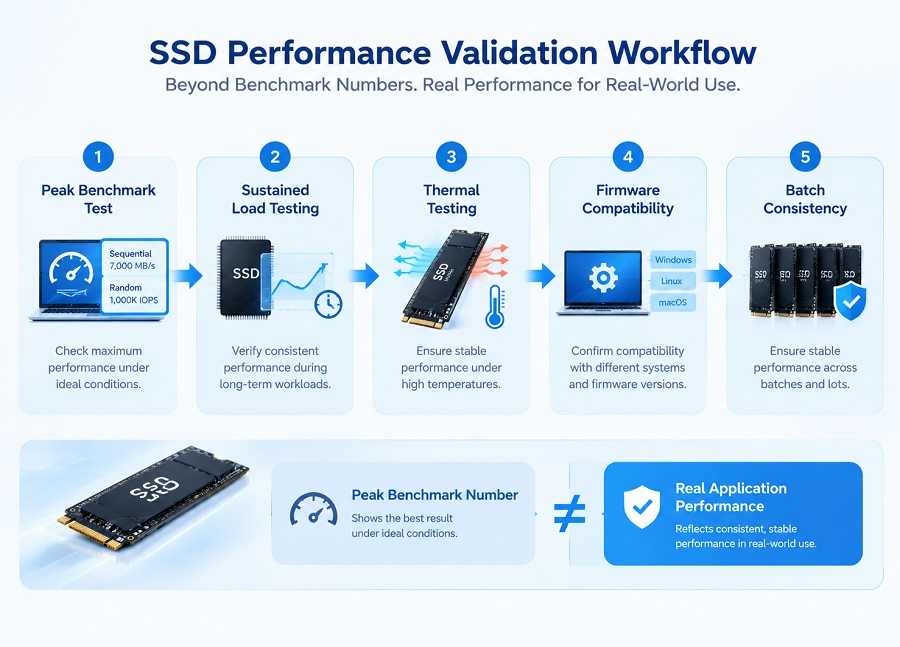
Peak specifications are only one part of SSD evaluation. At Taimi , our engineering team evaluates SSD performance through benchmark testing, real application scenarios, and compatibility validation.
For OEM projects and bulk procurement, stable performance, firmware compatibility, and batch consistency are essential when selecting a long-term SSD supplier.
- Sustained Load Testing: Evaluating SSD behavior during extended workloads to verify stable performance beyond short benchmark results.
- Thermal and Latency Testing: Checking performance consistency under continuous operation and different temperature conditions.
- Firmware & Platform Compatibility Testing: Validating SSD firmware across different systems, chipsets, and hardware platforms.
- Batch Consistency Validation: Ensuring predictable performance and stable quality for large-volume procurement projects.
Frequently Asked Questions (FAQ)
1. Is sequential speed or random speed more important for an SSD?
It depends on the workload. Sequential speed is more important for large file transfers, video editing, and data migration, while random performance has a greater impact on daily responsiveness, application loading, and operating system startup.
2. What is a good random speed for an SSD?
The ideal random performance depends on the SSD interface, NAND flash type, controller design, firmware optimization, and application requirements.
PCIe NVMe SSDs generally provide higher IOPS performance than SATA SSDs, but the right performance level should match the target workload.
3. Why can SSD write speed decrease during large file transfers?
During very large write operations, the temporary SLC cache may become full. After that, SSD write performance can change depending on NAND characteristics, controller design, and internal data management.
4. Should I choose an SSD only based on benchmark scores?
No. Especially for OEM buyers and system integrators, SSD selection should also consider NAND quality, sustained performance, compatibility, thermal characteristics, warranty, and manufacturer reliability.
Contact Taimi for SSD Specifications and OEM/ODM Support
Choosing the right SSD requires matching performance specifications with real application requirements.
Whether you need customized SSD specifications, compatibility support, or factory-direct SSD solutions for bulk procurement, Taimi (苔米) provides technical support and quality-tested storage products.
Request SSD Specifications & OEM/ODM Support