
Company Introduction
More








PCIe vs. SATA SSD: A 2026 Engineer’s Guide to Storage Upgrades
Share:
As someone who spends most of my time at the Taimi SMT production line or troubleshooting firmware issues, I often hear the same debate: "Should I keep using SATA, or is the PCIe jump actually worth it?"
If you are looking at spec sheets, the difference seems simple. If you are looking at real-world deployment or a home upgrade, it gets more complicated. Here is how we look at storage interface selection in 2026.
The Reality of the Bottleneck: AHCI vs. NVMe
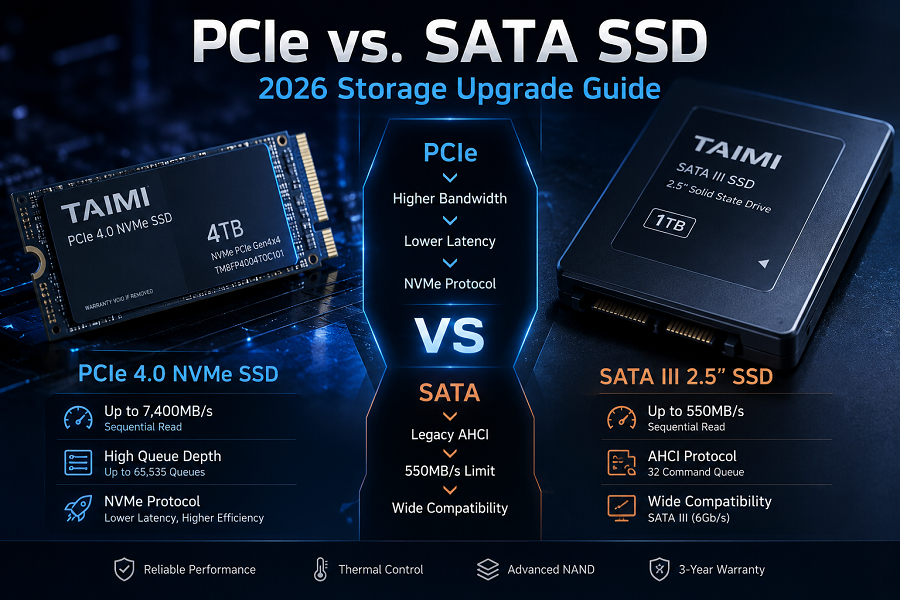
Most people talk about "speed" (MB/s). I prefer to talk about "latency" and "queuing."
SATA (AHCI)
Think of this as a relic of the spinning-disk era. It was never designed for the parallel nature of NAND flash. With a measly 32-command queue, it hits a hard performance wall the moment you throw a real-world workload at it. It’s reliable, but if you’re looking for speed, it’s a dead end. Looking for a deep dive into SATA interfaces, form factors, and real-world deployment scenarios? Check out our complete [SATA SSD Specs, Speed, and Application Guide (2026)].
PCIe (NVMe)
It’s not just a speed upgrade; it’s a total shift in protocol architecture. SATA carries a heavy protocol overhead designed for mechanical drive legacy. NVMe, however, taps directly into the PCIe bus. In my experience with raw 4K scrubbing or massive asset streaming, NVMe’s ability to handle deep command queues makes a night-and-day difference—the system just doesn't choke on parallel data streams like SATA does.
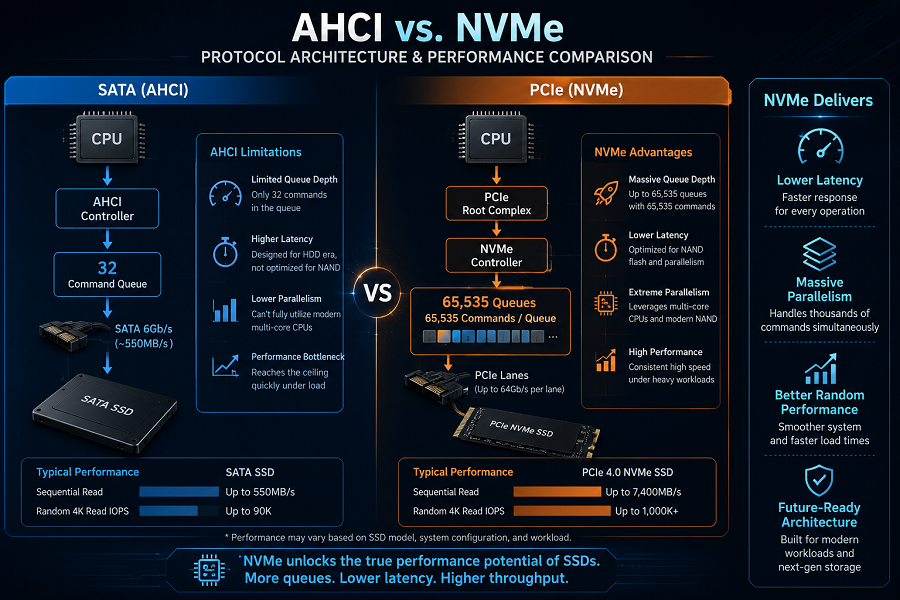
My takeaway: If you are still running a system on SATA in 2026, you are essentially driving a modern sports car on a restricted residential street.
For deeper reliability engineering behind SSD performance, see Wafer-level NAND testing and signal integrity validation
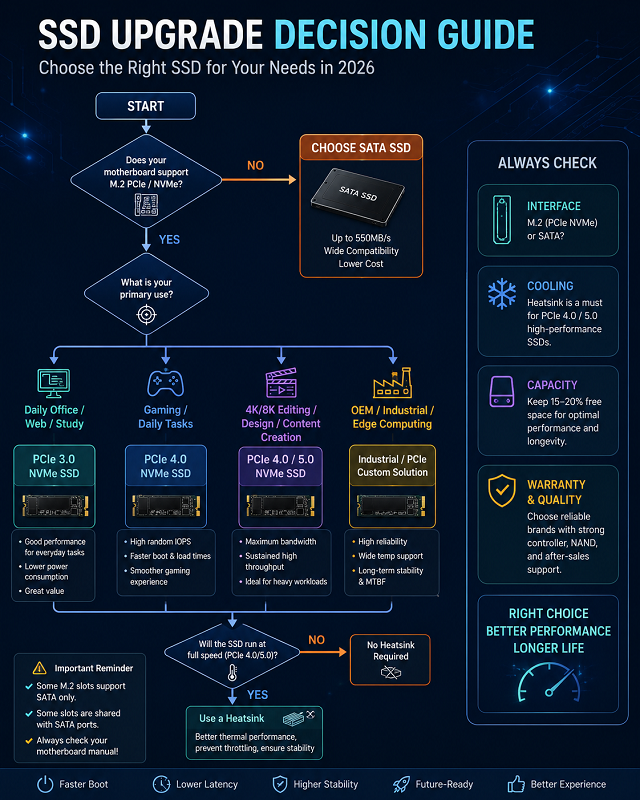
SSD Selection Reference: 2026 Scenario Guide
| Usage Scenario | Recommended Interface | Technical Driver | Engineering Logic |
|---|---|---|---|
| Basic Office / Legacy | SATA | Legacy Support | Mature AHCI protocol; zero thermal overhead. |
| Gaming / Daily Tasks | PCIe 3.0 / 4.0 | Random IOPS | Higher queue depths reduce latency during boot. |
| 4K Editing / Design | PCIe 4.0 / 5.0 | Bandwidth Ceiling | Sustained high-throughput avoids frame drops. |
| OEM / Industrial | Custom / PCIe | Reliability Logic | LDPC-based ECC; focused on MTBF. |
Need help deciding between PCIe 3.0, 4.0, and DRAM options for your specific build? Check out our complete selection guide: What Is an NVMe SSD? Complete Guide to Speed, Gaming Performance, Compatibility, and SSD Selection (2026).
Don’t Let These "Hidden Issues" Ruin Your Build
I’ve spent enough time in the lab to know that most 'defective' drives aren't broken—they're just misconfigured. Before you build, here’s what you actually need to watch out for:
- Thermals are real: A PCIe 4.0 drive running at full speed without a heatsink will eventually thermal-throttle. Don't skip the thermal solution—it’s a performance requirement.
- SLC Cache isn't magic: Everyone looks at "peak" speed. In the factory, we test for "sustained speed." Look for drives that prioritize controller stability over burst speed.
- The "Compatibility" Trap: Don't assume an M.2 slot is always PCIe. Some old laptop slots are SATA-only. Always check your motherboard manual.
- Pro Tip: Already installed the drive but it’s not appearing in your system? Don’t panic—it’s rarely a hardware failure. Follow our 3-step troubleshooting guide to quickly identify mounting or BIOS configuration issues.
Why We Care About the Details at Taimi
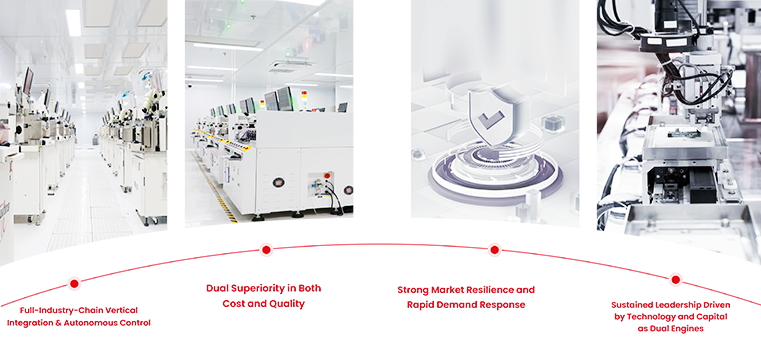
At Taimi, we don’t just buy and resell flash. We handle the process from DIE screening to firmware optimization. If you are interested in our industrial-grade storage solutions, [view our full product lineup here] or contact our engineering team to discuss custom storage specs for your next project.
FAQ
Q: Is PCIe 4.0 overkill for a daily machine?
A: Most don’t need it, but the price gap is negligible now. Just grab the 4.0—at this point, it’s about having the headroom for whatever comes next. If you're still worried about the budget, read our latest analysis: [Will SSD Prices Drop in 2026? Expert Buying Guide] to find the best window for your upgrade.
Q: Why does my drive feel slow after six months?
A: You're hitting an over-provisioning wall. Once you fill an SSD past 80%, the controller loses the headroom needed for wear leveling. It basically starts choking on its own data management tasks. Keep 15-20% free—it’s the simplest way to stop the performance from tanking.
Q: Do you help with custom storage specs?
A: Yes. We work with OEM partners on custom firmware and batch deployments. Reach out to our engineering team for technical specs.
Related Products
Recommended Articles
PCIe vs. SATA SSD: A 2026 Engineer’s Guide to Storage Upgrades
2026-07-02
More
Taimi Launches Official Website, Expanding Global Reach in High-Performance Storage Solutions
2026-06-30
More
PCIe 4.0 vs. SATA SSD: Choosing the Right Storage for OEM Projects (No Fluff)
2026-06-26
More
Will SSD Prices Drop in 2026? Expert Analysis and Buying Guide
2026-05-08
More
Taimi’s Integrated Manufacturing Strategy: Insights from Eletrolar Show 2026
2026-06-24
More