
Company Introduction
More












What Is a SATA SSD? Speed, Benefits, Compatibility, and Applications (2026 Guide)
Share:
If you are replacing an old hard drive or upgrading an older PC, a SATA SSD is still one of the simplest and most practical storage upgrades in 2026.
A SATA SSD uses NAND Flash memory to store data and the Serial ATA (SATA) interface to communicate with the host computer. Unlike a traditional hard drive, it has no spinning platters or mechanical read/write heads. The result is much lower access latency and a noticeably more responsive experience when starting Windows, opening applications, or working with files.
NVMe SSDs offer much higher bandwidth on modern PCIe platforms, but SATA SSDs have not disappeared. They remain useful in older laptops and desktops, office computers, industrial systems, embedded devices, and secondary storage setups where compatibility and practical performance matter more than maximum throughput.
This guide covers what a SATA SSD is, how fast it can be, how it compares with HDD and NVMe storage, where it is still useful, and what to check before buying one.
What Is a SATA SSD?
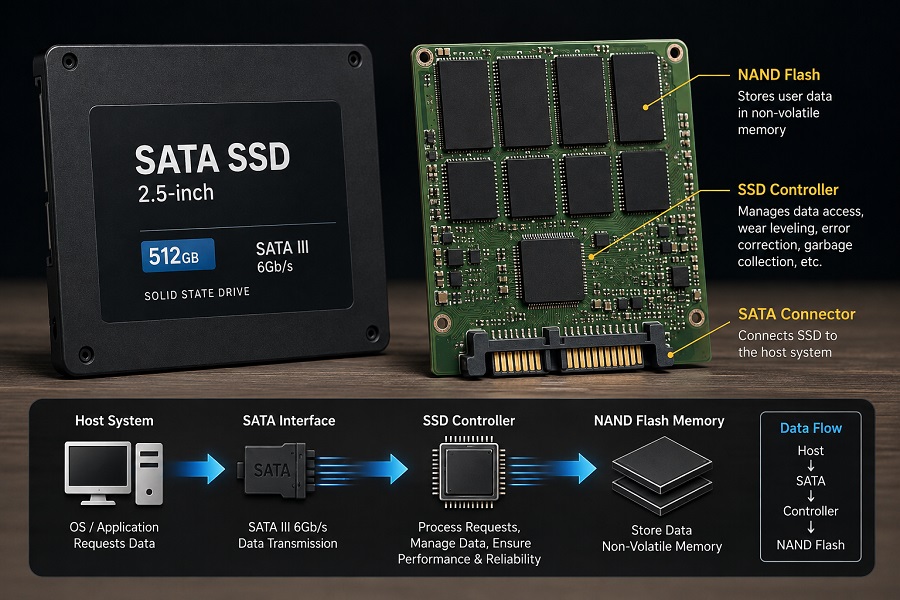
A SATA SSD (Solid-State Drive) is a storage device that uses NAND Flash memory and communicates with a computer through the Serial ATA interface.
When the operating system requests data, the SSD controller processes the request and determines where that data is stored in the NAND Flash. The controller also handles many background tasks that are necessary for maintaining performance and reliability.
A typical SATA SSD contains several key components:
- NAND Flash: Non-volatile memory that stores user data even when the drive is powered off.
- SSD controller: Manages data access, error correction, wear leveling, garbage collection, and other NAND operations.
- Firmware: Controls how the SSD handles data management and background operations.
- SATA interface: Provides the connection between the SSD and the host system.
- PCB: Connects the controller, NAND chips, power circuits, and other components.
The controller is particularly important because NAND Flash has its own management requirements. Data cannot simply be overwritten in place in the same way as data on a magnetic hard drive. The controller therefore manages logical-to-physical address mapping, block management, error correction, and wear distribution.
For a more detailed explanation of the controller's role, see How SSD Controllers Work: The Engineering Behind SSD Performance, Thermal Throttling, and Lifespan.
SATA SSD vs. HDD: What's the Difference?
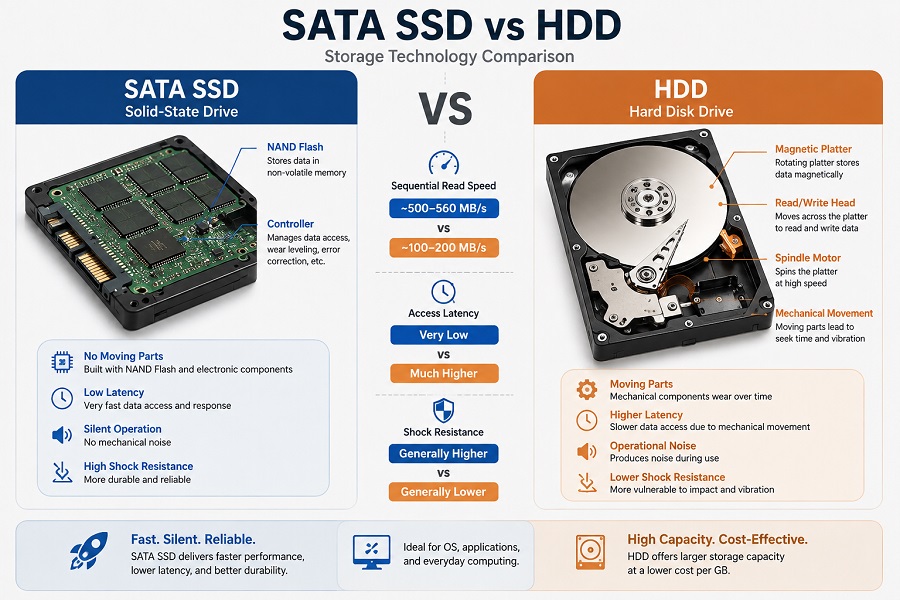
The fundamental difference between a SATA SSD and an HDD is how they store and access data.
An HDD relies on spinning magnetic platters and mechanical read/write heads. A SATA SSD stores data in NAND Flash and has no moving mechanical parts.
| Feature | SATA SSD | HDD |
|---|---|---|
| Storage technology | NAND Flash | Magnetic platters |
| Moving parts | No | Yes |
| Typical sequential speed | Around 500–560 MB/s | Around 100–200 MB/s |
| Access latency | Very low | Much higher |
| Mechanical noise | None | Yes |
| Shock resistance | Generally higher | Generally lower |
For an older computer that still uses an HDD, the difference can be substantial. Windows starts faster, applications open with less delay, and everyday file operations feel more responsive.
The improvement is not only about sequential transfer speed. SSDs also avoid the mechanical seek time that limits HDD performance, especially when the system needs to access many small files.
How Fast Is a SATA SSD?
Most modern SATA SSDs use SATA III, which provides a 6 Gb/s interface.
The interface provides a theoretical signaling rate of 6 gigabits per second. Because of interface and protocol overhead, the usable host-side throughput is lower.
In normal conditions, most SATA SSDs deliver approximately:
| Specification | Typical SATA SSD |
|---|---|
| Interface | SATA III 6 Gb/s |
| Sequential read | Up to around 500–560 MB/s |
| Sequential write | Around 450–530 MB/s |
| Storage medium | NAND Flash |
| Common form factors | 2.5-inch, M.2 SATA |
Actual results vary between drives. Controller design, NAND type, capacity, firmware, workload, and test software can all affect benchmark results.
Peak Speed vs. Sustained Performance
A short benchmark does not always show how a SATA SSD behaves during a long write.
Many SSDs use an SLC cache to improve short-term write performance. Once the cache is full, the drive may have to write directly to TLC or QLC NAND at a lower rate.
This matters when copying large video files, creating backups, or performing other sustained write operations. For these workloads, stable long-term performance can be more useful than the highest number shown in a short benchmark.
What Limits SATA SSD Performance?
The biggest limitation of a SATA SSD is the SATA interface itself.
Modern NAND Flash and SSD controllers can process considerably more data internally than the host system can transfer through a SATA III connection. Once the SATA bandwidth is saturated, increasing the internal processing capability does not translate into much higher sequential speed at the computer.
That is why most SATA SSDs operate within a relatively narrow peak sequential performance range.
There can still be meaningful differences between models, particularly in workloads involving:
- Random 4K performance: Important for operating system responsiveness and small file access.
- Sustained writes: Relevant when writing large amounts of data continuously.
- SLC cache behavior: Determines how the drive behaves after its temporary write cache is filled.
- Garbage collection: Helps the SSD reclaim blocks that are no longer in use.
- Thermal stability: Affects performance during longer workloads, particularly in compact systems.
- Endurance: Indicates how much data the NAND is rated to handle over its service life.
For everyday users, these characteristics can matter more than a small difference between two SATA SSDs that both advertise around 550 MB/s read speed.
What Are the Benefits of a SATA SSD?
1. A Major Upgrade Over an HDD
For an older PC or laptop, replacing an HDD with a SATA SSD can be one of the simplest ways to improve overall responsiveness. The operating system loads faster, applications launch more quickly, and file access feels much less sluggish.
2. Low Access Latency
An HDD has to move its read/write head and wait for the platter to rotate to the correct position. A SATA SSD accesses NAND Flash electronically, so it avoids these mechanical delays. This is particularly useful for workloads involving many small files.
3. No Moving Mechanical Parts
SATA SSDs do not contain spinning platters, motors, or mechanical heads. That makes them better suited to laptops and systems that experience movement or vibration. It also eliminates the mechanical wear associated with hard drives. Of course, solid-state storage can still fail because of NAND wear, controller problems, firmware issues, or electrical faults.
4. Broad Compatibility
SATA has been used in computers for many years, so SATA SSDs remain compatible with a wide range of systems that support SATA storage. For a system that already uses a SATA hard drive, upgrading to a SATA SSD is often much easier than replacing the entire storage platform.
5. Practical Power and Thermal Characteristics
Without a spinning motor, a SATA SSD can avoid some of the mechanical power requirements of an HDD. Actual power consumption depends on the controller, NAND configuration, firmware, and workload, but the solid-state design makes SATA SSDs a practical option for many compact systems and laptops.
SATA SSD vs. NVMe SSD: What's the Difference?
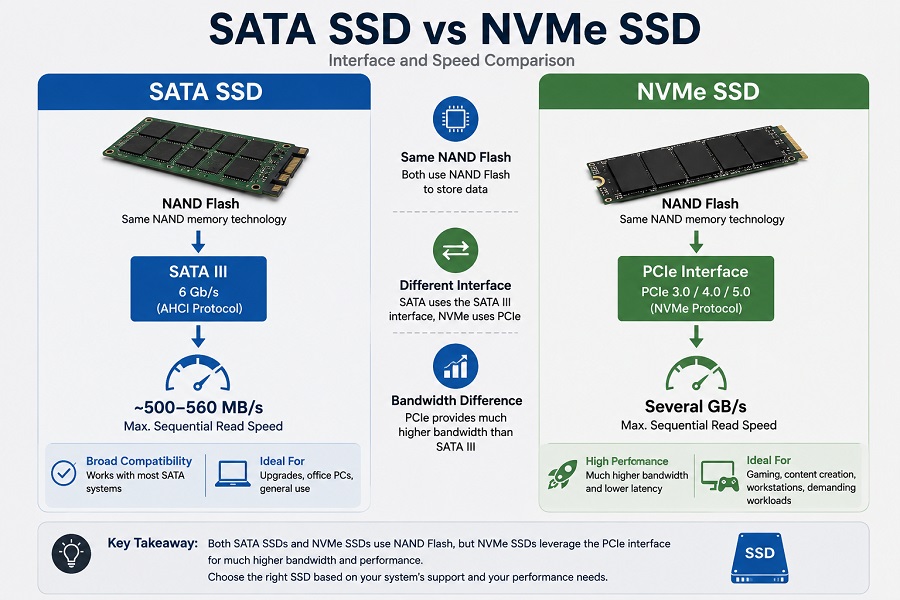
Both SATA and NVMe SSDs use NAND Flash, but they use different interfaces and protocols.
| Feature | SATA SSD | NVMe SSD |
|---|---|---|
| Host interface | SATA | PCIe |
| Storage protocol | AHCI / ATA | NVMe |
| Typical sequential speed | Around 500–560 MB/s | Several GB/s |
| Access latency | Low | Generally lower |
| Compatibility | Broad | Requires PCIe/NVMe support |
| Common applications | PC upgrades, office systems, industrial storage | Gaming, workstations, demanding workloads |
The biggest practical difference is bandwidth.
SATA III limits sequential throughput to roughly the 500 MB/s range, while PCIe provides substantially more bandwidth for NVMe SSDs.
That does not mean NVMe is automatically the better choice for every system. If an older computer only supports SATA storage, an NVMe SSD may not be usable as a direct replacement.
For a broader interface comparison, see PCIe vs. SATA SSD: A 2026 Engineer's Guide to Storage Upgrades.
SATA SSD Form Factors: 2.5-Inch vs. M.2 SATA
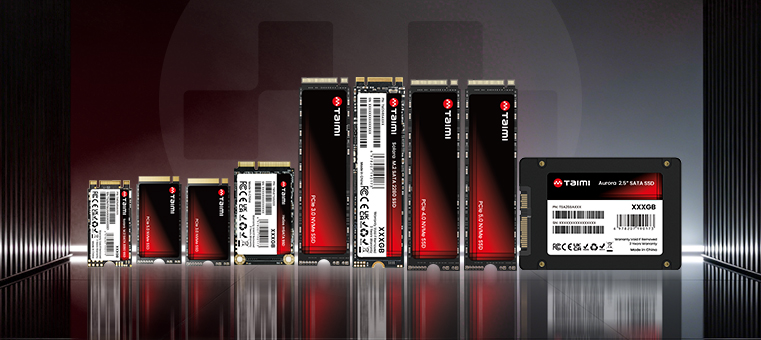
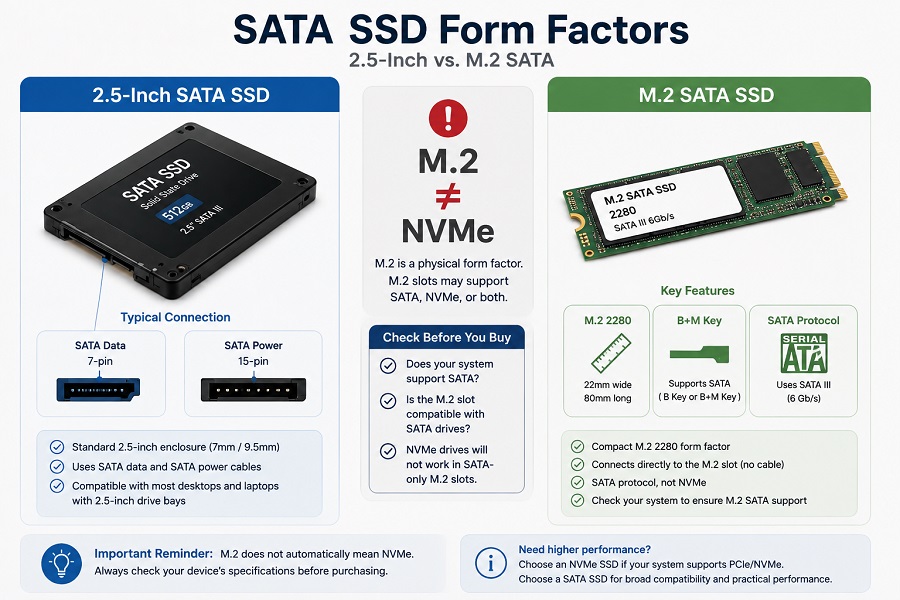
SATA SSDs are available in different physical formats. The two most common are 2.5-inch SATA SSDs and M.2 SATA SSDs.
2.5-Inch SATA SSD
A 2.5-inch SATA SSD is commonly used in older desktops and laptops. It normally requires:
- A SATA data connection to the motherboard
- A SATA power connection from the power supply
This makes it a straightforward replacement for many 2.5-inch SATA hard drives.
M.2 SATA SSD
An M.2 SATA SSD uses the compact M.2 form factor but communicates through the SATA protocol.
This leads to an important compatibility point: M.2 does not automatically mean NVMe.
M.2 describes the physical form factor. Depending on the system, an M.2 slot may support SATA, PCIe/NVMe, or both. An M.2 SATA SSD will not normally work in an M.2 slot that supports only PCIe/NVMe.
Always check the specifications of the specific laptop or motherboard before buying an M.2 SSD.
SATA SSD Compatibility Checklist
Before installing a SATA SSD, check these points.
1. SATA II vs. SATA III
A SATA III SSD can generally operate on a SATA II port. The older interface will limit the available bandwidth, so the SSD will not reach its full SATA III performance. Even so, replacing an HDD with an SSD can still make an older SATA II system noticeably more responsive.
2. M.2 SATA Support
If you are buying an M.2 SATA SSD, confirm that the M.2 slot supports SATA. Do not assume that every M.2 slot supports both SATA and NVMe.
3. Physical Size and Connectors
For a 2.5-inch drive, check the available drive bay and make sure both SATA data and power connections are available. For an M.2 SSD, check the supported length, key configuration, and storage protocol.
4. BIOS and Operating System
If a newly installed SSD is not detected, check:
- SATA data and power connections
- BIOS/UEFI storage settings
- M.2 slot compatibility
- Whether the drive appears in BIOS
- Whether the drive needs to be initialized in Windows
The motherboard or laptop manufacturer's documentation is the best source for compatibility information.
Where Are SATA SSDs Used?
SATA SSDs continue to serve several applications even as NVMe becomes more common.
Desktop and Laptop Upgrades
Replacing an HDD with a SATA SSD is one of the most common uses. For an older computer, this can provide a significant improvement without replacing the CPU, motherboard, or memory.
Office and Business Computers
Web browsers, document software, accounting applications, and many ERP systems do not require several gigabytes per second of storage bandwidth. For these systems, a SATA SSD can provide fast everyday response with broad hardware compatibility.
Secondary Storage
Some systems use an NVMe SSD as the primary drive and a SATA SSD for additional storage. This can be useful for game libraries, media files, backups, and other data that does not require the maximum bandwidth available from PCIe.
Industrial and Embedded Systems
SATA SSDs are also used in industrial computers, POS terminals, digital signage, embedded systems, and other specialized equipment. In these environments, stable operation, endurance, compatibility, temperature characteristics, and long-term product availability may matter more than maximum sequential speed.
HDD vs. SATA SSD vs. NVMe SSD
| Feature | HDD | SATA SSD | NVMe SSD |
|---|---|---|---|
| Storage technology | Magnetic disk | NAND Flash | NAND Flash |
| Moving parts | Yes | No | No |
| Typical sequential speed | ~100–200 MB/s | ~500–560 MB/s | Several GB/s |
| Interface | SATA | SATA | PCIe |
| Access latency | High | Low | Very low |
| Typical use | Bulk storage | Upgrades, office, general computing | High-performance workloads |
There is no single storage type that is best for every computer.
For an older SATA-based system, moving from an HDD to a SATA SSD can produce a much bigger improvement in everyday use than the benchmark gap between SATA and NVMe might suggest.
For a newer PCIe-compatible computer running demanding workloads, NVMe is generally the more appropriate choice.
How to Choose the Right SATA SSD
When comparing SATA SSDs, look beyond the advertised sequential read and write speeds.
1. NAND Flash Type
TLC and QLC are two common NAND Flash types. TLC generally provides a good balance between endurance, performance, and cost. QLC allows greater storage density and can reduce the cost per gigabyte, although sustained write performance and endurance can differ. The right choice depends on capacity requirements and workload.
For a more detailed comparison, see TLC vs. QLC SSD: Performance, Endurance, Lifespan, and Which NAND Is Better?.
2. SSD Controller
The controller manages data access, error correction, garbage collection, wear leveling, and other internal operations. Two SATA SSDs with similar advertised speeds can therefore behave differently during sustained or mixed workloads.
3. DRAM vs. DRAM-less Design
Some SATA SSDs include dedicated DRAM, while others use a DRAM-less architecture. DRAM can help the controller manage the Flash Translation Layer efficiently. DRAM-less designs can reduce cost and power consumption. Neither design is automatically better for every workload. NAND, controller, firmware, cache strategy, and intended use all need to be considered together.
4. TBW and Endurance
TBW (Terabytes Written) is commonly used to describe an SSD's rated write endurance. It can be useful when comparing drives for workloads with frequent writes. However, TBW is a rating rather than an exact prediction of how long an individual SSD will operate.
5. Sustained Performance
If the drive will be used for large file transfers, backups, video work, or other write-heavy tasks, look beyond peak benchmark results. Check how the SSD behaves after its SLC cache is filled and whether its performance remains stable during extended writes.
Frequently Asked Questions
What is a SATA SSD?
A SATA SSD is a solid-state drive that stores data in NAND Flash memory and communicates with a computer through the Serial ATA interface.
How fast is a SATA SSD?
Most SATA III SSDs provide sequential read speeds of around 500–560 MB/s and sequential write speeds of roughly 450–530 MB/s, depending on the specific drive and test conditions.
Is a SATA SSD faster than an HDD?
Yes. A SATA SSD provides much lower latency and higher storage performance than a traditional mechanical hard drive.
Is SATA SSD slower than NVMe?
Yes. SATA SSDs are limited by the SATA interface, while NVMe SSDs use PCIe and can reach several gigabytes per second.
Can I use a SATA SSD in an M.2 slot?
Only if the M.2 slot supports SATA storage. M.2 is a physical form factor and does not automatically mean that the slot supports SATA or NVMe.
Is a SATA III SSD compatible with a SATA II motherboard?
Generally, yes. A SATA III SSD can operate on a SATA II connection, but its performance will be limited by the older interface.
Is a SATA SSD still worth buying in 2026?
Yes. SATA SSDs remain useful for upgrading older computers, replacing HDDs, office systems, secondary storage, and industrial or embedded platforms where compatibility and practical performance are important.
Key Takeaway:
SATA SSDs remain a practical choice in 2026 when compatibility, everyday responsiveness, and cost matter more than maximum storage bandwidth. For older SATA-based computers, they can provide a major upgrade over HDDs without requiring a platform replacement. Newer systems with PCIe support can benefit from NVMe SSDs when higher storage performance is required.
Conclusion
SATA SSDs are no longer the fastest solid-state storage devices available, but they remain a practical and widely compatible option in 2026.
For an older desktop or laptop that still uses an HDD, upgrading to a SATA SSD can make a noticeable difference without replacing the entire system. For newer computers with PCIe support and demanding storage workloads, NVMe is generally the better choice when higher bandwidth is needed.
When choosing a SATA SSD, look beyond the advertised peak speed. Interface compatibility, form factor, NAND type, controller, cache design, sustained performance, endurance, and firmware quality all contribute to the actual storage experience.
For most buyers, the decision is fairly straightforward: if the system supports SATA and the workload does not require PCIe-level bandwidth, a good SATA SSD can still be a sensible storage choice in 2026.
Looking for Reliable SATA SSD Solutions for Your Business?
Whether you need industrial-grade 2.5-inch SATA SSDs, M.2 SATA drives for embedded systems, or customized storage solutions for OEM/ODM projects, Taimi provides high-quality solid-state storage with flexible supply support.
Have questions about SSD compatibility, NAND endurance ratings, or bulk availability?
Related Products
Recommended Articles
How SSD Controllers Work: The Engineering Behind SSD Performance, Thermal Throttling, and Lifespan (2026 Guide)
2026-08-07
More
What Is an NVMe SSD? Complete Guide to Speed, Gaming Performance, Compatibility, and SSD Selection (2026)
2026-08-12
More
TLC vs QLC SSD: Performance, Endurance, Lifespan, and Which NAND Is Better?
2026-07-27
More
Why an SSD Is Detected in BIOS but Not Showing in Windows
2026-07-22
More
From NAND Flash to Finished SSD: Inside the SSD Manufacturing and Testing Process
2026-07-20
More
SSD TBW Explained: What It Means and How It Affects SSD Lifespan
2026-07-15
More
New SSD Not Showing Up? Here's How to Fix It in 3 Simple Steps (2026 Guide)
2026-07-03
More
PCIe 4.0 vs. 3.0: An Engineering Reality Check on Performance
2026-07-08
More
Taimi SSD Technology: Wafer-Level Testing & Signal Integrity for Enterprise SSD Reliability
2026-07-06
More
PCIe vs. SATA SSD: A 2026 Engineer’s Guide to Storage Upgrades
2026-07-02
More