
Company Introduction
More











SSD Buying Guide 2026: How to Choose the Right SSD for PC, Laptop, and OEM Applications
Share:
When evaluating SSDs for real-world deployment, sequential read/write speed is only one part of the equation. Factors such as NAND consistency, controller behavior, firmware optimization, and thermal management often determine long-term performance.
Whether you are building custom PCs, manufacturing laptops, or sourcing drives for OEM projects, this guide walks through the physical, architectural, and supply-chain factors that actually determine drive longevity and system compatibility.
1. Verify Physical & Bus Compatibility First
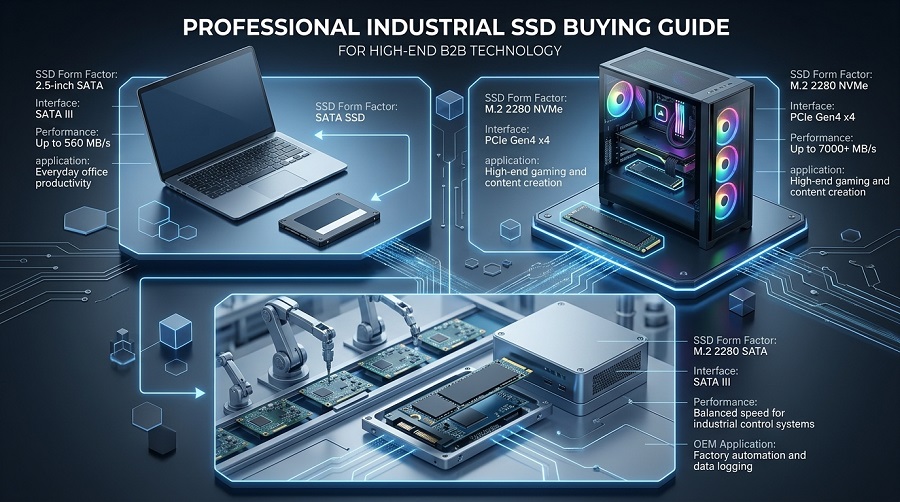
A fast SSD cannot deliver expected performance if the motherboard does not support the correct interface, PCIe generation, or physical size.
| SSD Format | Physical Interface | Bus Protocol | Primary Deployment |
|---|---|---|---|
| 2.5-inch SATA | SATA III (6Gbps) | AHCI | Legacy systems, business PCs, industrial applications |
| M.2 SATA | M.2 (B+M Key) | AHCI | Industrial PCs, thin clients, ultra-compact systems |
| M.2 NVMe | M.2 (M Key) | PCIe 3.0 / 4.0 / 5.0 | Modern laptops, gaming rigs, workstations |
| AIC PCIe | PCIe Slot | NVMe | Enterprise servers, high-density storage arrays |
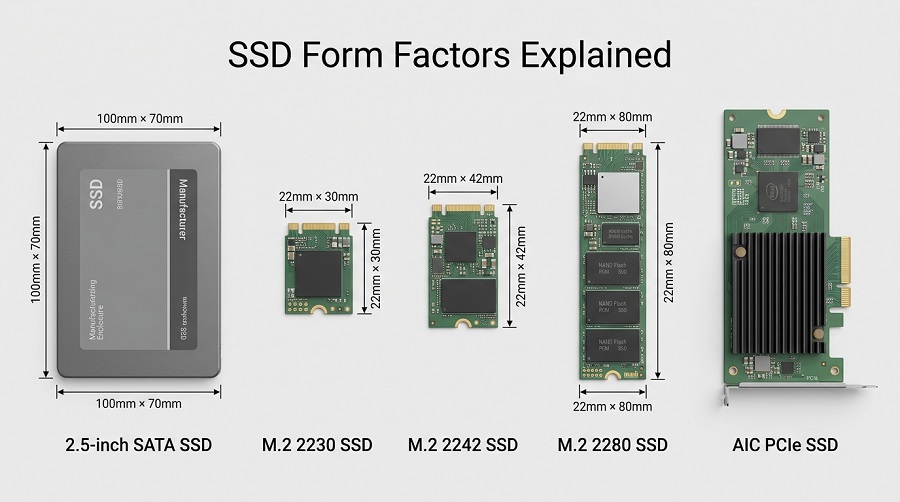
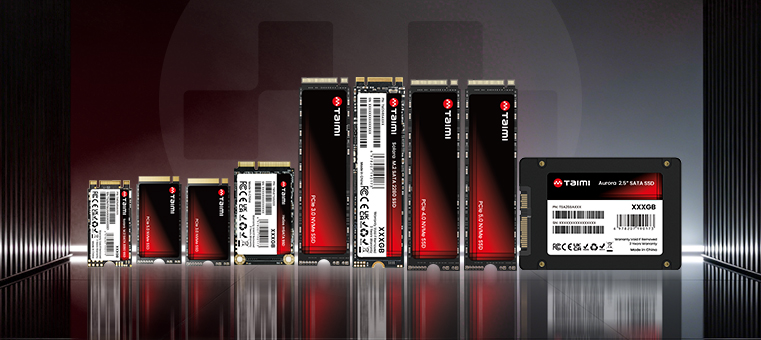
Common SSD form factors include 2.5-inch SATA SSDs, M.2 2230, M.2 2242, M.2 2280, and AIC PCIe SSD formats. The correct form factor depends on the available space, connector type, and device design requirements.
Engineer's Note on M.2 Keys: Do not assume an M.2 slot supports NVMe simply because the physical connector fits. Always verify whether the host motherboard maps that specific M.2 slot to PCIe lanes or standard SATA buses before deploying drives in bulk.
Related Guide: M.2 SSD Compatibility: Sizes, Keys, Bus Protocols, and OEM Validation
2. SATA vs. NVMe: Matching Bus Architectures to Real Workloads
SATA III (AHCI)
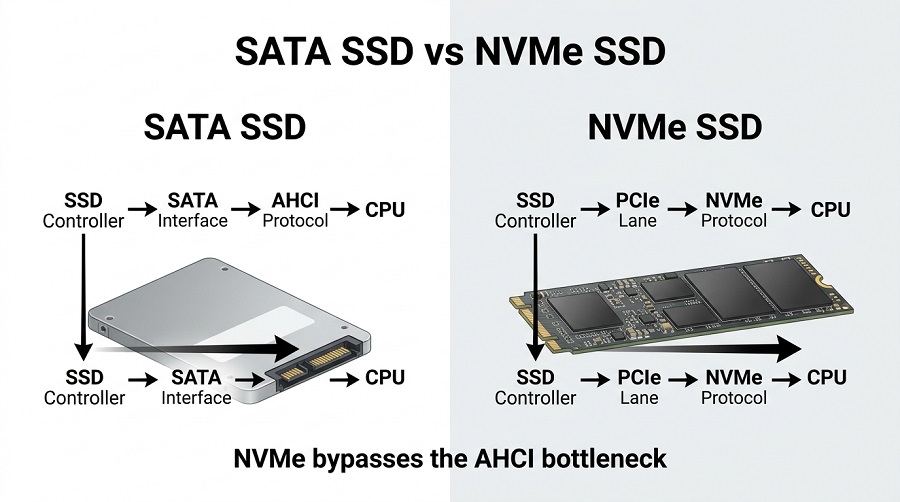
Caps out at a theoretical limit around 600 MB/s. While sequential throughput is restricted, low power draw and absolute legacy hardware support make SATA a practical choice for office PCs and basic system upgrades.
NVMe (PCIe)
Bypasses the legacy AHCI bottleneck by attaching directly to PCIe lanes.
- PCIe 3.0: ~3,500 MB/s max speed; ideal for standard laptops and budget-conscious commercial builds.
- PCIe 4.0: ~7,000 MB/s read speed; the current standard for high-performance gaming and workstation platforms.
- PCIe 5.0: ~14,000 MB/s read speed; requires active cooling or heavy heatsinks, built for extreme sustained throughput.
System Bottleneck Warning: A PCIe 4.0 NVMe drive installed into a PCIe 3.0 slot will downshift to PCIe 3.0 speeds due to backwards compatibility. Select the generation that matches your chipset capability rather than overpaying for unused bandwidth.
Related Guide: What Is an NVMe SSD? Complete Guide to Speed, Gaming Performance, and Selection
3. Practical Capacity Planning
- 256GB: Lightweight OS boot drives, thin clients, basic office terminals.
- 512GB: Standard commercial workstations and everyday computing.
- 1TB: The mainstream sweet spot in 2026 for consumer laptops, gaming PCs, and general deployments.
- 2TB – 4TB+: Content creation rigs, video editing suites, and high-density data logging systems.
Capacity Selection Tip:
Choosing the right SSD capacity depends on storage requirements, workload type, and future expansion needs. For a detailed comparison of 512GB, 1TB, and 2TB SSDs across different usage scenarios, see our guide:
Related Guide: [How Much SSD Storage Do You Need? 512GB vs. 1TB vs. 2TB SSD Comparison]
4. NAND Architecture: TLC vs. QLC in Heavy Workloads
NAND Flash selection directly impacts drive endurance and long-term write performance.
- TLC (3-bit per cell): Offers higher endurance, superior random IOPS, and stable sustained write performance. Preferred for workstations, OS drives, and write-heavy applications.
- QLC (4-bit per cell): Provides higher storage density and lower cost per gigabyte, but trades off native endurance and sustained write speed.
Sustained Write Reality Check: QLC drives rely heavily on pseudo-SLC caching. Once the SLC cache fills up during massive file transfers, direct-to-TLC/QLC write speeds can plummet—sometimes dropping to 80–100 MB/s on QLC, which is slower than a conventional mechanical hard drive.
Related Guide: TLC vs QLC SSD: Performance, Endurance, Lifespan, and NAND Selection
5. Controller Processing, Firmware & Thermal Management
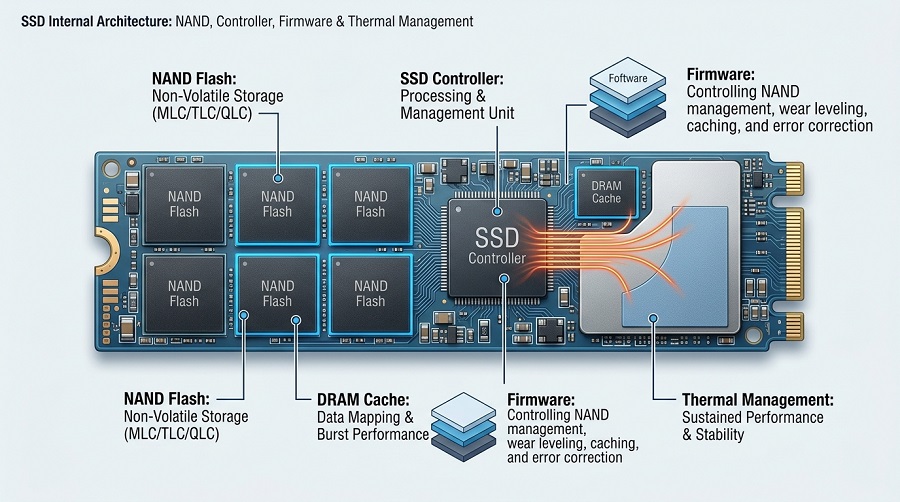
The SSD controller acts as the CPU of the storage device, running wear-leveling algorithms, garbage collection, and ECC (Error Correction Code).
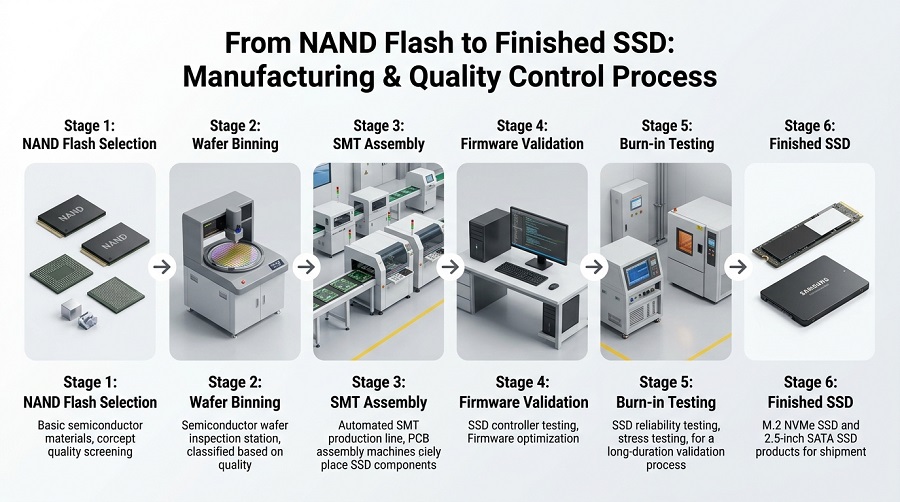
Raw Wafer Binning → SMT PCB Assembly → Controller & Custom Firmware → Thermal Validation
- Thermal Throttling: Gen4 and Gen5 NVMe controllers run hot under continuous load. Without proper airflow, thermal pads, or integrated heatsinks, the controller will auto-throttle clock speeds to prevent physical damage, tanking performance.
- Firmware Tuning: Firmware controls how the SSD manages data placement, caching, and NAND behavior. Two drives using the same NAND and controller can perform differently because of firmware optimization.
Related Guide: How SSD Controllers Work: Engineering, Thermal Throttling, and Lifespan
6. Application-Based Deployment Matrix
- Office & Commercial PCs: SATA or PCIe 3.0 NVMe (256GB–512GB). Focus on low power consumption, cost optimization, and thermal stability in fanless chasses.
- Gaming & Workstation Systems: PCIe 4.0 M.2 NVMe (1TB–2TB). Prioritize high 4K random read speeds and motherboard heatsink compatibility.
- OEM / Volume Sourcing: Look past raw spec sheets. Verify wafer source stability, controller lot-to-lot consistency, and burn-in testing protocols to minimize RMA rates.
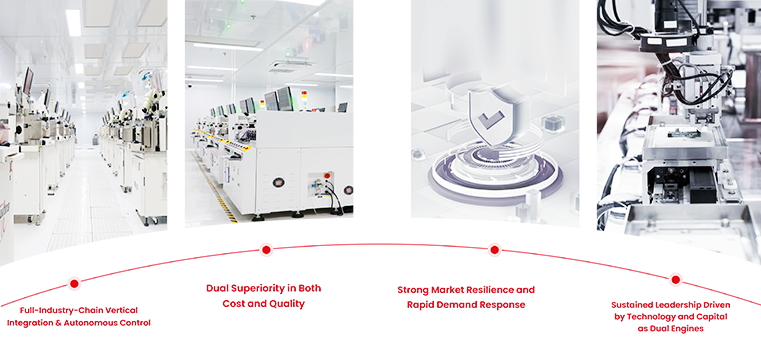
7. Supply Chain & OEM Quality Standards
For volume buyers, system integrators, and distributors, hardware failures directly hit warranty bottom lines. A complete manufacturing process must integrate:
- Direct wafer sorting and strict flash binning
- High-precision SMT assembly lines
- In-house firmware customization and compatibility validation
- Environmental chamber burn-in testing
At Taimi, we manage the entire manufacturing cycle—from raw wafer binning and SMT assembly to firmware validation and burn-in testing—helping OEM and distribution partners achieve more consistent quality, predictable supply, and easier product validation.
In actual OEM projects, SSD validation often reveals issues that benchmark testing cannot detect, including firmware compatibility problems, unexpected thermal behavior, and inconsistent NAND performance between production batches.
2026 Pre-Procurement Checklist
- ☑ Host bus and protocol confirmed (SATA III vs PCIe 3.0/4.0/5.0)
- ☑ Physical M.2 clearance and Key type checked (2280 vs 2230, M Key vs B+M Key)
- ☑ NAND Flash type matched to workload intensity (TLC for sustained writes, QLC for read-heavy storage)
- ☑ Passive/Active thermal solution planned for high-speed NVMe drives
- ☑ Supplier factory validation and warranty terms verified
Frequently Asked Questions
Is an NVMe SSD always faster than a SATA SSD in everyday tasks?
In office environments, users may not notice a dramatic difference between SATA and NVMe during simple tasks such as email, document editing, or web browsing. However, workloads involving large file transfers, software loading, or multitasking benefit more from NVMe bandwidth.
Why does my Gen4 NVMe drive slow down during 100GB+ file copies?
This occurs when the drive's SLC write cache is fully exhausted, forcing the controller to write directly to native TLC or QLC cells while simultaneously clearing old cache data (garbage collection).
What factors matter most when buying SSDs in bulk for OEM projects?
Focus on controller and NAND supply longevity, BOM (Bill of Materials) consistency across batches, custom firmware capability, and rigorous factory burn-in testing standards rather than baseline component price alone.
What is the difference between M.2 and NVMe SSD?
M.2 refers to the physical form factor, while NVMe refers to the communication protocol. An M.2 SSD can use either SATA or PCIe/NVMe interfaces depending on the design.
What should OEM buyers check before selecting an SSD supplier?
OEM buyers should evaluate NAND sourcing, controller consistency, firmware support, testing procedures, warranty terms, and long-term supply capability.
How long does an SSD last?
SSD lifespan depends on NAND type, TBW rating, workload intensity, and operating environment. For business and OEM applications, endurance testing and firmware optimization are important factors when evaluating long-term reliability.
Looking for Reliable SSD Solutions for Your Next OEM/ODM Project?
Whether you need bulk storage procurement, custom firmware tuning, or rigorous factory validation, Taimi provides end-to-end SSD manufacturing and supply chain stability.
- Direct Wafer Sourcing & Strict Binning Processes
- Custom Firmware Tuning & Thermal Optimization
- 100% Factory Burn-in & Compatibility Validation
Related Products
Recommended Articles
What Is a PCIe SSD? Speed, NVMe, and Compatibility Guide (2026)
2026-08-19
More
M.2 SSD Compatibility: Sizes, Keys, Bus Protocols, and OEM Validation
2026-08-17
More
What Is a SATA SSD? Speed, Benefits, Compatibility, and Applications (2026 Guide)
2026-08-14
More
What Is an NVMe SSD? Complete Guide to Speed, Gaming Performance, Compatibility, and SSD Selection (2026)
2026-08-12
More
How SSD Controllers Work: The Engineering Behind SSD Performance, Thermal Throttling, and Lifespan (2026 Guide)
2026-08-07
More
SSD Shows “Not Initialized” in Windows? Causes and Fixes (2026 Guide)
2026-08-05
More
Why Is My SSD Slow After Installation? Causes and Fixes Explained
2026-07-29
More