
Company Introduction
More














Why Is My SSD Slow After Installation? Causes and Fixes Explained
Share:
```html
When users install a new SSD, the expectation is usually simple:
Higher speed, faster boot time, and better system responsiveness.
However, during real SSD testing and deployment, we often see a different situation:
A newly installed SSD does not always reach the performance shown on the product specification sheet.
Common examples include:
- A PCIe 4.0 NVMe SSD does not reach its rated speed.
- A new SSD performs well during the first few seconds of a transfer but slows down later.
- An M.2 SSD is installed correctly but delivers lower-than-expected performance.
Does this mean the SSD has a quality problem?
Not necessarily.
The speed shown in SSD specifications is measured under a specific test environment. Once the drive is installed into a different computer, actual performance can change depending on:
- Motherboard interface
- SSD controller
- Firmware optimization
- NAND flash characteristics
- Temperature
- Workload type
In many cases, checking the system configuration first can identify the real reason behind the performance difference.
Quick Answer
A new SSD running slower than its rated speed does not automatically mean the SSD is defective. Actual performance depends on the PCIe or SATA interface, motherboard compatibility, controller and firmware behavior, NAND flash, temperature, SLC cache, and workload conditions. Checking the system configuration before replacing the SSD can often identify the real performance limitation.
Why Is My New SSD Running Slow? Common Causes
In real testing, SSD performance issues usually come from several areas:
| Possible Cause | What Happens |
|---|---|
| Interface limitation | The motherboard cannot provide enough bandwidth for the SSD |
| M.2 compatibility issue | SATA and NVMe protocols do not match the system slot |
| Firmware and controller behavior | Data management affects sustained performance |
| SLC cache exhaustion | Long write operations exceed temporary cache capacity |
| Thermal throttling | The SSD reduces speed to control temperature |
| System environment | Background tasks and storage conditions affect results |
Check Whether the SSD Is Running on the Correct Interface
One of the first things engineers check during SSD troubleshooting is the connection between the SSD and the host platform.
A high-performance SSD can only reach its designed speed when the system provides the correct interface.
For example:
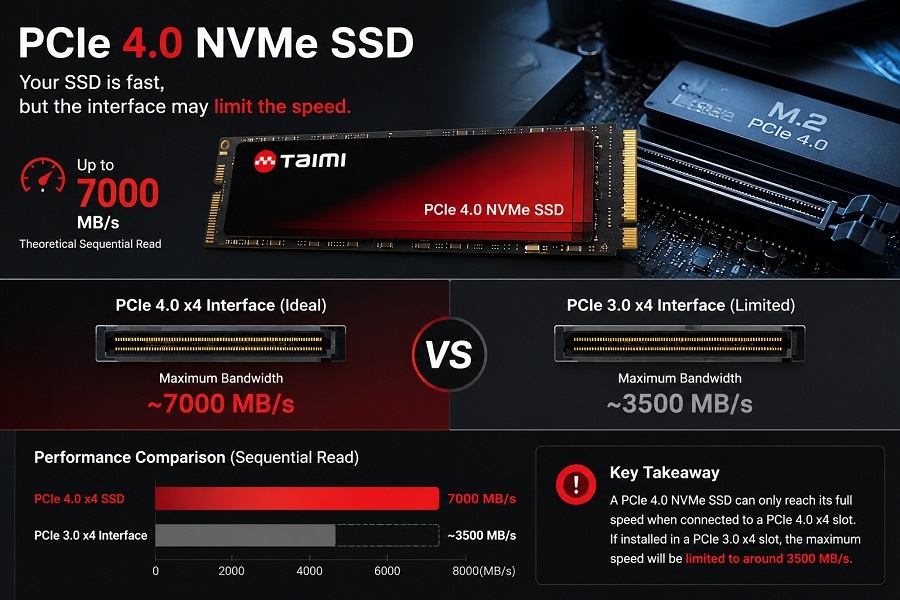
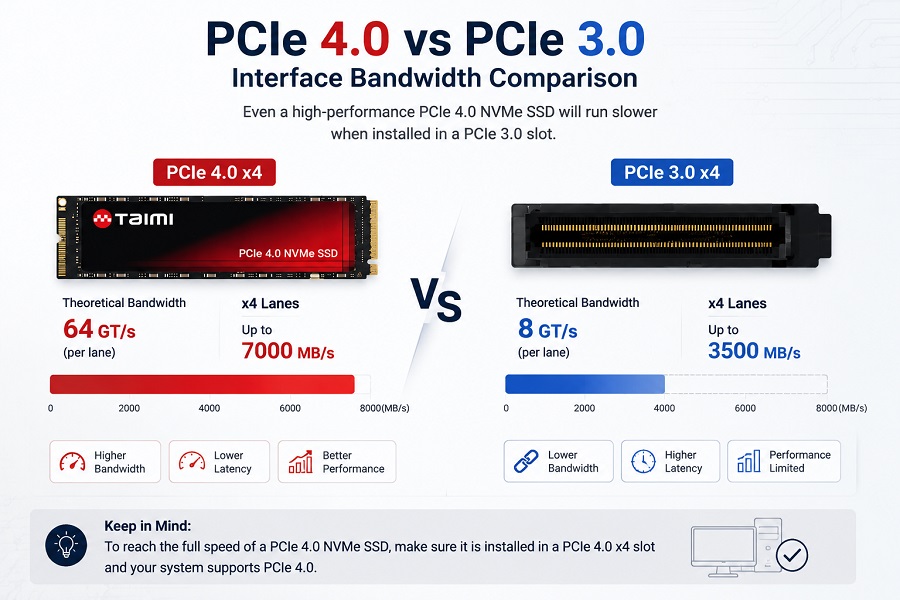
A PCIe 4.0 NVMe SSD can reach approximately:
- 7,000 MB/s sequential read
- 6,000 MB/s sequential write
under suitable testing conditions.
However, if the same SSD is installed on a PCIe 3.0 platform, the available bandwidth becomes the limiting factor.
The difference between PCIe generations can significantly affect SSD performance. For a detailed comparison of PCIe 3.0 and PCIe 4.0 bandwidth limitations, see: PCIe 4.0 vs. 3.0: An Engineering Reality Check on Performance
The actual performance may be closer to:
- 3,500 MB/s read
- 3,000 MB/s write
In this situation, the SSD itself is not necessarily the problem. The system platform is limiting the available performance.
Example: Why a 7,000 MB/s SSD Was Limited to 3,500 MB/s
We had a customer reach out recently claiming their new PCIe 4.0 SSD was broken because CrystalDiskMark hit a hard wall at ~3,500 MB/s.
A quick HWInfo check showed the issue right away: they plugged the drive into the bottom M.2 slot on an older B450 board. That slot was wired for PCIe 3.0 x4.
PCIe 3.0 x4 provides around 3.9 GB/s theoretical bandwidth, and after protocol overhead, around 3,500 MB/s is a normal result for this platform. The SSD was operating normally—the motherboard bandwidth was the actual limitation.
Replacing the SSD would not improve the result in this situation. The limitation came from the motherboard bandwidth rather than the SSD itself.
M.2 SATA vs NVMe: A Common Compatibility Issue
One common mistake during SSD upgrades is assuming that all M.2 SSDs use the same protocol.
In reality, M.2 only describes the physical form factor. The communication protocol can be different.
| SSD Type | Protocol | Typical Performance |
|---|---|---|
| M.2 SATA SSD | SATA protocol | Up to around 550 MB/s |
| M.2 NVMe SSD | PCIe protocol | Depends on PCIe generation |
Although both drives may look similar, they are not always interchangeable.
- An M.2 SATA SSD may not work in an NVMe-only slot.
- An NVMe SSD may not work in a SATA-only M.2 slot.
Before upgrading an SSD, confirm:
- Supported M.2 slot type
- SATA or NVMe protocol
- PCIe generation
For more details about SSD compatibility issues, see our guide: SSD Not Detected in BIOS? What SSD Compatibility Testing Reveals
SSD Interface Performance Comparison
| SSD Type | Interface | Typical Sequential Performance | Main Limitation |
|---|---|---|---|
| 2.5" SATA SSD | SATA III | Up to ~550 MB/s Read / Write | SATA bandwidth |
| M.2 SATA SSD | SATA III | Up to ~550 MB/s Read / Write | SATA protocol |
| PCIe 3.0 NVMe SSD | PCIe 3.0 x4 | Up to ~3,500 MB/s Read / ~3,000 MB/s Write | PCIe 3.0 bandwidth |
| PCIe 4.0 NVMe SSD | PCIe 4.0 x4 | Up to ~7,000 MB/s Read / ~6,000 MB/s Write | PCIe 4.0 support required |
| PCIe 5.0 NVMe SSD | PCIe 5.0 x4 | 10,000 MB/s class performance | Higher thermal requirements |
SSD Controller and Firmware Affect Real Performance
NAND flash stores the data, but the SSD controller manages how efficiently that data is processed.
The controller handles tasks such as:
- Data scheduling
- Error correction (ECC)
- Wear leveling
- Garbage collection
- NAND communication
Firmware determines how these functions behave under different workloads.
During SSD development, engineers need to balance:
- Performance
- Stability
- Power consumption
- NAND endurance
This is why two SSDs using similar NAND components may still show different real-world performance.
The difference often comes from controller architecture, firmware algorithms, and NAND management strategies.
Engineering Deep Dive: The controller isn't just a pass-through component—it actively manages wear leveling, dynamic caching, and thermal boundaries under load. To learn how different controller architectures handle these real-time scheduling tasks, read our complete guide: How SSD Controllers Work: Speed, Thermal & Lifespan .
Why SSD Speed Drops During Large File Transfers
A common SSD performance situation looks like this:
The first part of a file transfer is very fast, but the write speed decreases after several gigabytes.
One reason is SLC cache behavior.
Many modern SSDs use part of NAND flash as temporary SLC cache.
The writing process can be simplified as:
Host Data → SLC Cache → TLC/QLC NAND
The cache helps the SSD handle short bursts of high-speed writes.
However, during longer operations such as:
- Large video transfers
- Game installation
- System migration
- Backup tasks
the available cache space can be used up.
After that, the SSD writes directly to NAND flash, and sustained write speed may decrease.
This behavior is normal for many SSD designs.
Related article: SSD Cache (SLC Cache) Explained: Why SSD Speed Drops During Large File Writes
Deep Dive Note on Cache Architecture: Beyond the temporary SLC cache, the drive's internal cache architecture (specifically whether it uses dedicated onboard DRAM or relies on Host Memory Buffer / HMB) plays a massive role in how the controller handles sustained write operations. To understand why some drives hit severe performance cliffs while others maintain stability, read our engineering guide: DRAM vs DRAM-less SSD: Performance, Endurance, and Buying Guide (2026)
Temperature Can Affect SSD Performance
SSD performance is not only determined by the controller and NAND.
During sustained workloads, SSD temperature can directly affect the final performance result.
High-performance NVMe SSDs generate heat during intensive workloads.
When the controller temperature reaches a certain level, firmware may activate thermal throttling.
The SSD temporarily reduces performance to control heat and protect the components.
Typical symptoms include:
- High speed at the beginning of a benchmark
- Lower speed after continuous testing
- Increased temperature during heavy workloads
Possible solutions:
- Improve airflow inside the system
- Install an M.2 heatsink
- Avoid placing the SSD near high-temperature components
Thermal management becomes especially important for PCIe 4.0 and PCIe 5.0 SSD platforms.
System Environment Also Affects SSD Speed
Not every SSD performance issue comes from the drive itself.
The operating environment can also affect results.
Limited Free Space
SSDs need available space for internal management functions, including:
- Garbage collection
- Wear leveling
- Data organization
When an SSD is nearly full, sustained performance may decrease.
Keeping around 10%-20% free space can help maintain more stable performance.
Background System Activity
After installing a new SSD or migrating an operating system, the computer may perform tasks such as:
- File indexing
- Antivirus scanning
- System updates
- Cloud synchronization
These processes can temporarily increase SSD workload.
Benchmark Conditions
SSD specifications are measured under controlled conditions.
Actual results depend on:
- Test software
- Transfer size
- Drive capacity
- Temperature
- Workload pattern
A benchmark result should always be evaluated together with the intended application.
How Taimi Validates SSD Performance Before Mass Production
For SSD manufacturers, achieving a high benchmark result is only one part of product development.
The bigger challenge is maintaining consistent performance across different systems, capacities, and workload conditions.
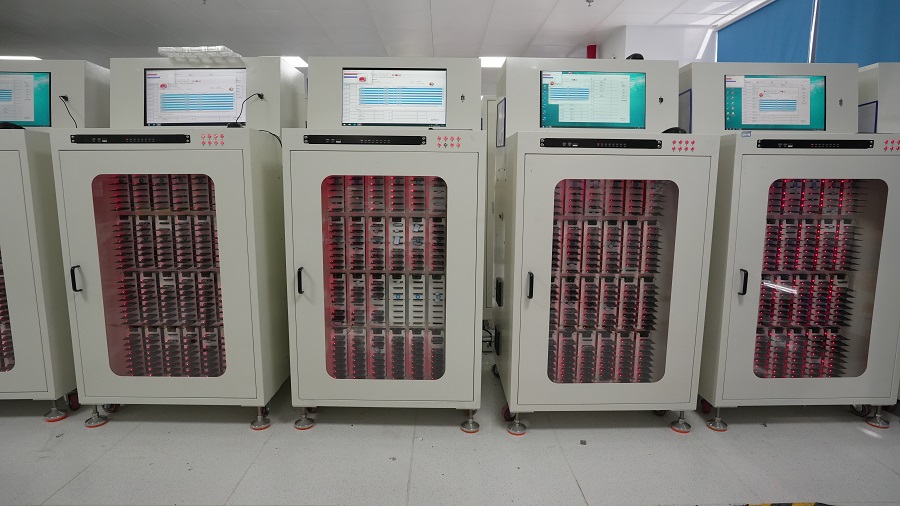
Before mass production, engineers typically verify:
- Firmware configuration
- NAND compatibility
- Different capacity versions
- Host platform compatibility
- Sequential and random performance
- Temperature behavior
- Long-term stability
At Taimi, SSD production combines SMT assembly, firmware configuration, performance testing, and quality inspection to verify product consistency before shipment.
To learn more about our SSD quality control approach, see:
SSD Manufacturing Quality Control: Inside Taimi SMT Production Process
In mass production, the difficult part is not achieving a high score from a single sample. The real challenge is ensuring thousands of SSDs deliver stable performance across different customer systems and application environments.
For a complete overview of SSD manufacturing, from NAND flash preparation to final product validation, read:
From NAND Flash to Finished SSD: Inside the SSD Manufacturing and Testing Process
Frequently Asked Questions About SSD Performance Issues
Why is my new SSD running slow after installation?
The speed shown on an SSD specification sheet is usually measured under a specific test environment. Once installed into another system, performance may change depending on the motherboard interface, firmware, temperature, and workload. For example, a PCIe 4.0 SSD installed on a PCIe 3.0 platform cannot reach its full bandwidth because the interface becomes the limiting factor.
Why does SSD speed drop during large file transfers?
This usually happens when the SSD's SLC cache is exhausted during sustained writing. After the cache is full, the SSD controller writes directly to NAND flash, which may reduce write speed.
Why is my SSD fast at first but slow later?
Short benchmark tests usually show peak performance. During longer workloads, factors such as SLC cache capacity, temperature, and NAND management can affect sustained performance.
Can SSD temperature reduce performance?
Yes. When the controller temperature becomes too high, thermal throttling may reduce SSD speed temporarily. Improving cooling conditions can help maintain more stable performance.
Is NVMe always faster than SATA SSD?
NVMe SSDs provide higher bandwidth because they use PCIe communication. However, SATA SSDs remain reliable solutions for many office computers, industrial systems, and embedded applications.
Should I replace my SSD if it does not reach the rated speed?
Not immediately.
Before replacing the drive, check:
- Interface compatibility
- M.2 SATA vs NVMe protocol
- PCIe generation
- Firmware version
- SSD temperature
- Benchmark method
Many SSD performance issues are caused by system limitations rather than SSD hardware failure.
Final Thoughts: Why SSD Performance Depends on More Than Speed
A new SSD running slower than expected does not always indicate a defective drive.
Actual SSD performance depends on the interaction between the drive, host platform, firmware, temperature, and workload environment.
Before replacing an SSD, checking these factors can often identify the real cause.
For SSD manufacturers, performance is not only about achieving high benchmark numbers. Consistency across different systems and workloads is what determines long-term reliability.
This is also why SSD validation, firmware optimization, and manufacturing control are essential parts of Taimi's production process.
Need Reliable SSDs for Your PC or OEM Project?
Looking for a stable SSD supplier for PC builds, laptop upgrades, system integration, or bulk procurement? Contact Taimi to discuss SSD capacity, interface, performance requirements, NAND configuration, and project specifications.
Contact Taimi Technical Team```
Related Products
Recommended Articles
Why Is My SSD Slow After Installation? Causes and Fixes Explained
2026-07-29
More
SSD Manufacturing Quality Control: Inside Taimi SMT Production Process
2026-07-24
More
Why an SSD Is Detected in BIOS but Not Showing in Windows
2026-07-22
More
SSD Not Detected in BIOS? What SSD Compatibility Testing Reveals
2026-07-17
More
New SSD Not Showing Up? Here's How to Fix It in 3 Simple Steps (2026 Guide)
2026-07-03
More
Will SSD Prices Drop in 2026? Expert Analysis and Buying Guide
2026-05-08
More
Laptop Still Slow? Stop Blaming the CPU and Fix Your Storage (2026)
2026-04-23
More