










Buy an M.2 drive, slide it into the slot, tighten the standoff screw, turn on the system—and nothing shows up in the BIOS. If you've spent time building PCs or assembling industrial hardware, you've likely seen this happen. NVMe is a storage protocol designed for non-volatile memory devices and commonly used over PCIe. It provides an efficient command interface for SSDs and supports high-speed storage communication.
The core issue is simple: M.2 defines the physical form factor, but it does not define the interface or protocol.
Just because two SSDs physically fit into the same socket doesn't mean the motherboard controller can read them. Before choosing an SSD upgrade, it is important to understand the differences between SATA SSD and NVMe SSD interfaces. For OEM projects and system integration, drive selection requires additional validation, including card dimensions, connector keying, and electrical signal routing.
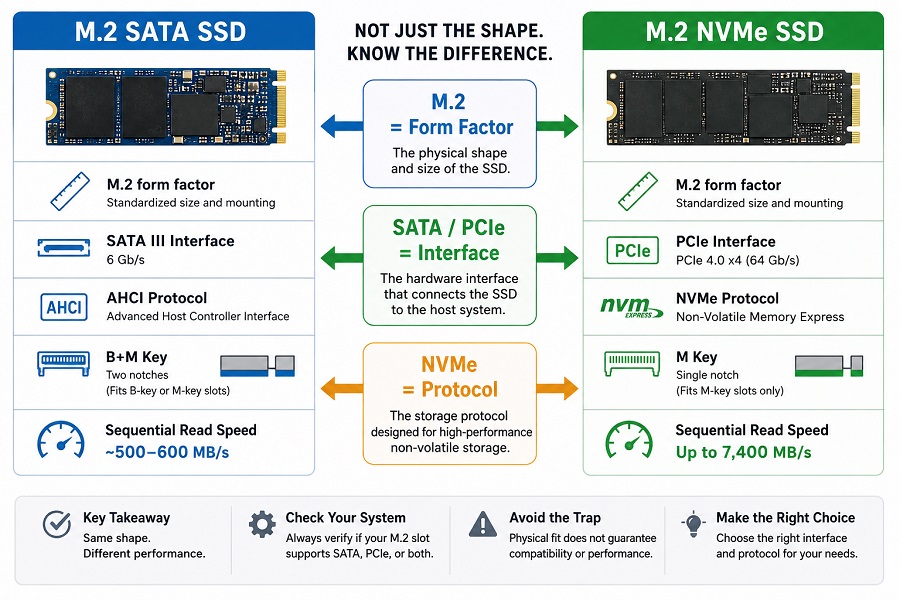
1. SATA vs. NVMe: Shape vs. Bus Signal
Don't confuse physical dimensions with protocol. Here is the split:
- M.2 is the card form factor, defining the physical dimensions and mounting configuration of the SSD.
- SATA and PCIe are hardware interfaces used to connect the SSD to the host system.
- NVMe is a storage protocol designed for non-volatile memory devices and commonly used over PCIe. It enables SSDs to communicate with the host system efficiently at high speeds.
├── M.2 SATA → SATA Interface → ~550 MB/s (AHCI)
└── PCIe Lanes → NVMe Protocol → High-Speed Storage
| Metric | M.2 SATA | M.2 NVMe (PCIe Gen4) |
|---|---|---|
| Interface | SATA III | PCIe 4.0 ×4 |
| Sequential Read | ~550 MB/s max | Up to 7,400 MB/s |
| Pin Keying | B+M Key (Two cutouts) | M Key (Single cutout) |
| Primary Use | Legacy laptop & PC upgrades | Desktops, laptops, gaming systems, workstations |
An M.2 SATA drive typically reaches around 500–600 MB/s because it is limited by the bandwidth of the SATA interface. NVMe drives bypass that bottleneck using direct PCIe lanes. Always check if your motherboard socket handles PCIe only, SATA only, or auto-switches between both.
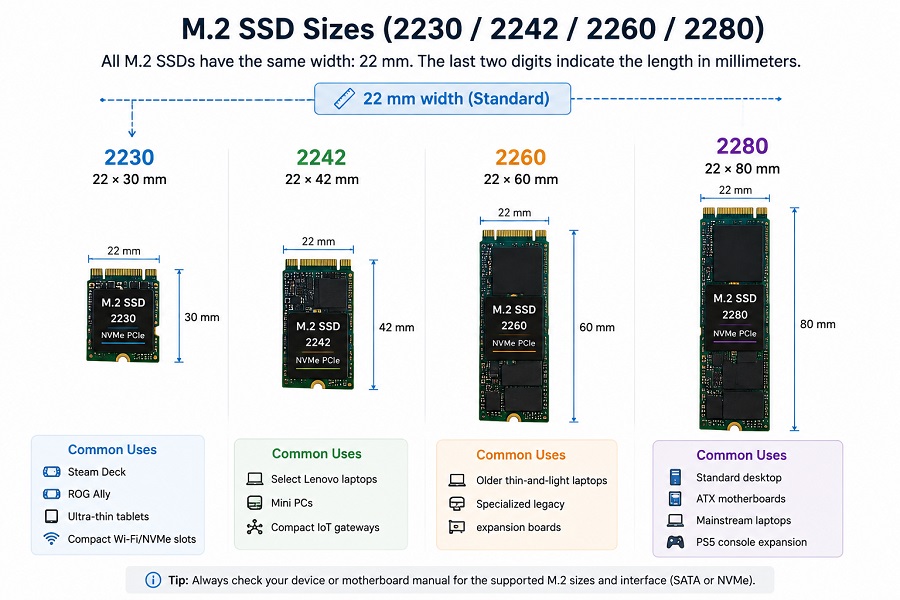
2. Deciphering M.2 Sizes (2230 through 2280)
The 4-digit code used for M.2 sizes indicates the module's width and length in millimeters. The first two digits are width (standard 22mm). The last two digits are length.
| Size Code | Dimensions | Common Hardware Uses |
|---|---|---|
| 2230 | 22 × 30 mm | Steam Deck, ROG Ally, ultra-thin tablets, compact Wi-Fi/NVMe slots |
| 2242 | 22 × 42 mm | Select Lenovo laptops, mini PCs, compact IoT gateways |
| 2260 | 22 × 60 mm | Older thin-and-light laptops, specialized legacy expansion boards |
| 2280 | 22 × 80 mm | Standard desktop ATX motherboards, mainstream laptops, PS5 console expansion |
After confirming the physical size of an M.2 SSD, capacity planning is the next step. Different devices and workloads require different storage levels, from 512GB for everyday computing to 1TB or 2TB for gaming, professional applications, and long-term usage.
For a detailed comparison of SSD capacity options, including real-world differences between 512GB, 1TB, and 2TB models, see our guide:
Related Guide: [How Much SSD Storage Do You Need? 512GB vs. 1TB vs. 2TB SSD]
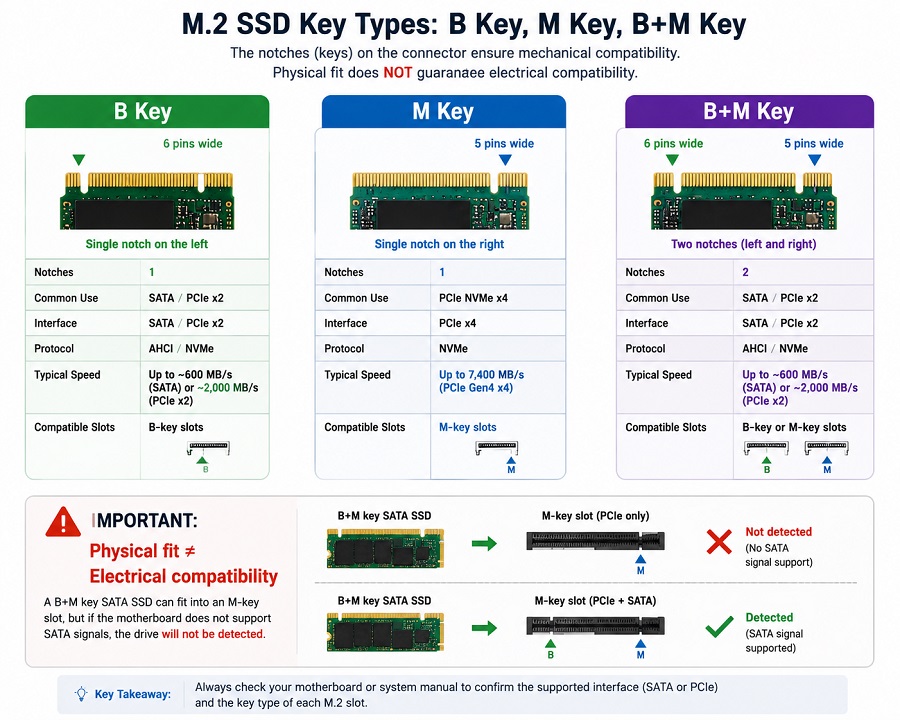
3. Pin Keying: B, M, and B+M
Small notch cutouts on the edge connector keep you from plugging incompatible cards into live sockets. But mechanical fit still doesn't equal electrical compatibility.
- M Key (Single notch): Commonly used on PCIe NVMe SSDs, including many PCIe Gen3, Gen4, and Gen5 x4 drives.
- B+M Key (Double notch): Common on M.2 SATA drives and select lower-speed PCIe ×2 cards. The dual notches allow them to physically seat into either B-key or M-key sockets.
The Trap: A B+M key SATA drive will slide right into an M-key motherboard slot. But if that specific slot lacks physical SATA trace lines connected to the chipset, the SSD may receive power, but it will remain completely undetected by the system.
4. Practical Hardware & Clearance Considerations
If you are retrofitting laptops or designing enclosed equipment, three physical details deserve attention:
- Single vs. Double-Sided PCBs: High-capacity SSDs often solder NAND chips onto both sides of the board. Handhelds and ultra-thin laptops usually lack physical Z-height clearance for double-sided drives. Forcing one in bends the PCB and risks shorting components against shields.
- Motherboard Lane Sharing: Populating a second or third M.2 slot on consumer desktop motherboards often quietly reallocates bandwidth—disabling specific SATA ports or cutting secondary PCIe slots down from ×4 to ×2. Check the manual block diagram before assigning drives.
-
PCIe Generation Fallback: A compatible PCIe Gen4 NVMe SSD can operate in a PCIe Gen3 slot, but its maximum throughput will be limited by the Gen3 interface (~3,500 MB/s for x4). It won't crash your build, but you're paying for speed the host processor can't use.
Choosing the correct SSD involves more than checking physical compatibility. Our [SSD Buying Guide 2026: How to Choose the Right SSD for PC, Laptop, and OEM Applications] explains how to balance form factor, interface, performance, NAND selection, and workload requirements when selecting storage solutions.
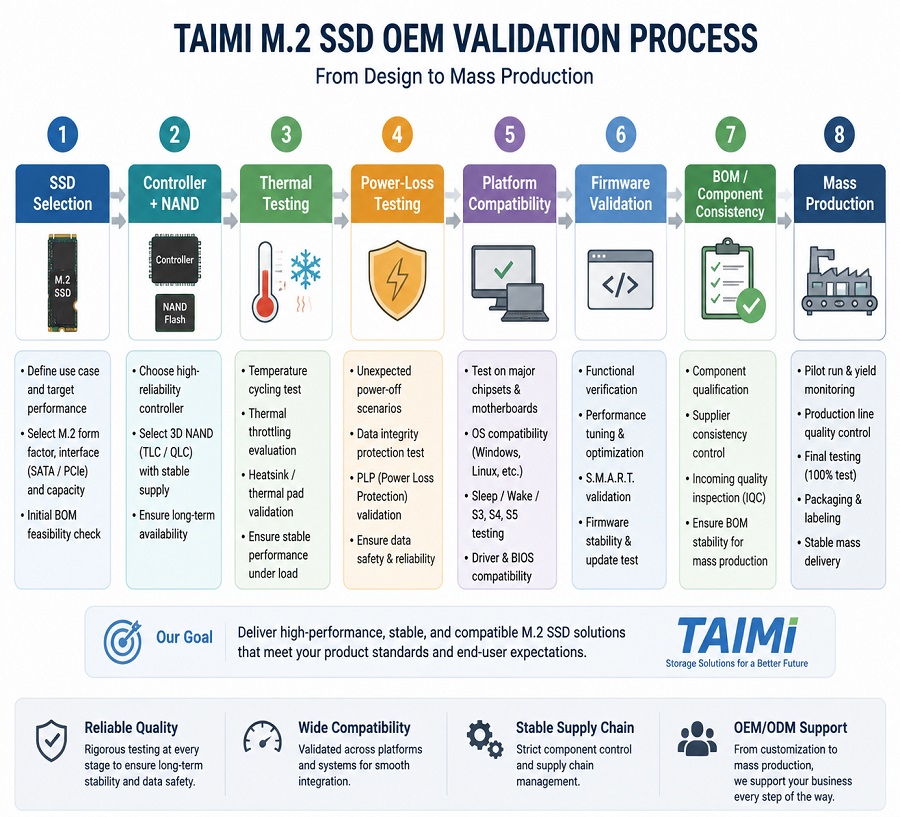
Taimi Engineering Note: OEM & System Integration
Selecting drives for mass-market hardware or embedded industrial deployments requires testing under real environment conditions. Beyond interface compatibility, OEM customers also need to evaluate factors such as TLC vs. QLC SSD NAND selection, endurance requirements, and long-term workload behavior.
During qualification, we evaluate:
- Sustained Thermal Behavior: Evaluating SSD performance, thermal throttling, and stability under elevated-temperature and sustained workload conditions.
- Power Loss Recovery: Evaluating firmware integrity and recovery behavior under repeated power-loss conditions.
- BOM & Controller Consistency: Guaranteeing fixed components and controller architecture throughout long-term supply cycles.
Frequently Asked Questions
Q: Is M.2 the same thing as NVMe?
No. M.2 is simply the physical shape of the card (like a stick of gum). NVMe is a storage protocol commonly used with PCIe-based SSDs. An M.2 drive can use either SATA or PCIe/NVMe, depending on the SSD and host platform.
Q: Will an M.2 SATA drive work in an NVMe-only motherboard slot?
It won't be detected. If the M.2 slot supports PCIe/NVMe only and does not support SATA signaling, the SATA SSD may physically fit but will not be detected by the system.
Q: What does "2280" actually mean?
It's just the physical size in millimeters: 22 mm wide by 80 mm long. It tells you how big the stick is, but says nothing about its speed or whether it's SATA or NVMe.
Q: Can I put a standard M.2 2280 SSD into a Steam Deck or ROG Ally?
No. Many handheld PCs, including models such as the Steam Deck and ROG Ally, use M.2 2230 SSDs because of their compact internal layouts. Always check the specific device's supported form factor and clearance before upgrading.
Q: What is the most critical metric when selecting M.2 SSDs for OEM or commercial builds?
For OEM and commercial deployments, thermal stability, firmware consistency, power-loss behavior, and platform compatibility are often more important than peak benchmark numbers alone.
Looking for reliable SSD storage?
Whether you need retail-ready PCIe Gen3/Gen4 NVMe SSDs or tailored firmware/SMT configurations for OEM projects, Taimi provides factory-direct hardware validation and supply continuity.
For Consumer SSDs
Explore Taimi PCIe Gen3/Gen4 NVMe and SATA SSDs for desktops, laptops, gaming systems, and other compatible devices.
Browse Products →For OEM & System Integration
Contact Taimi's engineering team to discuss SSD configuration, firmware, validation, SMT, and long-term supply requirements.
Contact Engineering →