
Company Introduction
More









DRAM vs DRAM-less SSD Explained: Performance, Endurance, and Buying Guide (2026)
Share:
Quick Summary
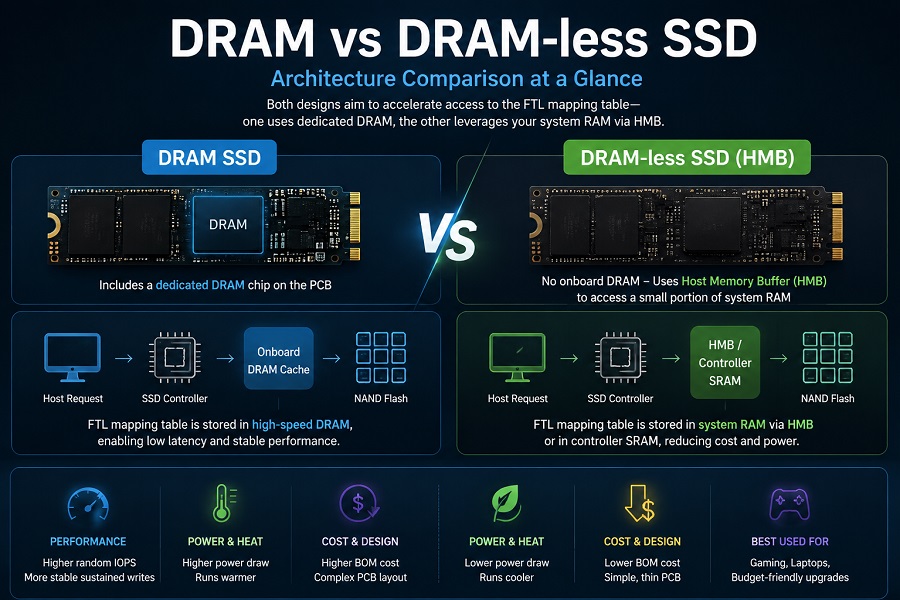
The core difference between a DRAM and a DRAM-less SSD comes down to how the drive accesses its Flash Translation Layer (FTL) mapping table.
- DRAM SSDs include a dedicated high-speed DRAM chip on the PCB to cache frequently accessed FTL mapping information. This helps reduce latency, improve random I/O performance, and maintain more consistent sustained write speeds.
- DRAM-less SSDs drop the onboard DRAM chip to cut manufacturing costs and power consumption. Modern NVMe drives offset this by borrowing a tiny slice of your system RAM via Host Memory Buffer (HMB).
Neither design is inherently "bad." A DRAM SSD is often preferred for OS boot drives and heavy workstation workloads, while a well-designed DRAM-less NVMe SSD is often the most cost-effective choice for secondary storage, gaming libraries, light laptop use, and budget-oriented upgrades.
The Core Problem: Why DRAM vs DRAM-less SSD Benchmarks Can Be Misleading
Two SSDs can list identical sequential speeds on paper—say, 5,000 MB/s read and 4,500 MB/s write—yet feel completely different in real-world use.
During validation testing, we frequently see drives with top-tier benchmark scores hit a performance cliff after just a minute of heavy sustained writing. Much of this variance comes back to cache architecture and how the SSD controller manages mapping data when the drive gets busy.
Related Guide: If your SSD is dropping speeds unexpectedly after installation, check out our troubleshooting breakdown: Why Is My SSD Slow After Installation? Causes and Fixes Explained .
What Does DRAM Actually Do on an SSD?
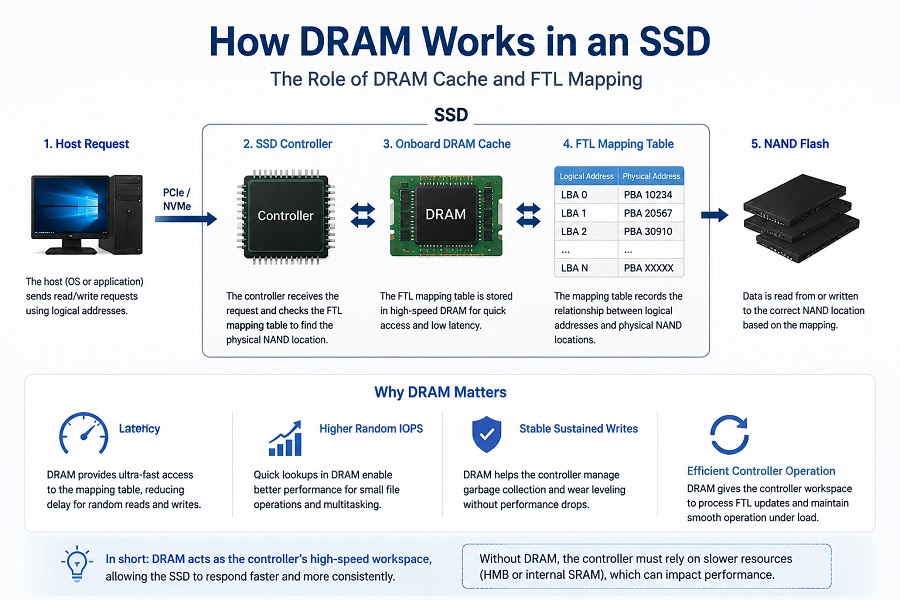
An SSD is essentially a small computer. It has NAND flash (where data lives), a controller (the CPU), firmware, and optionally, DRAM.
[ Host Request ] ──> [ SSD Controller ] ──> [ Onboard DRAM Cache ] ──> [ NAND Flash ]
The controller doesn't write data straight to raw NAND addresses. Instead, it relies on the Flash Translation Layer (FTL)—a lookup table that maps logical block addresses from your OS to physical NAND locations.
Because this map changes with every single write and overwrite operation, storing it in fast, volatile DRAM allows the controller to instantly check where data needs to go.
Key Advantages of Dedicated DRAM:
- Snappier Random Operations: Everyday OS tasks, background updates, and small file writes demand quick random lookups. Onboard DRAM keeps access latency strictly minimal.
- Sustained Write Stability: When you throw hundreds of gigabytes at the drive at once, the controller has to manage garbage collection, wear leveling, and active writes simultaneously. Onboard DRAM gives the controller the workspace it needs to keep from stalling.
How DRAM-less SSDs Get Away Without It
To lower the bill of materials (BOM) and shrink thermal profiles, manufacturers remove the physical DRAM package entirely.
Host Request
↓
SSD Controller
↓
HMB / Controller SRAM
↓
NAND Flash
↓
SSD Controller
↓
HMB / Controller SRAM
↓
NAND Flash
Without onboard memory, earlier generations of DRAM-less SSDs often showed weaker performance consistency, especially under sustained workloads. Modern NVMe drives, however, fix this problem using Host Memory Buffer (HMB).
How HMB Works
Introduced in the NVMe specification, HMB allows the SSD controller to temporarily use a small portion of the host system RAM (typically 16MB to 64MB) over the PCIe bus to store active FTL lookup information.
- Pros: Cheaper, draws less power, runs cooler, and keeps PCB footprints thin.
- Cons: Performance hinges on motherboards supporting HMB, clean PCIe link integrity, and smart firmware tuning.
- Technical Deep Dive: HMB and DRAM caching are just one part of the equation. To learn how the SSD controller coordinates FTL lookups, LDPC error correction, and thermal management at the silicon level, read our complete breakdown: How SSD Controllers Work: Speed, Thermal & Lifespan .
Engineering Breakdown: DRAM vs DRAM-less
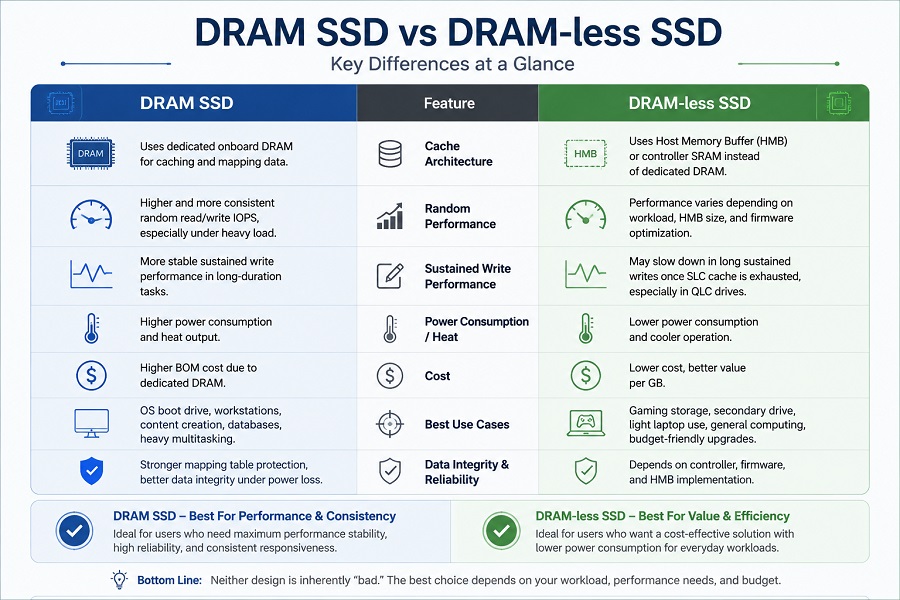
| Feature | DRAM SSD | DRAM-less SSD (HMB Enabled) |
|---|---|---|
| Cache Hardware | Dedicated onboard DRAM chip | System RAM via HMB + Controller SRAM |
| Random IOPS | High and consistent | Moderate to high (firmware-dependent) |
| Sustained Writes | More stable under heavy workloads | Depends on NAND cache design and controller optimization |
| Power & Heat | Higher power draw, runs warmer | Low power draw, minimal heat |
| PCB Layout | Double-sided or complex single-sided | Simple, ultra-thin single-sided |
| Best Used For | OS drives, Workstations, Databases | Gaming expansion, Laptops, Budget builds |
DRAM vs DRAM-less SSD: Which One Should You Buy for Your Workload?
1. Primary OS Drive (Windows / Linux)
- Choice: DRAM SSD
- Why: Your operating system constantly reads and writes thousands of tiny temporary files, logs, and registry keys in the background. Dedicated DRAM keeps system response times crisp even when multitasking under load.
2. Gaming Storage Drive
- Choice: DRAM-less SSD (NVMe Gen4)
- Why: Game loading is heavily sequential. Modern DRAM-less NVMe SSDs paired with HMB can deliver similar game loading experiences in many real-world scenarios. Unless you frequently transfer massive 100GB game folders back and forth, save your money here.
3. Professional Workstations (Video Editing, CAD, 3D Rendering)
- Choice: DRAM SSD
- Why: Rendering raw video or scrubbing massive timelines pushes continuous, long-duration write streams. Once a DRAM-less drive exhausts its pseudo-SLC cache, sustained write performance may decrease significantly depending on NAND type, cache design, and controller optimization.
4. Laptops & Embedded Systems
- Choice: DRAM-less SSD
- Why: Battery life and thermal constraints take priority. Removing the DRAM chip saves power and eliminates a key heat source on tight laptop motherboards.
OEM Selection Note: Balancing controller architecture with flash memory is critical for long-term project reliability. See our engineering comparison: TLC vs QLC SSD: Performance, Endurance, Lifespan, and Which NAND Is Better? .
Myth Busting: Does DRAM Make an SSD Last Longer?
A common misconception is that DRAM-less drives wear out much faster.
In truth, DRAM does not dictate physical NAND endurance. Flash degradation comes down to:
- P/E (Program/Erase) cycle limits of the NAND grade (e.g., industrial TLC vs. consumer QLC).
- Controller Write Amplification Factor (WAF) efficiency.
- Total Terabytes Written (TBW) limits and thermal throttling management.
While DRAM can help a controller execute background wear leveling more efficiently, a well-validated DRAM-less drive built with high-tier NAND flash will comfortably outlast its warranty period under standard workloads.
Further Reading: To understand how drive endurance is rated and calculated, check out: SSD TBW Explained: What It Means and How It Affects SSD Lifespan .
How SSD Manufacturers Validate DRAM and DRAM-less Designs
From an SSD manufacturing perspective, choosing DRAM or DRAM-less architecture is not simply a cost decision.
Engineers evaluate:
- Controller compatibility
- NAND quality
- Firmware optimization
- Thermal behavior
- Sustained workload performance
- Burn-in testing results
The final SSD design must balance performance, reliability, power efficiency, and target application requirements.
Decision Flowchart: Quick Rules of Thumb
- Building a primary workstation or high-end PC? → Go with a DRAM SSD.
- Adding a 2TB/4TB drive mainly for game libraries? → Grab a quality DRAM-less NVMe SSD.
- Upgrading a thin-and-light laptop to boost battery life? → A DRAM-less HMB drive is ideal.
FAQ
Is a DRAM-less SSD suitable for laptop upgrades?
Yes. DRAM-less NVMe SSDs are widely used in laptops because they offer lower power consumption, reduced heat generation, and compact PCB designs.
Do PCIe 5.0 SSDs hitting 14,000 MB/s require DRAM?
For top-tier Gen5 flagships, onboard DRAM is commonly used to improve performance consistency under extreme workloads. However, some newer mainstream Gen5 controllers may leverage advanced HMB implementations for power-conscious laptop and budget-oriented designs.
Is HMB safe? Will it steal too much of my computer's RAM?
It is completely safe. HMB requests an extremely small allocation—usually between 16MB and 64MB of system RAM. On a system with 16GB or 32GB of RAM, this overhead is entirely negligible.
Why do some DRAM-less SSDs get so slow when transferring large files?
When onboard pseudo-SLC cache fills up during massive transfers, the drive must write directly to TLC or QLC NAND while simultaneously clearing cache space. Without dedicated DRAM to quickly manage FTL lookup shifts, the controller throttles performance to keep up.
For a complete breakdown of real-world write speeds, thermal throttling, and SSD buying factors, check out our 2026 master guide: What Is an NVMe SSD? Complete Guide to Speed, Gaming Performance, Compatibility, and SSD Selection (2026) .
Looking for the Right SSD for Your Project?
If you are sourcing SSDs for PC builds, laptops, gaming systems, or OEM projects, Taimi can support different SSD architectures and application requirements. Contact our technical team to discuss capacity, interface, controller, NAND, performance targets, and bulk procurement requirements.
Contact Taimi Technical Team
Related Products
Recommended Articles
SSD Burn-in Testing Explained: How SSD Manufacturers Ensure Reliability Before Shipping
2026-07-31
More
Why Is My SSD Slow After Installation? Causes and Fixes Explained
2026-07-29
More
TLC vs QLC SSD: Performance, Endurance, Lifespan, and Which NAND Is Better?
2026-07-27
More
SSD Manufacturing Quality Control: Inside Taimi SMT Production Process
2026-07-24
More
Why an SSD Is Detected in BIOS but Not Showing in Windows
2026-07-22
More
From NAND Flash to Finished SSD: Inside the SSD Manufacturing and Testing Process
2026-07-20
More
SSD Not Detected in BIOS? What SSD Compatibility Testing Reveals
2026-07-17
More