
Company Introduction
More













What Is an M.2 SSD? Form Factors, Keys & NVMe vs SATA Explained (2026 Guide)
Share:
Quick Answer:
An M.2 SSD is a solid-state drive that uses the M.2 form factor. M.2 defines the drive's physical size, shape, and connector, while the SSD can use SATA or PCIe/NVMe technology.
In simple terms:
- M.2 = physical form factor
- NVMe = storage protocol designed for PCIe-based SSDs
This means not every M.2 SSD is an NVMe SSD. Some M.2 SSDs use SATA, while others use PCIe with NVMe. The M.2 2280 format, measuring approximately 22 × 80 mm, is one of the most widely used M.2 SSD sizes in desktop PCs and laptops.
What Is an M.2 SSD?
An M.2 SSD is a compact solid-state drive built around the M.2 form factor.
Unlike a traditional 2.5-inch SATA SSD, an M.2 SSD is typically a small circuit board that installs directly into a compatible M.2 slot on a motherboard or host device.
The M.2 specification was developed to provide a standardized, space-saving connection for storage and expansion modules. The key takeaway is simple:
M.2 describes the physical design of an SSD, not the storage protocol it uses.
This is why two drives can both be labeled M.2 2280 but use completely different technologies. One may be an M.2 SATA SSD, while the other is an M.2 PCIe NVMe SSD.
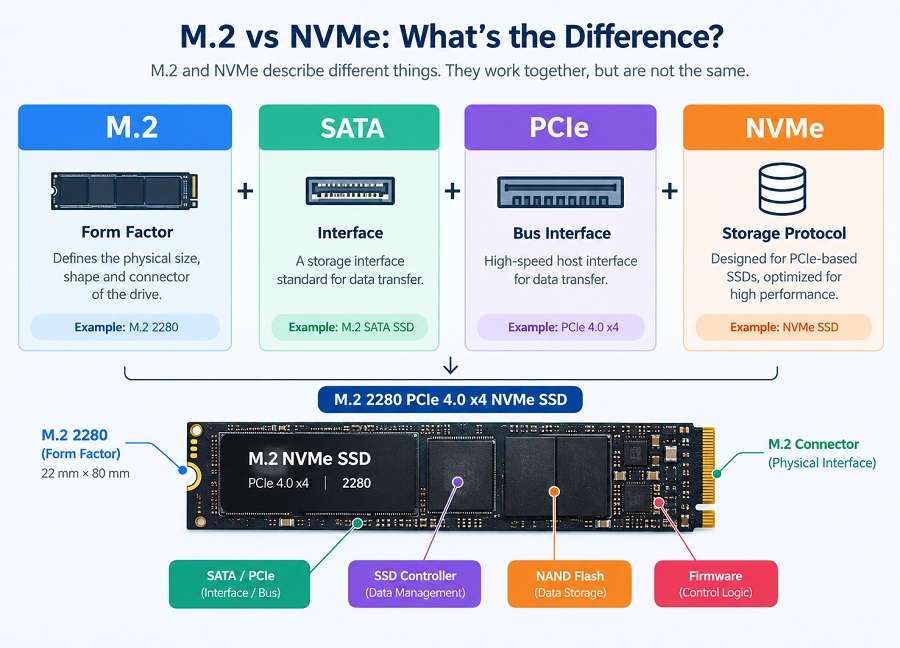
M.2 vs NVMe: What Is the Difference?
M.2 and NVMe describe different aspects of an SSD, so they should not be treated as interchangeable terms.
| Term | What It Describes | Example |
|---|---|---|
| M.2 | Physical form factor and connector | M.2 2280 |
| SATA | Storage interface / interface standard | M.2 SATA SSD |
| PCIe | High-speed host interface / bus interface | PCIe 4.0 x4 |
| NVMe | Storage protocol designed for PCIe SSDs | PCIe NVMe SSD |
For example, an SSD described as M.2 2280 + PCIe 4.0 x4 + NVMe can be understood as:
- M.2 2280 = physical size and form factor
- PCIe 4.0 x4 = host interface connection
- NVMe = storage protocol
For a deeper explanation of NVMe technology, see our guide to what an NVMe SSD is.
How Does an M.2 SSD Work?
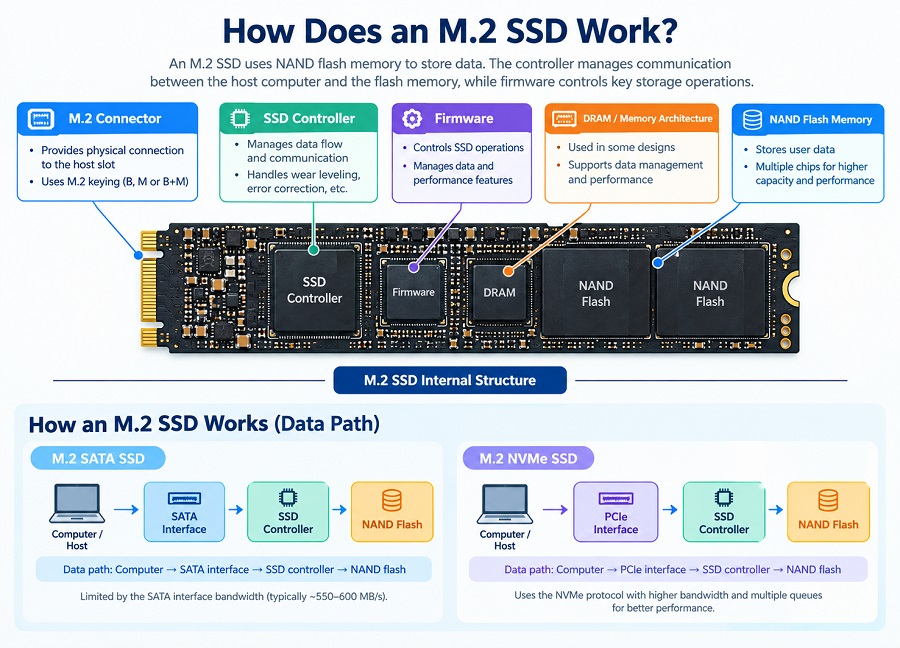
An M.2 SSD uses NAND flash memory to store data. The SSD controller manages communication between the host computer and the flash memory, while firmware controls key storage operations.
Depending on the SSD design, an M.2 drive may also use DRAM or another memory architecture to support data management and performance.
Main Components of an M.2 SSD
- NAND flash memory: Stores user data.
- SSD controller: Manages communication between the host system and NAND flash.
- Firmware: Controls SSD operations and data-management functions.
- DRAM or other memory architecture: May be used depending on the SSD design.
- M.2 connector: Provides the physical connection to the compatible host slot.
How an M.2 SATA SSD Works
A typical M.2 SATA SSD follows a data path similar to:
Computer → SATA interface → SSD controller → NAND flash
Because the drive communicates through the SATA interface, its performance is limited by the bandwidth of the SATA interface.
How an M.2 NVMe SSD Works
A typical M.2 NVMe SSD follows a data path similar to:
Computer → PCIe interface → SSD controller → NAND flash
The SSD controller communicates with the host using the NVMe protocol. PCIe provides substantially higher bandwidth than SATA, while NVMe supports efficient handling of multiple commands and queues for modern solid-state storage.
M.2 SSD Sizes Explained
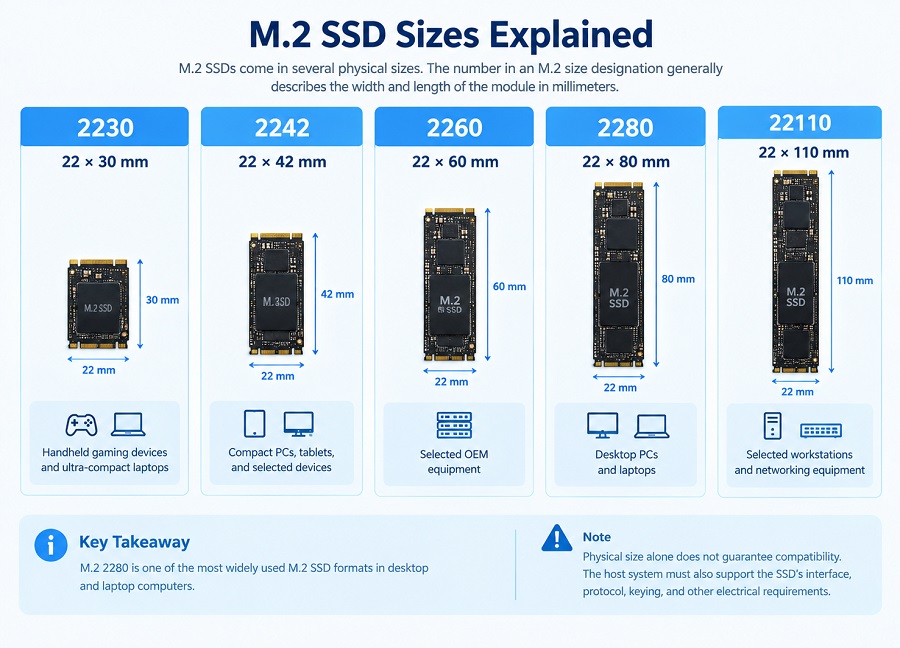
M.2 SSDs are available in several physical sizes. The number in an M.2 size designation generally describes the width and length of the module in millimeters.
| M.2 Size | Dimensions | Common Applications |
|---|---|---|
| 2230 | 22 × 30 mm | Handheld gaming devices and ultra-compact laptops |
| 2242 | 22 × 42 mm | Compact PCs, tablets, and selected devices |
| 2260 | 22 × 60 mm | Selected OEM equipment |
| 2280 | 22 × 80 mm | Desktop PCs and laptops |
| 22110 | 22 × 110 mm | Selected workstations and networking equipment |
M.2 2280 is one of the most widely used M.2 SSD formats in desktop and laptop computers.
However, physical size alone does not guarantee compatibility. The host system must also support the SSD's interface, protocol, keying, and other electrical requirements.
For a more detailed compatibility checklist, see our M.2 SSD compatibility guide.
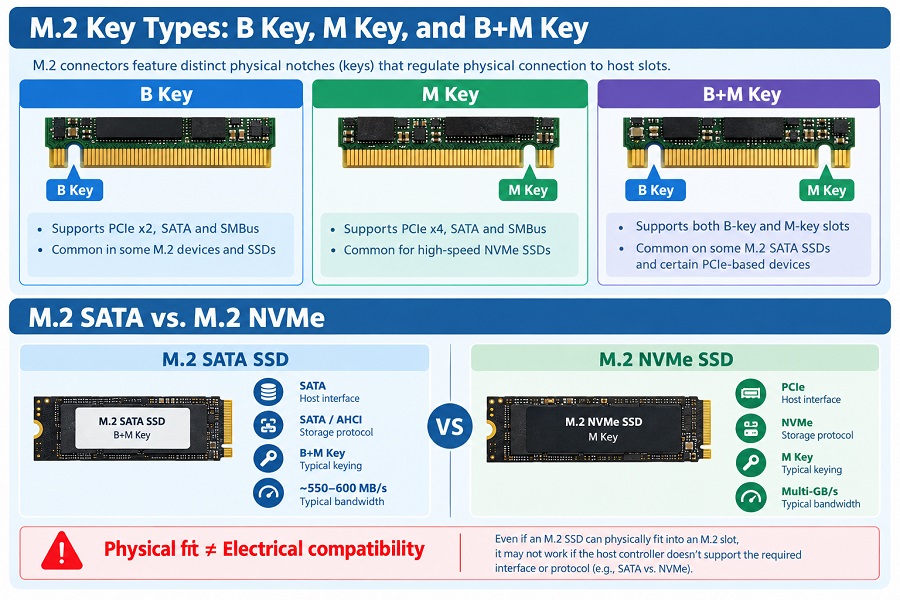
M.2 Key Types: B Key, M Key, and B+M Key
M.2 SSDs can use different keying configurations. The key refers to the position of the notch on the connector and helps control which modules can physically fit into a compatible slot.
| Key Type | General Description |
|---|---|
| B Key | A keying configuration used by some M.2 devices and SSDs. Depending on the device and host design, it may be associated with SATA or PCIe connectivity. |
| M Key | A common keying configuration for PCIe-based M.2 NVMe SSDs, particularly designs using PCIe x4. |
| B+M Key | A dual-notch configuration commonly found on some M.2 SATA SSDs and certain PCIe devices. |
Important: Keying controls physical insertion, but the key type alone does not determine electrical compatibility. A drive may physically fit into a slot but still fail to operate if the host does not support its interface or protocol.
M.2 SATA vs M.2 NVMe
One of the most common sources of confusion is assuming that every M.2 SSD is an NVMe SSD. In reality, M.2 SSDs can use different interfaces and protocols.
| Feature | M.2 SATA SSD | M.2 NVMe SSD |
|---|---|---|
| Form Factor | M.2 | M.2 |
| Host Interface | SATA | PCIe |
| Storage Protocol | SATA / AHCI | NVMe |
| Typical Bandwidth | Typically up to around 550–600 MB/s | Multi-GB/s depending on PCIe generation |
| Common Keying | B+M Key | M Key |
| Primary Use Case | Legacy systems and basic storage expansion | Modern PCs, gaming, workstations, and high-performance systems |
The physical appearance of M.2 SATA and M.2 NVMe SSDs can be very similar. Before installation, always check the motherboard or host-device specifications instead of relying only on the SSD's physical shape.
M.2 SSD vs 2.5-Inch SATA SSD
M.2 SSDs and 2.5-inch SATA SSDs can both provide solid-state storage, but they use different physical designs.
| Feature | M.2 SSD | 2.5-Inch SATA SSD |
|---|---|---|
| Physical Design | Compact circuit board | Enclosed 2.5-inch drive |
| Installation | Directly into a compatible M.2 slot | Drive bay plus SATA data and power connections |
| Interface Options | SATA or PCIe | SATA |
| Typical Advantage | Compact design and flexible interface options | Broad compatibility with systems designed for 2.5-inch SATA drives |
Why Are M.2 SSDs So Popular?
M.2 SSDs have become common in modern computers because they combine a compact physical design with support for different storage interfaces.
For manufacturers and PC builders, the M.2 format can also help simplify system layouts by allowing the SSD to be installed directly on the motherboard without a separate 2.5-inch drive enclosure.
For end users, M.2 PCIe NVMe SSDs can provide significantly higher storage bandwidth than SATA-based SSDs when the host system supports the required PCIe interface.
How to Choose an M.2 SSD
When selecting an M.2 SSD, physical dimensions are only one part of the compatibility check. Consider the following factors:
1. Form Factor
Check whether the motherboard or host device supports the required M.2 length, such as 2230, 2242, 2260, 2280, or 22110.
2. Interface and Protocol
Determine whether the host supports M.2 SATA or PCIe NVMe. An M.2 slot does not automatically support every type of M.2 SSD.
3. Keying
Check the connector key and the host-device specifications to confirm that the physical and electrical interfaces are compatible.
4. Capacity
Choose capacity according to the intended workload and system requirements. Common capacities include 512GB, 1TB, and 2TB.
5. Workload Requirements
Consider whether the SSD will be used for everyday computing, gaming, content creation, system integration, or other workloads. Performance requirements can vary significantly depending on the application.
For OEM and PC-building projects, compatibility validation should be completed before placing a large-volume order. For OEM validation considerations, see our guide to M.2 SSD compatibility and OEM validation.
Frequently Asked Questions About M.2 SSDs
What is an M.2 SSD?
An M.2 SSD is a solid-state drive that uses the M.2 form factor. M.2 defines the physical size and connector, while the drive may use SATA or PCIe/NVMe technology.
Is M.2 the same as NVMe?
No. M.2 describes a physical form factor and connector, while NVMe is a storage protocol designed for PCIe-based solid-state drives.
Is every M.2 SSD an NVMe SSD?
No. Some M.2 SSDs use SATA, while others use PCIe with NVMe. The M.2 label alone does not identify the storage protocol.
What does M.2 2280 mean?
M.2 2280 refers to an M.2 module measuring approximately 22 mm wide and 80 mm long. It is one of the most widely used M.2 SSD sizes in desktop PCs and laptops.
Can any M.2 SSD fit any M.2 slot?
No. Physical size, keying, interface, protocol, and host-system support all need to be checked. An SSD may physically fit into a slot but still be incompatible at the interface or protocol level.
What is the difference between M.2 SATA and M.2 NVMe?
M.2 SATA SSDs use the SATA interface and are typically limited to around 550–600 MB/s. M.2 NVMe SSDs use PCIe together with the NVMe protocol and can provide much higher bandwidth depending on the PCIe generation and SSD design.
Final Takeaway
The simplest way to understand M.2 SSD terminology is:
- M.2 = Form factor
- SATA = Storage interface
- PCIe = Host bus interface
- NVMe = Storage protocol
Understanding these differences is important when selecting an SSD because two M.2 drives can have the same physical size but use different interfaces and protocols.
Need M.2 SSDs for a PC Build or Bulk Project?
If you are selecting M.2 SSDs for a PC build, system design, or volume procurement project, the required interface, capacity, firmware, and compatibility should be confirmed before production.
Contact the Taimi Technical Team to discuss M.2 SSD capacity, interface specifications, compatibility validation, and bulk procurement requirements.
Related Products
Recommended Articles
What Is a SATA SSD? Speed, Benefits, Compatibility, and Applications (2026 Guide)
2026-08-14
More
M.2 SSD Compatibility Guide 2026: How to Check NVMe Support Before Buying
2026-08-28
More
What Is NAND Flash? Types, Speed, Endurance, and Applications Explained
2026-09-10
More
What Is eMMC? Everything You Need to Know About eMMC Storage
2026-09-04
More
M.2 SSD Compatibility: Sizes, Keys, Bus Protocols, and OEM Validation
2026-08-17
More
What Is a PCIe SSD? Speed, NVMe, and Compatibility Guide (2026)
2026-08-19
More
How Much SSD Storage Do You Need? 512GB vs. 1TB vs. 2TB SSD
2026-08-24
More