



















Quick Answer
UFS (Universal Flash Storage) is a high-performance embedded flash storage standard designed for smartphones, tablets, automotive infotainment systems, edge computing devices, and other compact electronics.
Unlike raw NAND Flash, UFS combines NAND memory, a dedicated controller, firmware, and a high-speed serial interface into an integrated storage solution. Compared with eMMC, UFS provides higher performance, lower latency, and full-duplex communication, making it better suited to devices that need fast data access and efficient power management.
UFS 3.1 and UFS 4.0 are commonly used for newer high-performance mobile and embedded platforms, although actual performance depends on the UFS device, host processor, firmware, thermal conditions, and workload.
What Is UFS Storage?
UFS stands for Universal Flash Storage. It is a JEDEC-standard embedded storage technology developed to provide higher performance and more efficient data communication than older embedded storage interfaces.
A UFS device is more than just NAND Flash. It combines several components into an integrated storage solution:
- NAND Flash Memory – Stores data even when the device is powered off.
- UFS Controller – Manages flash operations, error correction, wear leveling, and data mapping.
- Firmware – Controls storage operations and manages background tasks.
- High-Speed Serial Interface – Connects the UFS device with the host processor.
- Power Management – Helps manage the power requirements of the storage device.
The relationship between these components can be simplified as:
Quick Takeaway: NAND Flash is the underlying memory technology, while UFS defines the storage architecture and communication interface used to connect embedded flash storage with the host system.
For a deeper explanation of NAND Flash technology, see our guide to What Is NAND Flash?

How Does UFS Storage Work?
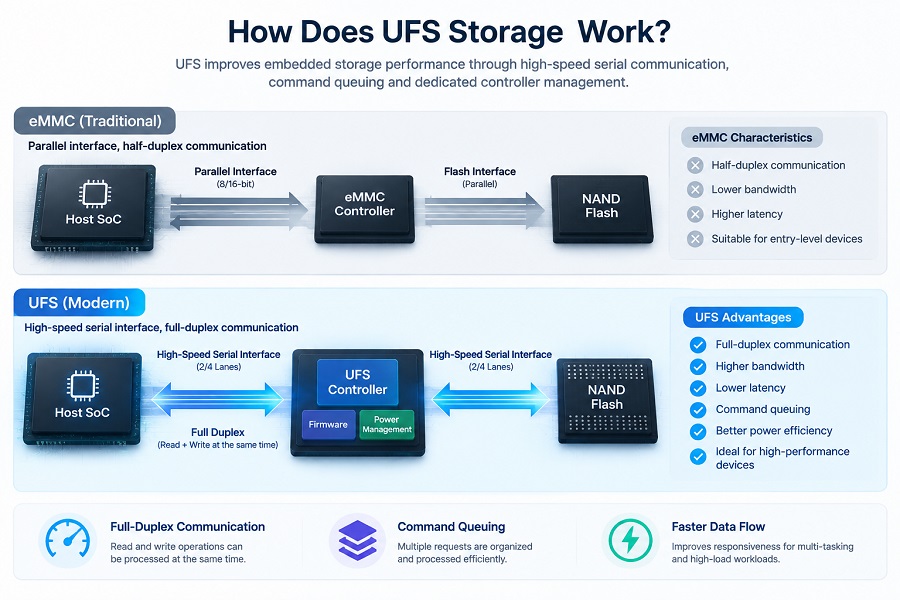
UFS improves embedded storage performance through its combination of high-speed serial communication, command queuing, and dedicated controller management.
Full-Duplex Communication
One of the main differences between UFS and eMMC is the way they communicate with the host.
Traditional eMMC uses a parallel interface and operates primarily in a half-duplex manner. UFS uses a high-speed serial interface that supports full-duplex communication, allowing read and write operations to be handled more efficiently.
This is particularly useful for workloads involving multiple simultaneous storage operations, such as application loading, background synchronization, video recording, and local data processing.
Command Queuing
UFS uses a SCSI-based command architecture and supports command queuing. Instead of handling storage requests strictly one at a time, the controller can organize multiple commands and process them efficiently.
This can improve responsiveness during workloads with many small or concurrent data requests.
UFS Controller and Firmware
The UFS controller handles many of the operations that users never see directly, including:
- Error correction
- Wear leveling
- Bad-block management
- Flash Translation Layer (FTL) operations
- Garbage collection
- Data management
- Performance optimization
Firmware also plays an important role in maintaining consistent storage performance over time.
How Fast Is UFS Storage?
UFS is generally much faster than older embedded storage technologies such as eMMC, but the actual speed of a UFS device depends on more than the UFS version alone.
Important factors include:
- UFS generation
- NAND Flash type and configuration
- Controller design
- Firmware
- Host SoC
- Number of interface lanes
- Thermal conditions
- Workload characteristics
- SLC cache behavior
UFS Performance Metrics
| Performance Metric | What It Means | Main Factors |
|---|---|---|
| Sequential Read | Moving large amounts of data quickly | UFS generation, host interface, NAND configuration |
| Sequential Write | Writing large files or data streams | NAND speed, controller, SLC cache |
| Random Read | Accessing many small data blocks | Controller, firmware, command queuing |
| Random Write | Handling frequent small writes | FTL, NAND characteristics, firmware |
| Latency | How quickly the device responds to requests | Controller, interface, workload, queue depth |
| Sustained Performance | Performance during longer workloads | Thermal conditions, cache behavior, NAND speed |
Is UFS 4.0 Always Faster in Real-World Use?
Not necessarily.
A newer UFS generation can provide substantially higher interface bandwidth, but the final system performance depends on the entire storage platform.
For example, a UFS 4.0 device connected to a host platform with limited interface support may not reach its maximum theoretical performance. Thermal throttling, NAND configuration, firmware, and sustained workload conditions can also reduce performance.
This is why OEM engineers should evaluate the complete host-storage combination, rather than selecting a UFS device based only on its advertised interface speed.
UFS Versions Explained
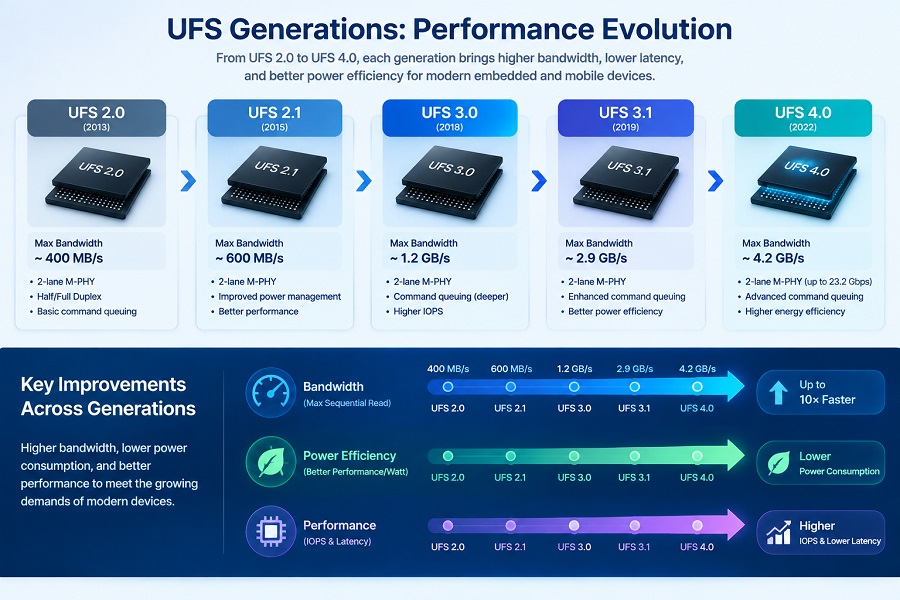
Different UFS generations provide improvements in bandwidth, power efficiency, and storage performance.
UFS Generation Comparison
| UFS Version | Approximate Interface Performance | Major Characteristics | Typical Applications |
|---|---|---|---|
| UFS 2.0 | Up to around 1 GB/s class | Earlier high-speed UFS generation | Smartphones, tablets, embedded devices |
| UFS 2.1 | Up to around 1 GB/s class | Improved reliability and performance features | Mobile devices, smart displays, embedded systems |
| UFS 3.0 | Up to around 2.9 GB/s class | Higher bandwidth and improved power efficiency | Smartphones, handheld devices, embedded platforms |
| UFS 3.1 | Up to around 2.9 GB/s class | Write Booster and additional performance features | High-performance mobile and embedded devices |
| UFS 4.0 | Up to around 4.2 GB/s class | Higher bandwidth and improved energy efficiency | Flagship mobile platforms, automotive and advanced embedded systems |
Actual storage performance varies by device implementation, NAND configuration, controller, firmware, and host platform.
UFS 2.0 and UFS 2.1
UFS 2.x established UFS as a high-performance alternative to older embedded storage technologies.
UFS 2.1 introduced additional performance and reliability improvements and was widely adopted in smartphones, tablets, and other embedded applications.
UFS 3.0 and UFS 3.1
UFS 3.x increased bandwidth and improved power efficiency for more demanding mobile workloads.
UFS 3.1 introduced features such as Write Booster, which can use faster temporary storage behavior to improve burst write performance.
This makes UFS 3.1 suitable for devices that frequently handle application data, high-resolution media, system updates, and other demanding workloads.
UFS 4.0
UFS 4.0 represents a major step forward in embedded storage bandwidth.
It is designed for newer high-performance platforms that require faster data access while maintaining efficient power consumption.
However, the benefit of UFS 4.0 depends on whether the host SoC, firmware, NAND configuration, and thermal design can take advantage of its higher performance.
UFS vs eMMC vs SSD: What Is the Difference?
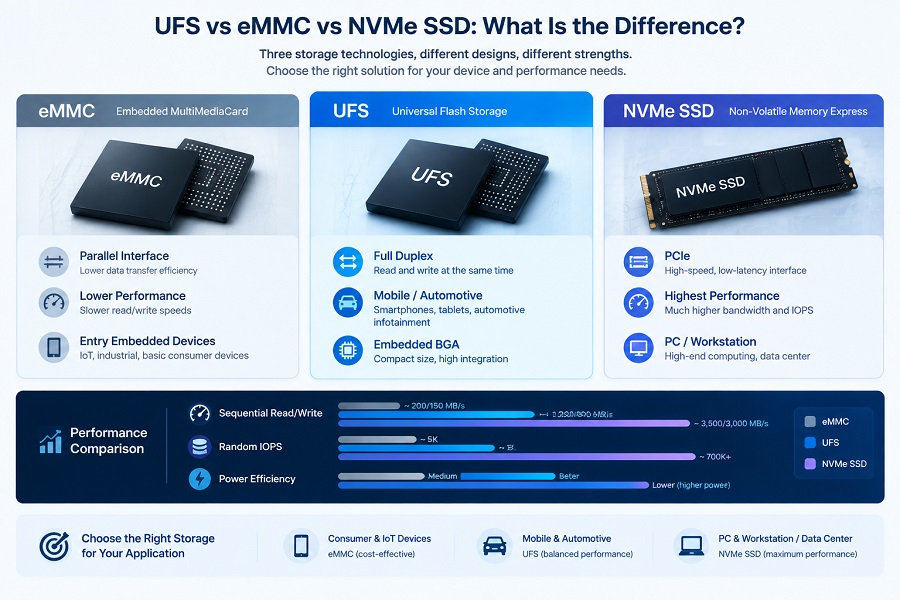
UFS and eMMC are both embedded flash storage technologies, while NVMe SSDs are commonly used in PCs and other computing platforms. Each is designed around different system requirements.
| Feature | UFS | eMMC | NVMe SSD |
|---|---|---|---|
| Communication | High-speed serial | Parallel interface | PCIe |
| Data Transfer | Full-duplex | Primarily half-duplex | Full-duplex |
| Command Queuing | Supported | More limited | Highly parallel |
| Performance | Generally higher | Generally lower | Generally highest |
| Typical Applications | Mobile, automotive, embedded | Entry-level embedded devices | PCs, workstations, servers |
| Package / Form Factor | Integrated BGA | Integrated BGA | M.2, 2.5-inch, BGA and other formats |
Is UFS Faster Than eMMC?
Yes, in general.
UFS is designed for higher bandwidth and more efficient handling of concurrent storage operations. This can result in faster application loading, improved multitasking responsiveness, and better performance during large file transfers.
However, the actual difference depends on the specific UFS and eMMC implementations being compared.
For a detailed explanation of eMMC, see What Is eMMC?
UFS vs SSD: Are They the Same?
No. UFS and SSDs are different storage solutions designed for different system requirements.
Both use NAND Flash and a controller, but their interfaces, physical formats, host environments, and typical applications are different.
| Feature | UFS Storage | NVMe SSD |
|---|---|---|
| Primary Use | Mobile and embedded devices | PCs, workstations, servers and computing systems |
| Interface | UFS / high-speed serial interface | PCIe + NVMe |
| Form Factor | Integrated BGA | M.2, 2.5-inch, BGA and other formats |
| System Integration | Typically soldered directly to the PCB | Often removable or replaceable |
| Power Focus | Low-power embedded operation | High-performance computing |
| Typical Workloads | Mobile OS, embedded applications, local data processing | PC applications, gaming, professional workloads |
UFS should therefore not be considered a smaller version of an NVMe SSD. It is a different storage architecture optimized for highly integrated systems.
For more information, see our guides to NVMe SSDs and PCIe SSDs.
What Are the Applications of UFS Storage?
UFS is mainly used where a system needs a combination of high storage performance, compact integration, and efficient power consumption.
Smartphones and Tablets
Smartphones are one of the largest application areas for UFS.
Modern mobile devices frequently perform multiple storage-intensive tasks, including operating system operations, application loading, high-resolution photography, 4K and 8K video recording, local AI processing, and background synchronization.
Automotive Infotainment and Cockpit Systems
UFS can also be used in automotive electronics where fast local storage and compact system integration are important.
Potential applications include:
- Infotainment systems
- Digital instrument clusters
- Navigation data
- Multimedia storage
- Event data recording
- Advanced cockpit systems
Edge AI and Embedded Computing
Edge computing devices increasingly process data locally instead of sending everything to the cloud.
UFS can provide fast local storage for applications such as:
- Computer vision
- Sensor data
- Local AI models
- Industrial gateways
- Smart cameras
- Compact computing systems
Other Compact Electronics
UFS may also be suitable for tablets, handheld devices, smart displays, and other electronics where PCB space and power consumption are important design considerations.
Advantages and Limitations of UFS Storage
Advantages
- Higher performance: UFS provides substantially higher bandwidth than older embedded storage interfaces.
- Full-duplex communication: Read and write operations can be handled more efficiently.
- Lower latency: Command queuing and controller architecture can improve responsiveness.
- Compact integration: UFS is normally implemented as a BGA storage device directly on the PCB.
- Power efficiency: UFS is designed to provide high storage performance while keeping power consumption suitable for mobile and embedded platforms.
Limitations
UFS is not the best choice for every application.
- Host platform compatibility
- Higher component cost compared with basic eMMC solutions
- PCB and hardware design requirements
- Firmware compatibility
- NAND endurance
- Thermal conditions
- Long-term supply requirements
For systems that require a removable or upgradeable storage device, an M.2 or 2.5-inch SSD may be more appropriate.
How to Select UFS Storage for OEM/ODM Projects
For volume production, selecting a UFS device requires more than comparing capacity and interface speed.
1. Check Host SoC Compatibility
Confirm that the host processor supports the required UFS generation and interface configuration.
The UFS device and host platform must be compatible at the hardware, protocol, firmware, and performance levels.
2. Select the Appropriate Capacity
Capacity should be based on the operating system, application software, user data, update requirements, and expected product lifecycle.
Avoid selecting capacity based only on current storage requirements. Future software growth should also be considered.
3. Evaluate NAND and Endurance
The NAND Flash configuration affects performance, endurance, and long-term reliability.
For applications with frequent data writes, OEM teams should evaluate endurance requirements, workload patterns, and expected product lifetime.
4. Evaluate Controller and Firmware
The controller and firmware have a major influence on real-world UFS performance.
Important areas include error correction, wear leveling, garbage collection, flash management, and compatibility with the target host platform.
5. Validate Samples Before Mass Production
Engineering samples should be tested on the actual target platform before a volume purchase.
Testing can include:
- Boot and system compatibility
- Sequential and random performance
- Long-duration workloads
- Thermal behavior
- Firmware stability
- Storage endurance
- Power behavior
6. Consider Supply and Batch Consistency
For OEM/ODM projects, stable supply is as important as the initial specification.
Before mass production, buyers should discuss:
- BOM consistency
- NAND and controller configuration
- Firmware version control
- Batch-to-batch performance
- Quality inspection
- Traceability
- Long-term supply planning
For more general SSD procurement considerations, see our SSD Supplier Evaluation Checklist.
UFS Storage for OEM and Embedded Applications
For OEM and ODM projects, storage selection should be treated as part of the overall system design rather than a simple component purchase.
A suitable supplier should be able to support engineering samples, host compatibility testing, quality control, configuration management, and production consistency.
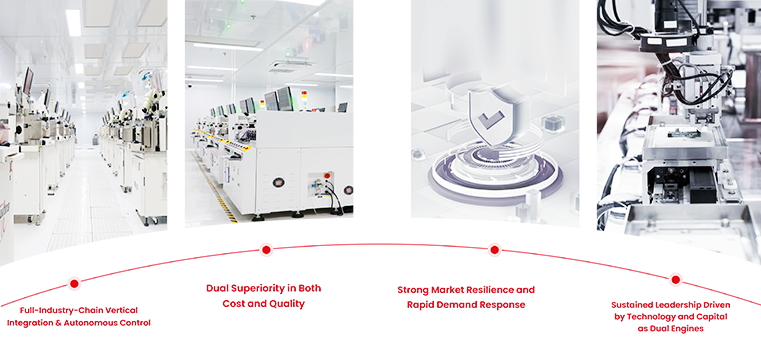
At Taimi, our flash storage manufacturing process covers die testing, chip packaging, SMT production, testing, and final assembly. Our engineering and production teams can support storage product development and OEM/ODM requirements based on the target application.
For embedded storage projects, sample evaluation and host-platform validation should be completed before locking the final specification for volume production.
Frequently Asked Questions About UFS Storage
What is UFS storage?
UFS (Universal Flash Storage) is a high-performance embedded flash storage standard that combines NAND Flash, a controller, firmware, and a high-speed serial interface into an integrated storage solution.
How fast is UFS storage?
UFS speed depends on the UFS generation and the complete host-storage implementation. UFS 3.1 can reach around the 2.9 GB/s class, while UFS 4.0 can reach around the 4.2 GB/s class under suitable conditions. Actual performance can be lower depending on the host, NAND, controller, firmware, workload, and thermal conditions.
What is the difference between UFS 3.1 and UFS 4.0?
UFS 4.0 provides substantially higher interface bandwidth and improved efficiency compared with UFS 3.1. However, the host processor and complete system must support UFS 4.0 to take advantage of its higher performance.
Is UFS faster than eMMC?
Yes. UFS generally provides higher bandwidth, lower latency, and more efficient concurrent data processing than eMMC. The actual difference depends on the specific devices being compared.
Is UFS the same as an SSD?
No. UFS and SSDs both use NAND Flash and controllers, but they are designed for different system architectures. UFS is primarily an integrated embedded storage solution, while SSDs commonly use PCIe/NVMe or SATA interfaces and are widely used in PCs and other computing systems.
Where is UFS storage used?
UFS is commonly used in smartphones, tablets, automotive infotainment systems, embedded computing devices, edge AI platforms, smart displays, and other compact electronics that require fast and efficient local storage.
Key Takeaway
UFS storage is a high-performance embedded flash storage technology designed for systems that need fast data access, compact integration, and efficient power consumption.
Compared with eMMC, UFS offers higher performance and more efficient handling of concurrent storage operations. Newer generations such as UFS 3.1 and UFS 4.0 provide substantially higher bandwidth, but actual performance still depends on the NAND, controller, firmware, host SoC, thermal design, and workload.
For OEM/ODM projects, the best UFS solution should therefore be selected based on host compatibility, capacity, NAND endurance, controller and firmware, thermal behavior, testing requirements, and long-term supply consistency.
Need Customized Embedded Storage Solutions?
Looking for embedded flash storage for an OEM/ODM project? Contact the Taimi Technical Team to discuss engineering samples, host compatibility, and volume production requirements.
Contact Taimi Technical Team