
Company Introduction
More



















SSD Health Check: How to Check SSD Lifespan and Condition (2026 Guide)
Share:
💡 TL;DR / Quick Summary for Engineering & IT Teams
-
Health Percentage tracks NAND wear only—it cannot predict controller failure, firmware panics, or PMIC power delivery issues.
-
Always monitor
Media and Data Integrity ErrorsandAvailable Sparealongside basic health status to catch hardware faults early. -
Continuous random-write workloads elevate the Write Amplification Factor (WAF); keeping at least 15% unallocated space ensures efficient garbage collection.
-
Taimi Architecture: All Taimi client SSDs feature independent DRAM cache chips and undergo multi-stage high-temperature burn-in (RDT) testing to maintain low WAF and batch stability, backed by a 3-year warranty.
An SSD rarely fails without any warning.
Before a drive becomes completely unreadable, users may notice small changes: slower file transfers, longer boot times, system freezes, or occasional detection problems.
These symptoms do not always mean the SSD is failing. They can also be caused by insufficient free space, thermal throttling, firmware issues, or system compatibility problems.
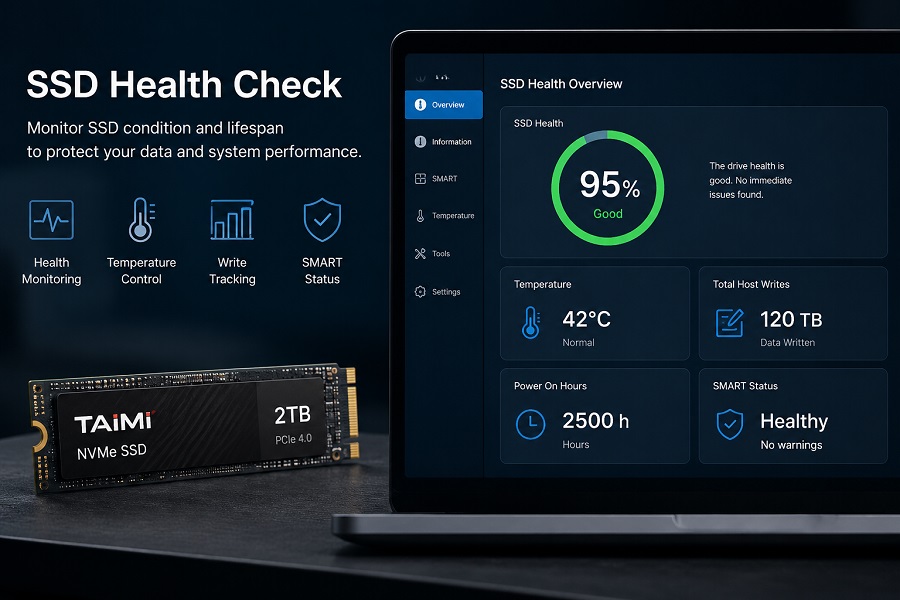
This is why checking SSD health regularly can be useful. By looking at health percentage, SMART information, temperature, write activity, and error records, users can better understand the current condition of their drive.
This guide explains how to check SSD health, what the health percentage really means, and which signs indicate that an SSD may need attention.
What Is SSD Health?
When people talk about SSD health, they are usually referring to two things:
-
How much NAND Flash endurance has been used.
-
Whether the SSD is reporting abnormal operating conditions.
Unlike HDDs, SSDs store data in NAND Flash memory. Each NAND cell can only handle a limited number of write and erase cycles. Over time, repeated writes gradually consume endurance.
Modern SSDs use several technologies to manage this process, including:
-
Wear leveling
-
Error correction (ECC)
-
Garbage collection
-
Bad block management
The SSD controller monitors these conditions and reports health information through SMART or NVMe monitoring data.
Common SSD Health Indicators
| Indicator | What It Shows |
| Health Percentage | Estimated remaining endurance |
| Percentage Used | NAND wear level |
| Total Host Writes | Amount of data written by the system |
| Temperature | Current operating condition |
| SMART Status | Drive monitoring information |
However, SSD health is only an indicator. A health percentage cannot tell the exact day an SSD will fail. It should be evaluated together with actual drive behavior.
How to Check SSD Health
For most users, checking SSD health is a software-based process. No special hardware tools are required.
1. Use SSD Manufacturer Software
The first choice should usually be the monitoring software provided by the SSD manufacturer. These tools are designed for specific SSD models and can usually display:
-
SSD health percentage
-
Remaining endurance
-
Temperature
-
Firmware version
-
Total host writes
-
SMART information
Because SSD controllers and firmware differ between models, manufacturer software often provides the most accurate interpretation of drive status.
2. Use SMART Monitoring Tools
Third-party tools can also provide useful SSD health information. For example, CrystalDiskInfo or smartmontools can display:
-
Health status
-
SMART attributes
-
Temperature
-
Power-on hours
-
Total writes
These tools are convenient when a computer contains SSDs from different manufacturers. One thing to keep in mind: SMART attributes are not identical across all SSD models. A value that looks unusual on one drive may be normal on another.
3. Check SSD Condition Through Windows
Windows provides basic storage information, but built-in tools usually show less detail about NAND wear and endurance. If the goal is to understand SSD lifespan, use a tool that can read SMART or NVMe health information.
What Does SSD Health Percentage Mean?
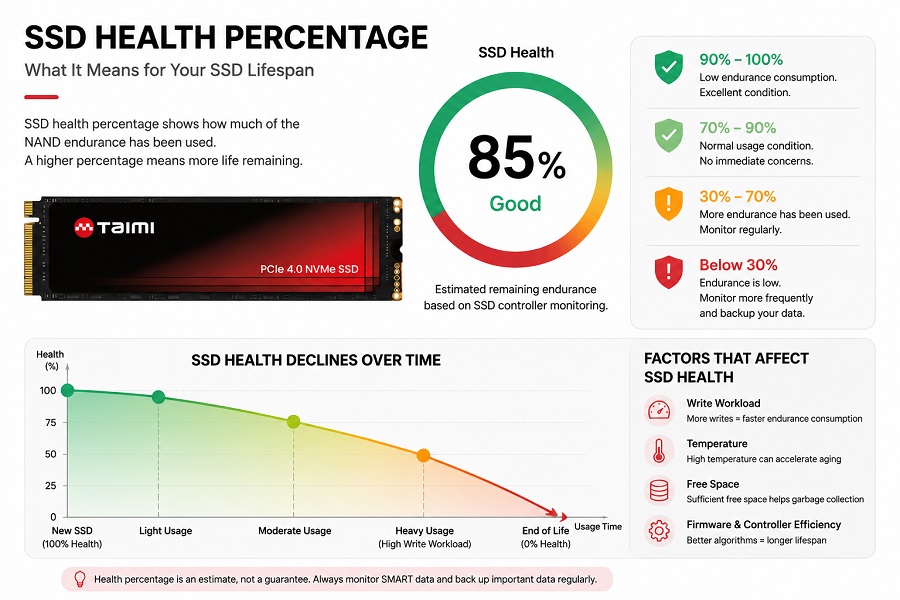
SSD health percentage is an estimate of the remaining endurance reported by the SSD controller.
General Reference Guidelines
| SSD Health | General Condition |
| 90% - 100% | Low endurance consumption |
| 70% - 90% | Normal usage condition |
| 30% - 70% | More endurance has been used |
| Below 30% | Monitor more frequently |
These values are only guidelines. A common mistake is judging an SSD only by the health percentage.
For example:
-
A 50% health SSD may continue working normally for a long time.
-
A 100% health SSD may still have controller, firmware, or power-related problems.
In real troubleshooting, engineers usually look at several factors together: error history, temperature behavior, workload, performance stability, and SMART information. The overall trend is often more valuable than a single health number.
Understanding SSD SMART Information
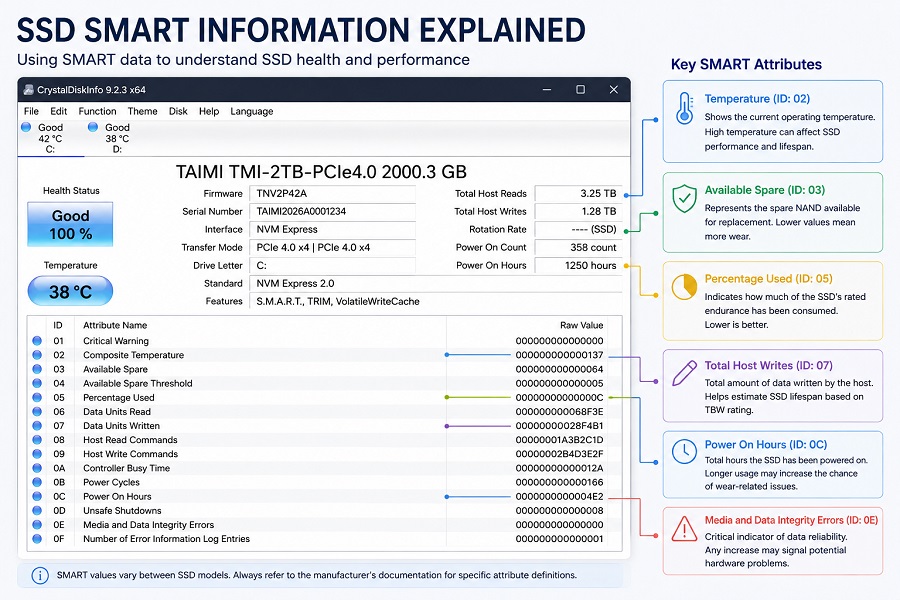
SMART (Self-Monitoring, Analysis and Reporting Technology) allows storage devices to report operating information. For SSD users, several values are especially useful.
Percentage Used
This shows how much of the SSD's rated endurance has been consumed. A gradual increase is expected as the drive is used.
Total Host Writes
This records how much data has been written by the operating system. It can be compared with the SSD's TBW rating. TBW represents the endurance level defined by the manufacturer, while SSD health shows the estimated current condition.
Temperature
Temperature has a direct impact on SSD performance. During long transfers or heavy workloads, NVMe SSDs may reduce speed temporarily through thermal throttling. This does not necessarily indicate a failing SSD, but frequent high temperatures may affect long-term operating stability.
Error Information
Error records become more important when they appear together with real symptoms (e.g., file corruption, read/write errors, system crashes, or unexpected drive disconnects). A single warning does not always mean failure; a pattern of increasing errors is more meaningful.
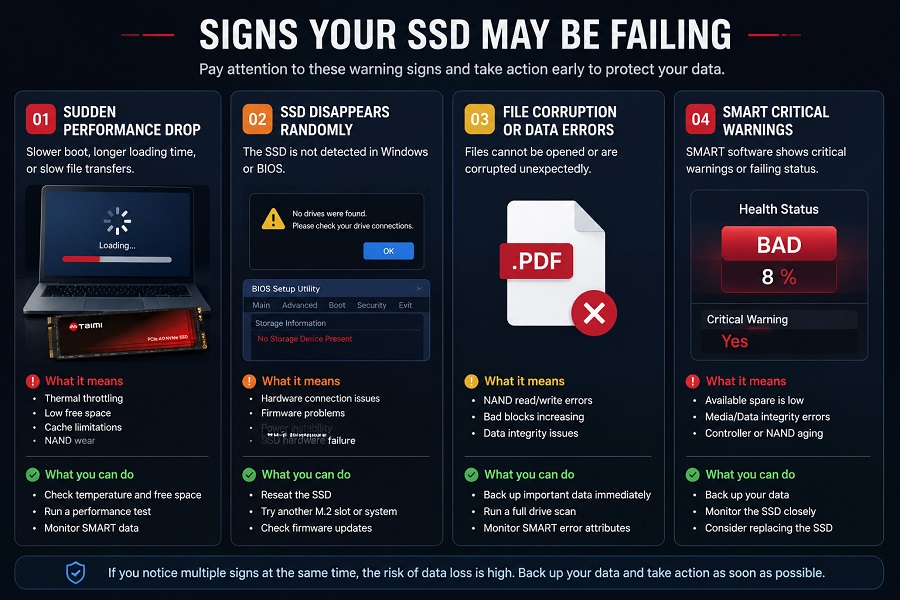
Signs Your SSD May Be Failing
SSD health information is useful, but actual usage behavior is equally important.
-
Sudden Performance Changes: A noticeable slowdown may be caused by thermal throttling, low free space, cache limitations, background SSD maintenance, or NAND wear.
-
The SSD Disappears Randomly: An SSD that disappears from Windows or BIOS may have hardware problems, firmware issues, connection problems, or power instability.
-
File Corruption: Repeated corrupted files are a more serious warning sign. Create a backup immediately before continuing troubleshooting.
-
SMART Critical Warnings: When monitoring software reports critical warnings (e.g.,
Available Sparedropping below threshold), users should take action instead of waiting for complete failure.
Can an SSD Fail With 100% Health?
Yes.
SSD health percentage mainly reflects NAND endurance. It does not represent every component inside the SSD. An SSD also depends on:
-
Controller (SoC)
-
Firmware
-
Power management IC (PMIC) and DRAM cache
-
Interface communication
The controller manages NAND communication, data mapping (FTL), error correction, and wear leveling. A controller problem or firmware assertion can make an SSD inaccessible even when NAND wear is still low.
-
Learn more:
How SSD Controllers Work: The Engineering Behind SSD Performance, Thermal Throttling, and Lifespan
This is why SSD health monitoring should be treated as an early warning method, not a guarantee that a drive cannot fail. Regular backups are still necessary.
How to Extend SSD Lifespan
Although NAND wear cannot be reversed, proper usage can help maintain SSD reliability.
-
Keep Enough Free Space: An SSD that is almost full has less room for background management operations. Keeping at least 15% free space helps the controller handle garbage collection and wear leveling efficiently.
-
Control Operating Temperature: Good airflow is especially important for high-performance NVMe SSDs. Keeping controller operating temperatures under 60°C avoids frequent thermal throttling and extends component lifespan.
-
Update Firmware When Needed: Firmware updates may improve compatibility, stability, and FTL error handling routines. Always use firmware designed for the exact SSD model.
-
Choose the Right SSD for the Workload: Different applications create different write patterns. For write-heavy OS, client deployments, or multitasking, opting for SSD architectures featuring independent DRAM cache chips (like Taimi’s client lineup) significantly reduces Write Amplification Factor (WAF) and protects Flash Translation Tables (FTL).
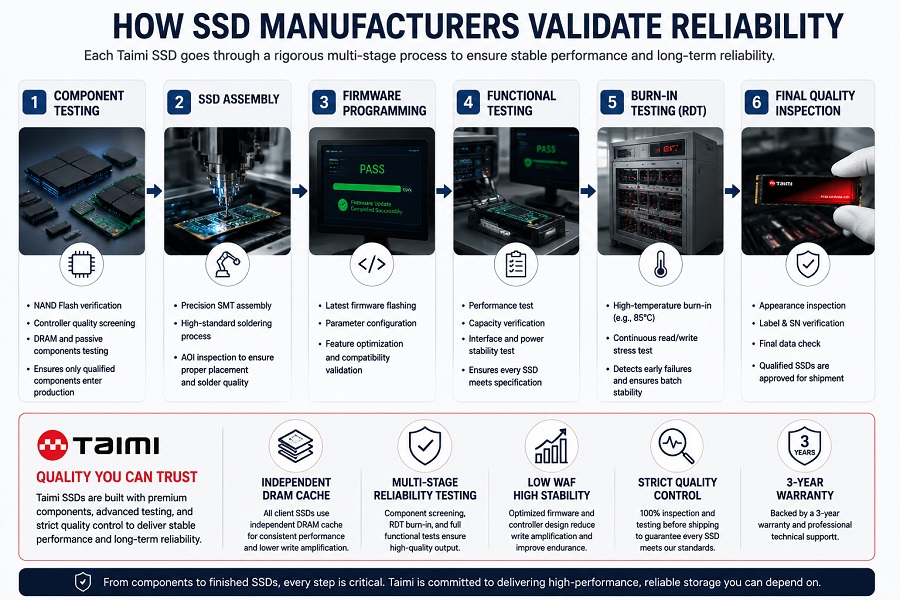
How SSD Manufacturers Validate Reliability
SSD health checks show how a drive performs after installation. Reliability testing starts much earlier during manufacturing.
Component Validation (Wafer & Die Screening)
                     ↓
SSD Assembly (SMT & BGA Placement)
                     ↓
Firmware Programming & Calibration
                     ↓
Burn-in Testing (High-Temp RDT Cycles)
                     ↓
Functional Testing & Drive Verification
                     ↓
Final Quality Inspection (OQC)
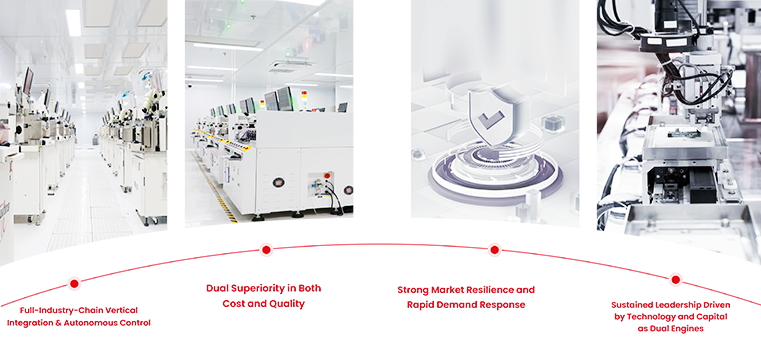
At Taimi, SSD reliability is supported through multiple production and testing stages, including component validation, firmware programming, functional testing, high-temperature burn-in testing (RDT), and final inspection. By equipping all current SSD models with independent DRAM cache chips and backing them with a 3-year warranty, Taimi ensures batch-to-batch consistency and sustained reliability throughout the drive's lifecycle.
📦 Partner with Taimi for OEM & Client Storage Deployments
Evaluating reliable storage hardware for client builds, system integration, or channel distribution?
Independent DRAM Architecture: Lower WAF and superior FTL protection under sustained workloads.
Strict Factory Screening: Wafer-level qualification, high-temp RDT burn-in, and 3-year warranty backing.
📩 [Contact Taimi Engineering Team for Qualification Samples & B2B Inquiries]
Frequently Asked Questions About SSD Health Check
How do I check my SSD health?
Use SSD manufacturer software or a SMART monitoring tool. Check health percentage together with temperature, total writes, and error information.
What is a good SSD health percentage?
A high percentage generally means less endurance has been consumed, but it does not guarantee that the SSD will never fail.
How long does an SSD last?
SSD lifespan depends on NAND type, endurance rating, workload, temperature, and usage conditions.
Can SSD health percentage predict failure?
No. It shows estimated endurance usage but cannot predict every hardware or firmware problem.
Can SSD health be restored?
No. NAND wear is physical and cannot be reversed through formatting or reinstalling the operating system.
When should I replace my SSD?
Consider replacement when the drive shows critical warnings, increasing errors, repeated disconnects, or serious data reliability problems.
How do I check the health and remaining lifespan of my SATA SSD?
You can monitor your drive using manufacturer tools or SMART utilities like CrystalDiskInfo. For a detailed breakdown of SMART indicators, temperature limits, and failure signs, check our [2026 SSD Health Check & Lifespan Guide] .
Conclusion
An SSD health check is a practical way to understand how a drive is aging and identify potential problems early. The most useful information includes SSD health percentage, SMART status, total host writes, temperature, and error history.
However, SSD reliability cannot be judged by one number alone. A complete evaluation should consider the drive's health data, workload, operating environment, controller behavior, and firmware condition. Regular monitoring and reliable backups remain the best ways to reduce the impact of unexpected SSD failure.
Related Products
Recommended Articles
SSD Shows “Not Initialized” in Windows? Causes and Fixes (2026 Guide)
2026-08-05
More
SSD Burn-in Testing Explained: How SSD Manufacturers Ensure Reliability Before Shipping
2026-07-31
More
TLC vs QLC SSD: Performance, Endurance, Lifespan, and Which NAND Is Better?
2026-07-27
More
SSD Manufacturing Quality Control: Inside Taimi SMT Production Process
2026-07-24
More
From NAND Flash to Finished SSD: Inside the SSD Manufacturing and Testing Process
2026-07-20
More
SSD TBW Explained: What It Means and How It Affects SSD Lifespan
2026-07-15
More
Will SSD Prices Drop in 2026? Expert Analysis and Buying Guide
2026-05-08
More
7000MB/s Peak Read vs. Sustained Write Lines in 4K Video Workflows
2026-04-24
More
PCIe vs. SATA SSD: A 2026 Engineer’s Guide to Storage Upgrades
2026-07-02
More