
Company Introduction
More












What Is SSD Firmware? How It Impacts Performance, Compatibility, and Reliability
Share:
Quick Answer: SSD firmware is the low-level embedded software running on the SSD controller. It acts as the control layer that manages NAND flash memory, processes host commands, coordinates error correction, and handles internal data management.
While interface standards such as PCIe 4.0 or SATA III define the available physical bandwidth, firmware plays an important role in determining real-world SSD behavior. It works together with the SSD controller, NAND flash, DRAM or SLC cache architecture, interface, and thermal design to manage operations such as wear leveling, garbage collection, bad block management, and power states.
For PC builders, system integrators, distributors, and bulk buyers, firmware is also an important part of SSD configuration control. Unannounced firmware or hardware changes between sample validation and mass production can introduce compatibility or system stability issues.
While interface standards such as PCIe 4.0 or SATA III define the available physical bandwidth, firmware plays an important role in determining real-world SSD behavior. It works together with the SSD controller, NAND flash, DRAM or SLC cache architecture, interface, and thermal design to manage operations such as wear leveling, garbage collection, bad block management, and power states.
For PC builders, system integrators, distributors, and bulk buyers, firmware is also an important part of SSD configuration control. Unannounced firmware or hardware changes between sample validation and mass production can introduce compatibility or system stability issues.
What Is SSD Firmware and How Does It Work?
SSD firmware is specialized low-level control logic stored in the drive's non-volatile memory. Unlike a standard desktop application that runs on the host CPU, SSD firmware executes through the SSD controller and coordinates the internal operation of the storage device.
When the operating system sends a read or write command, the SSD controller receives the command and the firmware determines how the drive should process the operation.
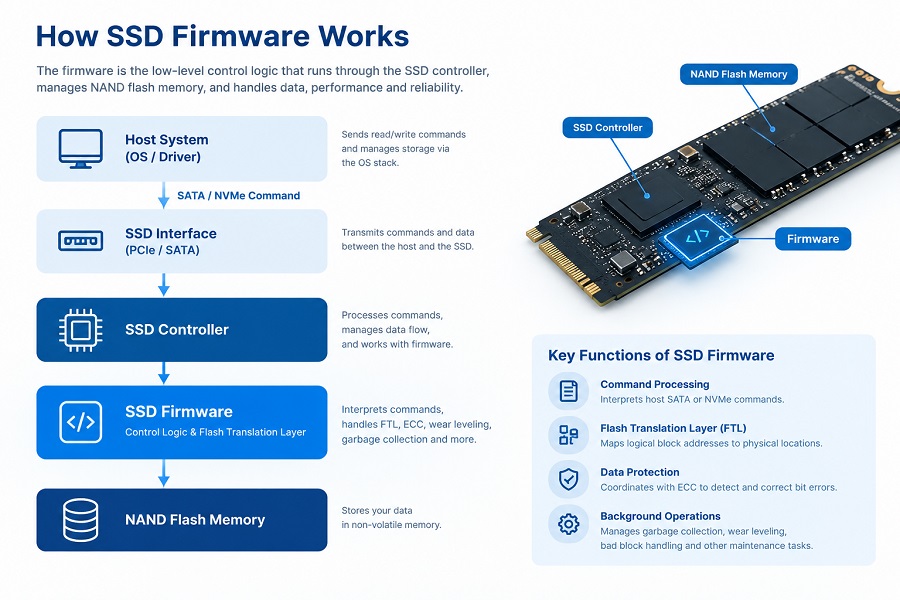
Host System (OS / Driver)
↓
SATA / NVMe Command
↓
SSD Interface
↓
SSD Controller
↓
SSD Firmware — Control Logic & Flash Translation Layer
↓
NAND Flash Memory
↓
SATA / NVMe Command
↓
SSD Interface
↓
SSD Controller
↓
SSD Firmware — Control Logic & Flash Translation Layer
↓
NAND Flash Memory
The main operations include:
- Command Processing: Interprets host SATA or NVMe commands.
- Flash Translation Layer (FTL): Maps logical block addresses (LBA) from the host system to physical locations within NAND flash.
- Data Protection: Coordinates with error correction mechanisms to detect and correct NAND bit errors.
- Background Operations: Manages garbage collection, wear leveling, bad block handling, and other internal maintenance tasks.
For a deeper explanation of NAND flash architecture, see What Is NAND Flash?
SSD Firmware vs. Software vs. Controller: What's the Difference?
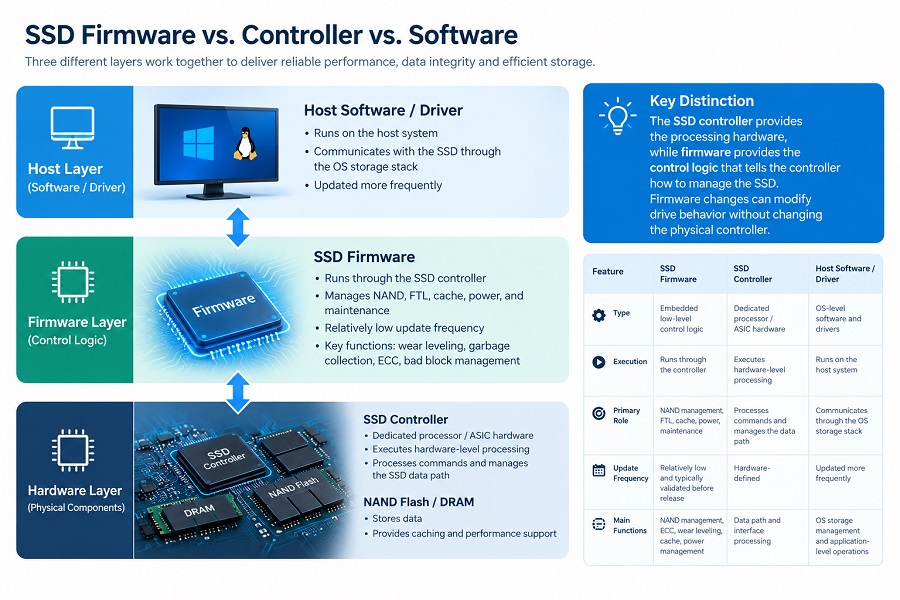
Three different layers are involved in the operation of a modern SSD: the physical controller hardware, the embedded firmware, and the host operating system or driver.
| Feature | SSD Firmware | SSD Controller | Host Software / Driver |
|---|---|---|---|
| Type | Embedded low-level control logic | Dedicated processor / ASIC hardware | OS-level software and drivers |
| Execution | Runs through the SSD controller | Executes hardware-level processing | Runs on the host system |
| Primary Role | Controls NAND management, FTL, cache, power, and maintenance | Processes commands and manages the SSD data path | Communicates with the storage device through the OS storage stack |
| Update Frequency | Relatively low and typically validated before release | Hardware-defined | Updated more frequently |
| Main Functions | NAND management, ECC, wear leveling, cache, power management | Data path and interface processing | OS storage management and application-level operations |
Key Distinction: The SSD controller provides the processing hardware, while firmware provides the control logic that tells the controller how to manage the SSD. Firmware changes can modify drive behavior without changing the physical controller.
For more information, see How SSD Controllers Work: The Engineering Behind SSD Performance.
What Does SSD Firmware Do?
Modern 3D TLC and QLC NAND require continuous internal management. SSD firmware coordinates multiple processes that work together to maintain data integrity, performance, and usable storage capacity.
| Firmware Function | What It Does |
|---|---|
| Error Correction & Data Integrity | Coordinates with the controller's error-correction mechanisms to detect and correct bit errors as NAND cells wear over time. |
| Wear Leveling | Distributes write and erase cycles across available NAND blocks to reduce uneven wear. |
| Garbage Collection & TRIM | Reclaims NAND blocks containing invalid data and prepares available space for future writes. |
| SLC Cache Management | Controls how temporary high-speed write cache is allocated and managed according to the SSD architecture. |
| Bad Block Management | Identifies unusable NAND blocks and removes them from normal storage allocation. |
| Power & Thermal Management | Controls power states, sleep transitions, and thermal-related operating behavior. |
If you want to understand how SLC cache affects sustained write performance, see What Is SLC Cache in an SSD? How It Affects Write Speed and Sustained Performance.
How Firmware Affects Real-World SSD Performance and Compatibility
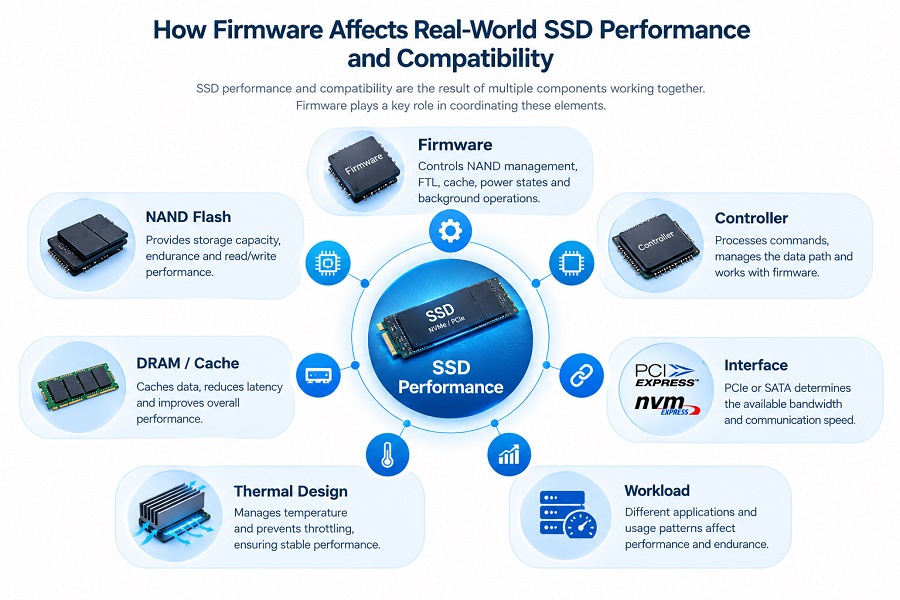
Firmware can influence SSD performance, but it is only one part of the complete storage architecture.
NAND Flash + SSD Controller + Firmware + DRAM / Cache + Interface + Thermal Design + Workload
1. Sequential and Sustained Performance
Two SSDs using the same controller and NAND can still have different performance characteristics because of differences in firmware configuration, cache strategy, power management, and overall SSD design.
Firmware can influence how the SSD manages the transition from peak SLC cache performance to sustained NAND write performance during large file transfers.
2. Random Workload Handling
Small-file operations depend on command scheduling, mapping-table management, and background operations. Firmware scheduling can therefore influence command latency and behavior during multi-threaded random read/write workloads.
3. Platform Compatibility and Power States
SSD compatibility is not determined solely by the physical interface. Firmware can influence boot behavior, sleep and resume states, PCIe power management, and other platform-level behaviors across different motherboards, laptops, mini-PCs, and system configurations.
For more information about platform compatibility testing, see SSD Not Detected in BIOS? What SSD Compatibility Testing Reveals.
Why Firmware Consistency Matters for Bulk Buyers and System Integrators
For individual consumers, firmware is often a technical detail. For PC builders, system integrators, distributors, and OEM buyers, firmware management can be an important part of configuration control.
Risks of Unannounced Hardware and Firmware Changes
If a supplier changes the firmware revision, controller model, or NAND configuration between sample validation and mass production, several issues may need to be re-evaluated:
- Unexpected firmware or component changes can introduce compatibility issues during OS deployment or system validation.
- System behavior under sustained thermal workloads may change.
- Previously validated power-state behavior may need to be tested again.
- Field returns or troubleshooting requirements may increase if configuration changes are not communicated clearly.
What Should Bulk Buyers Check Before Deployment?
- Firmware Version: Confirm the firmware revision used during sample validation and define how firmware changes will be communicated.
- Platform Validation: Test sample drives on the actual motherboard or host system platform where they will be deployed.
- Hardware Configuration: Confirm the controller, NAND flash, DRAM or cache configuration, and other key components.
- Change Notification: Establish a clear agreement with the supplier regarding changes to firmware, controller, NAND, or other critical components.
How Taimi Ensures SSD Configuration Consistency for OEM Projects
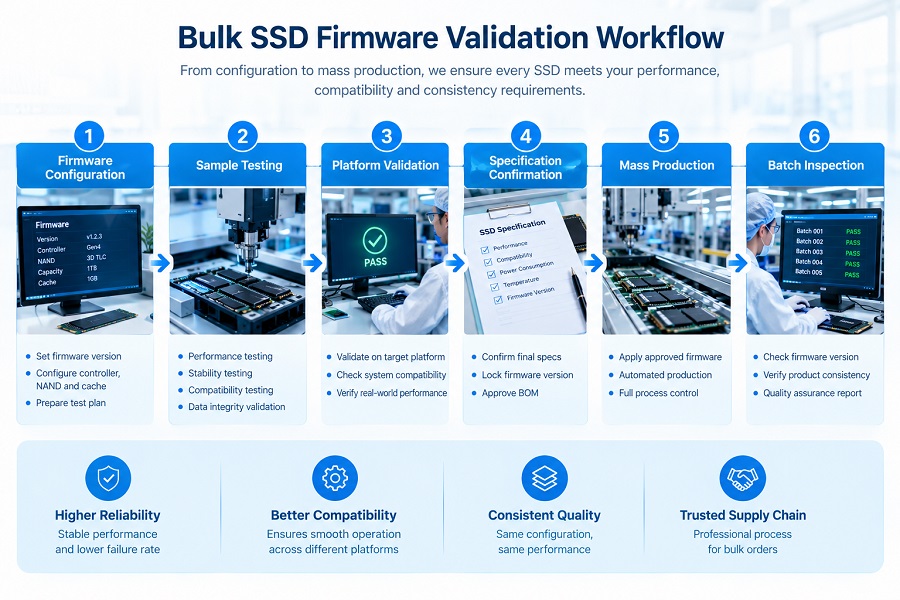
At Taimi, we support PC builders, system integrators, distributors, and regional brands with validated SSD solutions where configuration consistency is important for repeat production.
Firmware Configuration
↓
Sample Testing
↓
Platform Validation
↓
Specification Confirmation
↓
Mass Production
↓
Batch Inspection
↓
Sample Testing
↓
Platform Validation
↓
Specification Confirmation
↓
Mass Production
↓
Batch Inspection
Strict BOM and Firmware Control
We define the approved hardware and firmware configuration during the sample validation stage and use the confirmed specification as the reference for mass production.
Platform Validation and Factory QC
SSD hardware and firmware configurations undergo platform validation and factory quality-control procedures before mass shipment. Production testing may include automated optical inspection, high-temperature burn-in testing, and full-drive functional testing.
OEM Customization Support
For qualified OEM projects, Taimi can support customized firmware configurations, model strings, vendor information, and private-label branding based on project requirements.
Frequently Asked Questions
What is SSD firmware?
SSD firmware is low-level embedded software that runs through the SSD controller. It manages NAND flash memory, processes host commands, coordinates error correction, and controls internal maintenance operations.
Does SSD firmware affect SSD performance?
Yes. Firmware can influence command processing, cache management, garbage collection, background operations, and power management. However, overall SSD performance also depends on the controller, NAND flash, DRAM or SLC cache architecture, interface, thermal conditions, and workload.
Can SSD firmware affect platform compatibility?
Yes. Firmware configuration can influence command handling, boot behavior, power states, and sleep/resume behavior. This is why platform validation is important when SSDs are deployed across different motherboard, laptop, or system configurations.
Should you update your SSD firmware?
Firmware should generally be updated only when the SSD manufacturer provides a validated release addressing a documented compatibility issue, stability problem, or specific product requirement. In established OEM or production deployments, firmware changes should be validated before wider deployment.
How do you check your SSD firmware version?
On Windows, the firmware revision can usually be checked through Device Manager, SSD management utilities, or diagnostic software. On Linux, tools such as nvme can be used for NVMe SSDs, while smartctl can provide information for many SATA drives.
Can SSD firmware affect SSD lifespan?
Firmware can influence wear leveling, garbage collection, write amplification, and bad block management. These functions affect how NAND flash is managed over the life of the SSD. For more information, see How Long Do SSDs Last? TBW, NAND Wear, and Real-World Lifespan Explained.
Partner with Taimi for Validated SSD Procurement
Whether you require standard 2.5-inch SATA III SSDs or M.2 PCIe NVMe storage, Taimi provides consumer-grade SSD solutions with defined specifications, manufacturing quality control, and engineering support for volume projects.
Taimi SSD Product Capabilities
- Form Factors: 2.5-inch SATA III, M.2 PCIe NVMe (PCIe Gen 3.0 / Gen 4.0)
- Capacities: 128GB to 2TB, with qualified 3D TLC NAND options available depending on product configuration
- Quality Assurance: Automated optical inspection, high-temperature burn-in testing, functional testing, and 3-Year Limited Warranty
- Project Support: Sample testing, platform validation, specification confirmation, and batch inspection
Need SSD Specifications or Sample Units for Platform Testing?
Talk with the Taimi Technical Team about SSD specifications, sample testing, OEM projects, and bulk procurement requirements.
About Taimi: Taimi is a consumer-grade SSD and storage manufacturer supporting PC builders, distributors, system integrators, and OEM projects with SSD products, sample validation, and bulk procurement support.
Related Products
Recommended Articles
How to Choose a 2.5-Inch SATA SSD Supplier for Bulk Orders
2026-09-28
More
What Is SLC Cache in an SSD? How It Affects Write Speed and Sustained Performance (2026 Guide)
2026-09-27
More
UFS vs eMMC: Speed, Performance, Versions, and Key Differences
2026-09-21
More
What Is an M.2 SSD? Form Factors, Keys & NVMe vs SATA Explained (2026 Guide)
2026-09-18
More
How to Choose a PCIe 3.0 SSD Supplier for Bulk Orders
2026-09-23
More
What Is NAND Flash? Types, Speed, Endurance, and Applications Explained
2026-09-10
More
What Is eMMC? Everything You Need to Know About eMMC Storage
2026-09-04
More
What Is a PCIe SSD? Speed, NVMe, and Compatibility Guide (2026)
2026-08-19
More